FreeQAs
 Request Exam  Contact
  • Home
  • View All Exams
  • New QA's
  • Upload
PRACTICE EXAMS:
  • Oracle
  • Fortinet
  • IBM
  • Juniper
  • Microsoft
  • Cisco
  • Citrix
  • CompTIA
  • VMware
  • ISC
  • SAP
  • EMC
  • PMI
  • HP
  • Salesforce
  • Other
  • Oracle
    Oracle
  • Fortinet
    Fortinet
  • IBM
    IBM
  • Juniper
    Juniper
  • Microsoft
    Microsoft
  • Cisco
    Cisco
  • Citrix
    Citrix
  • CompTIA
    CompTIA
  • VMware
    VMware
  • ISC
    ISC
  • SAP
    SAP
  • EMC
    EMC
  • PMI
    PMI
  • HP
    HP
  • Salesforce
    Salesforce
  1. Home
  2. Salesforce Certification
  3. Plat-Dev-210 Exam
  4. Salesforce.Plat-Dev-210.v2026-02-12.q38 Dumps
  • «
  • 1
  • 2
  • 3
  • 4
  • 5
  • 6
  • 7
  • 8
  • 9
  • »
Download Now

Question 31

A developer needs to transform contact data into a JSON array.
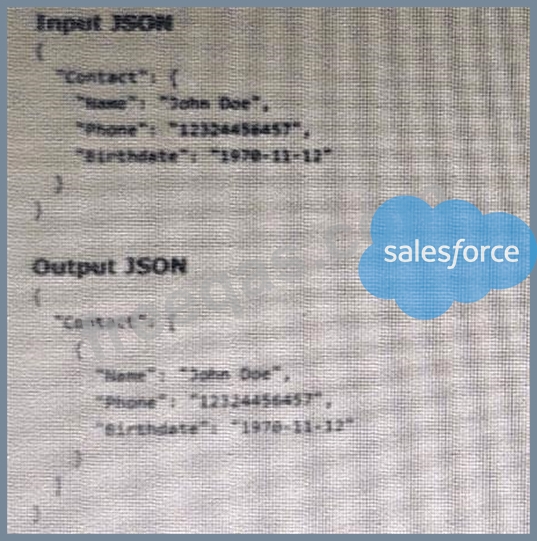
Given the input JSON shown above, what are two ways a developer could configure a DATA Raptor transform to achieve the expected Output JSON? Choose 2 answers

Correct Answer: A,C
A DataRaptor Transform can be used to transform data from one format to another, such as JSON, XML, or CSV. The developer can specify the input and output paths for each field in the Transform tab. The developer can also use formulas to manipulate data in the Formula tab1. To transform contact data into a JSON array, the developer can use either of these methods:
* Use a formula LIST(Contact), and add the output of the formula as the input in the Transform tab. This will create a list of contact objects from the input JSON and output it as a JSON array.
* Set the Input JSON Path as Contact, the Output JSON Path as Contact, and the Output Data Type as List. This will output each contact object as an element of a JSON array.
insert code

Question 32

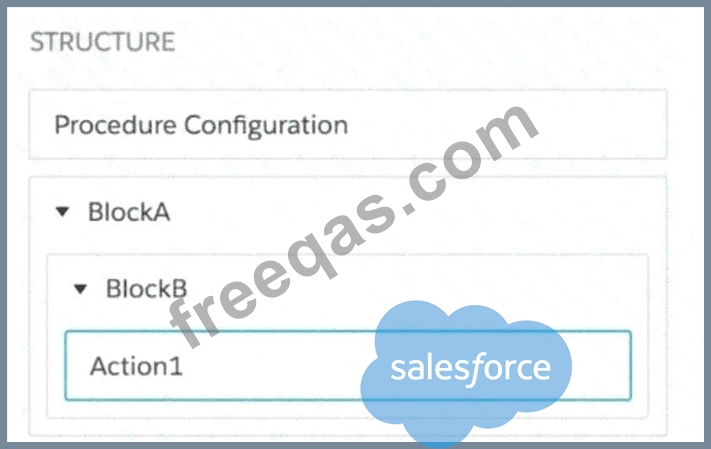
Refer to the exhibit below.

In this Integration Procedure structure, which Send JSON Path should be used to send the output of the Action1 element to a Remote Action?

Correct Answer: A
In OmniStudio Integration Procedures, when you want to reference the output of an element in a nested block (e.g., for use in a Remote Action or another step), you must use dot notation that mirrors the block structure hierarchy.
In the exhibit:
* Action1 is nested inside:
* BlockB, which is nested inside:
* BlockA
Therefore, the correct Send JSON Path to access the result of Action1 is:
CopyEdit
BlockA.BlockB.Action1
This format complies with the standard output reference syntax in Integration Procedures, which follows the pattern:
php-template
CopyEdit
<ParentBlock>.<ChildBlock>.<ActionElement>
Incorrect Options:
* B. BlockA:BlockB:Action1 - Uses colons instead of dots. This is invalid syntax in JSON path resolution within Integration Procedures.
* C. Action1:BlockB:BlockA - Incorrect order and invalid separators.
* D. Action1.BlockB.BlockA - Incorrect order (reversed path).
Reference:
Salesforce OmniStudio Developer Guide # Integration Procedure Element JSON Pathing Best Practices for Send JSON Path # Nested Blocks and Element Referencing
insert code

Question 33

A developer is creating a FlexCard for a new Community page. The FlexCard will display case information along with actions to close the case and update the case, and it will be styled using the Community's theme.
What must the developer do to configure the FlexCard for deployment in a community?

Correct Answer: B
The FlexCard Player component is used to display FlexCards in a community page. The developer needs to add the FlexCard's API name to the FlexCard Player component to configure the FlexCard for deployment in a community.
insert code

Question 34

A healthcare company wants to enable its subscribers to add, edit, or delete dependents related to their policy Community portal. The developer on the project decides to use an MniScript.
How should the developer configure the OmniScript to providethis functionality?

Correct Answer: A
An Edit Block element configured with Remote Actions allows the developer to create a dynamic table that can display, add, edit, or delete records from a Salesforce object. The Remote Actions can be configured to perform CRUD operations on the object using SOQL or Apex.
insert code

Question 35

Which two of these options can a developer use to retrieve data from a Salesforce object?
Choose 2 answers

Correct Answer: A,C
To retrieve (read) data from Salesforce objects:
* A. Data Mapper Extract Action - Correct. A DataRaptor Extract is specifically used to retrieve data from Salesforce, based on input parameters or context.
* C. Lookup Input Element - Correct. This is used within OmniScripts to look up a record by matching input data, essentially performing a read operation.
Incorrect Options:
* B. DataRaptor Post is not a valid DataRaptor type.
* D. DataRaptor Load Action is used for writing/updating data, not retrieving it.
:
Salesforce OmniStudio Guide # DataRaptor Types and Lookup Input Element Usage
insert code
  • «
  • 1
  • 2
  • 3
  • 4
  • 5
  • 6
  • 7
  • 8
  • 9
  • »
[×]

Download PDF File

Enter your email address to download Salesforce.Plat-Dev-210.v2026-02-12.q38 Dumps

Email:

FreeQAs

Our website provides the Largest and the most Latest vendors Certification Exam materials around the world.

Using dumps we provide to Pass the Exam, we has the Valid Dumps with passing guranteed just which you need.

  • DMCA
  • About
  • Contact Us
  • Privacy Policy
  • Terms & Conditions
©2026 FreeQAs

www.freeqas.com materials do not contain actual questions and answers from Cisco's certification exams.