FreeQAs
 Request Exam  Contact
  • Home
  • View All Exams
  • New QA's
  • Upload
PRACTICE EXAMS:
  • Oracle
  • Fortinet
  • Juniper
  • Microsoft
  • Cisco
  • Citrix
  • CompTIA
  • VMware
  • ISC
  • SAP
  • EMC
  • PMI
  • HP
  • Salesforce
  • Other
  • Oracle
    Oracle
  • Fortinet
    Fortinet
  • Juniper
    Juniper
  • Microsoft
    Microsoft
  • Cisco
    Cisco
  • Citrix
    Citrix
  • CompTIA
    CompTIA
  • VMware
    VMware
  • ISC
    ISC
  • SAP
    SAP
  • EMC
    EMC
  • PMI
    PMI
  • HP
    HP
  • Salesforce
    Salesforce
  1. Home
  2. ServiceNow Certification
  3. CSA Exam
  4. ServiceNow.CSA.v2026-06-26.q348 Dumps
  • ««
  • «
  • …
  • 45
  • 46
  • 47
  • 48
  • 49
  • 50
  • 51
  • 52
  • 53
  • 54
  • …
  • »
  • »»
Download Now

Question 241

What types of entities can receive task assignments, in ServiceNow?
Choose 2 answers

Correct Answer: A,C
insert code

Question 242

What are the components that make up a filter condition? (Choose three.)

Correct Answer: A,C,E
Reference: https://docs.servicenow.com/bundle/rome-platform-user-interface/page/use/using-lists/concept
/c_Filters.html
insert code

Question 243

Knowledge Base Search results can be sorted by which of the following? (Choose three.)

Correct Answer: A,B,C
The Knowledge Base (KB) Search functionality in ServiceNow is designed to help users find the most relevant articles efficiently. ServiceNow provides various sorting options for search results to ensure that users can access the most useful information.
Sorting Options in Knowledge Base Search:
When users search for articles within a Knowledge Base, the results can be sorted using three primary criteria:
Most Recent Update (✅ Option A)
This sorting method ranks articles based on their last modified date.
Newer or recently updated articles appear higher in the search results.
This ensures users see the most current information first.
Popularity (✅ Option B)
Popularity is determined by user interactions such as article views, feedback ratings, and usage.
More frequently accessed or positively rated articles are ranked higher.
This helps prioritize articles that have been helpful to other users.
Relevancy (✅ Option C)
The ServiceNow platform uses an internal search algorithm to determine relevance based on keywords, titles, and content within the article.
More relevant articles appear at the top, ensuring users get the most appropriate answers to their queries.
Why Are the Other Options Incorrect?
D . Manager Assignment (❌ Incorrect)
Knowledge articles are not sorted by manager assignment.
Manager assignment applies to workflows and approvals, not to search ranking.
E . Number of Views (❌ Incorrect)
While article popularity is a ranking factor, ServiceNow does not provide a direct "Sort by Number of Views" option.
The "popularity" metric includes views but also considers other engagement factors like helpfulness ratings.
Reference from Certified System Administrator (CSA) Documentation:
📌 ServiceNow Docs - Knowledge Management: Search and Filtering
🔗 ServiceNow Knowledge Management Docs
"Knowledge articles can be sorted by relevance, popularity, or most recent update to ensure users find the most useful and up-to-date information." Conclusion:
✅ The correct answers are:
A . Most recent update (Sorts by last modified date)
B . Popularity (Sorts based on article usage and engagement)
C . Relevancy (Sorts based on keyword matching and importance)
🔹 Understanding Knowledge Base search sorting is essential for ServiceNow administrators to help users find the right information efficiently.
insert code

Question 244

On a form, which type of Geld has this icon which can be clicked, 10 S00 a preview of the associated record?
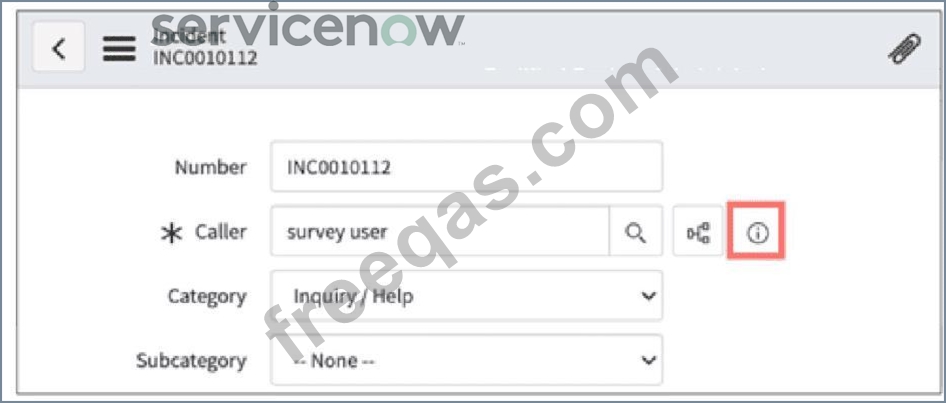
Correct Answer: F
The icon highlighted in the image is theReference Icon(iinside a circle). It is used forReference fieldsin ServiceNow forms.
AReference fieldlinks to a record in another table (e.g., theCallerfield in anIncidentform references thesys_usertable).
Clicking theReference Icon (i)opens apreviewof the referenced recordwithout navigating away from the form.
This feature is helpful forquickly viewing user details, CI information, or related records.
A). Drilldown- This term is not used for form field behavior in ServiceNow; "drilldowns" are usually associated with reports.
B). Lookup- While lookups are used to search for values, they do not display previews of referenced records.
C). Quickview- This is not a defined ServiceNow field type.
D). Preview- While the icon allows previewing, the correct term isReference field, not "Preview field." E). Snapshot- No such field type exists in ServiceNow.
ServiceNow Reference Fields & Preview
ServiceNow CSA Training Module:"Configuring Forms and Fields - Reference Fields and Their Behavior" How Reference Fields Work:Why Other Answers Are Incorrect:References from Certified System Administrator (CSA) Official Documentation:
insert code

Question 245

What resource can you use to view details of the tables and configuration items (CIs) associated with a particular use case?


Correct Answer: C
Understanding CMDB and Use Case Modeler:
The CMDB (Configuration Management Database) contains information about Configuration Items (CIs) and their relationships.
CMDB Use Case Modeler is a tool within ServiceNow that helps users visualize and analyze CIs and tables related to a specific business use case.
Why CMDB Use Case Modeler is the Correct Answer:
It maps tables and CIs to specific use cases, providing an organized view of how different components interact.
It helps analyze dependencies and understand the impact of changes on IT services.
It assists with troubleshooting and compliance checks by offering a graphical representation of CIs.
Why Other Answers Are Incorrect:
A . Scenario Dashboard → Not a recognized ServiceNow tool for viewing CIs or tables related to a use case.
B . CI Use Case Modeler → No such feature exists; it may be confused with the correct answer (CMDB Use Case Modeler).
D . Common Service Data Model (CSDM) product view → The CSDM provides a standardized framework for organizing CMDB data but does not specifically offer a tool for viewing tables and CIs related to a use case.
Best Practice Solution:
To access CMDB Use Case Modeler in ServiceNow:
Navigate to CMDB Workspace → Use Case Modeler
Select the relevant use case and analyze the related CIs and tables
Ensure that your CMDB is properly populated and maintained to get accurate results.
Reference:
ServiceNow CMDB Best Practices (CSA Official Documentation)
ServiceNow Docs: CMDB Use Case Modeler
CSDM and CMDB Overview
insert code
  • ««
  • «
  • …
  • 45
  • 46
  • 47
  • 48
  • 49
  • 50
  • 51
  • 52
  • 53
  • 54
  • …
  • »
  • »»
[×]

Download PDF File

Enter your email address to download ServiceNow.CSA.v2026-06-26.q348 Dumps

Email:

FreeQAs

Our website provides the Largest and the most Latest vendors Certification Exam materials around the world.

Using dumps we provide to Pass the Exam, we has the Valid Dumps with passing guranteed just which you need.

  • DMCA
  • About
  • Contact Us
  • Privacy Policy
  • Terms & Conditions
©2026 FreeQAs

www.freeqas.com materials do not contain actual questions and answers from Cisco's certification exams.