FreeQAs
 Request Exam  Contact
  • Home
  • View All Exams
  • New QA's
  • Upload
PRACTICE EXAMS:
  • Oracle
  • Fortinet
  • Juniper
  • Microsoft
  • Cisco
  • Citrix
  • CompTIA
  • VMware
  • ISC
  • SAP
  • EMC
  • PMI
  • HP
  • Salesforce
  • Other
  • Oracle
    Oracle
  • Fortinet
    Fortinet
  • Juniper
    Juniper
  • Microsoft
    Microsoft
  • Cisco
    Cisco
  • Citrix
    Citrix
  • CompTIA
    CompTIA
  • VMware
    VMware
  • ISC
    ISC
  • SAP
    SAP
  • EMC
    EMC
  • PMI
    PMI
  • HP
    HP
  • Salesforce
    Salesforce
  1. Home
  2. Snowflake Certification
  3. ARA-C01 Exam
  4. Snowflake.ARA-C01.v2026-04-11.q236 Dumps
  • ««
  • «
  • …
  • 27
  • 28
  • 29
  • 30
  • 31
  • 32
  • 33
  • 34
  • 35
  • 36
  • …
  • »
  • »»
Download Now

Question 151

You have an inventory table. You created two views on this table. The views look like as below
CREATE VIEW NON_SECURE_INVENTORY AS
SELECT BIBNUMBER, TITLE, AUTHOR,ISBN
FROM INVENTORY
WHERE BIBNUMBER IN(511784,511805,511988,512044,512052,512063);
CREATE SECURE VIEW SECURE_INVENTORY AS
SELECT BIBNUMBER, TITLE, AUTHOR,ISBN
FROM INVENTORY
WHERE BIBNUMBER IN(511784,511805,511988,512044,512052,512063);
You ran the below queries
ALTER SESSION SET USE_CACHED_RESULT=FALSE;--This is to ensure that we do not retrieve from query cache
SELECT * FROM NON_SECURE_INVENTORY WHERE BIBNUMBER =511784; SELECT * FROM SECURE_INVENTORY WHERE BIBNUMBER =511784;
The query profile for the first query looks as below
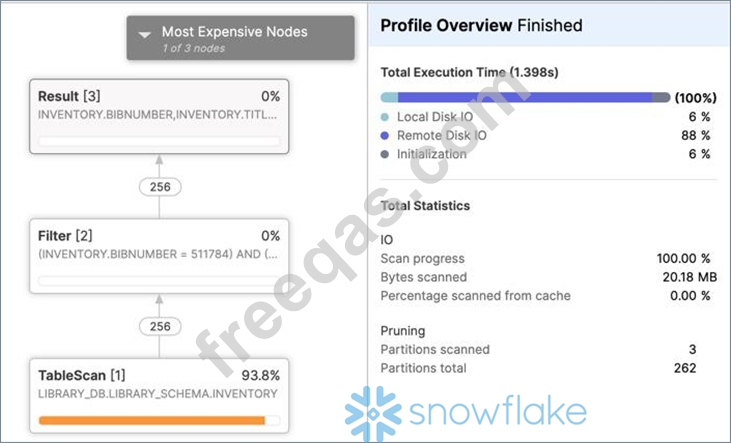
However, the query profile for the second one looks like as below
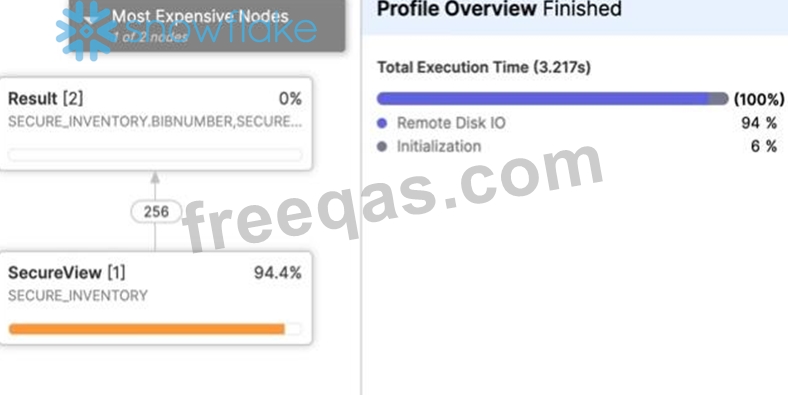
Both the views use the same columns from the same underlying view. So, why is this difference in query profiles.

Correct Answer: B
insert code

Question 152

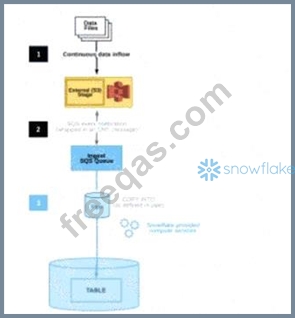
The diagram shows the process flow for Snowpipe auto-ingest with Amazon Simple Notification Service (SNS) with the following steps:
Step 1: Data files are loaded in a stage.
Step 2: An Amazon S3 event notification, published by SNS, informs Snowpipe - by way of Amazon Simple Queue Service (SQS) - that files are ready to load. Snowpipe copies the files into a queue.
Step 3: A Snowflake-provided virtual warehouse loads data from the queued files into the target table based on parameters defined in the specified pipe.
If an AWS Administrator accidentally deletes the SQS subscription to the SNS topic in Step 2, what will happen to the pipe that references the topic to receive event messages from Amazon S3?

Correct Answer: D
If an AWS Administrator accidentally deletes the SQS subscription to the SNS topic in Step 2, the pipe that references the topic to receive event messages from Amazon S3 will no longer be able to receive the messages. This is because the SQS subscription is the link between the SNS topic and the Snowpipe notification channel. Without the subscription, the SNS topic will not be able to send notifications to the Snowpipe queue, and the pipe will not be triggered to load the new files. To restore the system immediately, the user needs to manually create a new SNS topic with a different name and then recreate the pipe by specifying the new SNS topic name in the pipe definition. This will create a new notification channel and a new SQS subscription for the pipe. Alternatively, the user can also recreate the SQS subscription to the existing SNS topic and then alter the pipe to use the same SNS topic name in the pipe definition. This will also restore the notification channel and the pipe functionality. References:
* Automating Snowpipe for Amazon S3
* Enabling Snowpipe Error Notifications for Amazon SNS
* HowTo: Configuration steps for Snowpipe Auto-Ingest with AWS S3 Stages
"To circumvent the 72-hour delay, you can create a SNS topic with a different name. Recreate any pipes that reference the topic using the CREATE OR REPLACE PIPE command, and specify the new topic name."
https://docs.snowflake.com/en/user-guide/data-load-snowpipe-ts#snowpipe-stops-loading-files-after-amazon- sns-topic-subscription-is-deleted
insert code

Question 153

The following DDL command was used to create a task based on a stream:

Assuming MY_WH is set to auto_suspend - 60 and used exclusively for this task, which statement is true?

Correct Answer: A
insert code

Question 154

How can an Architect enable optimal clustering to enhance performance for different access paths on a given table?

Correct Answer: B
Snowflake allows only one clustering key per table, which limits its effectiveness when multiple access paths exist. Creating a composite clustering key that includes many columns often leads to poor clustering depth and limited pruning.
Materialized views provide an effective alternative. Each materialized view can be clustered independently, allowing architects to tailor physical data organization to specific query patterns (Answer B). Queries targeting different access paths can then leverage the appropriate materialized view, achieving better pruning and performance.
Super projections are not a Snowflake feature. Creating multiple clustering keys on a single table is not supported. This question reinforces SnowPro Architect knowledge of advanced performance design techniques using materialized views.
=========
insert code

Question 155

A table contains five columns and it has millions of records. The cardinality distribution of the columns is shown below:

Column C4 and C5 are mostly used by SELECT queries in the GROUP BY and ORDER BY clauses. Whereas columns C1, C2 and C3 are heavily used in filter and join conditions of SELECT queries.
The Architect must design a clustering key for this table to improve the query performance.
Based on Snowflake recommendations, how should the clustering key columns be ordered while defining the multi-column clustering key?


Correct Answer: D
According to the Snowflake documentation, the following are some considerations for choosing clustering for a table1:
Clustering is optimal when either:
You require the fastest possible response times, regardless of cost.
Your improved query performance offsets the credits required to cluster and maintain the table.
Clustering is most effective when the clustering key is used in the following types of query predicates:
Filter predicates (e.g. WHERE clauses)
Join predicates (e.g. ON clauses)
Grouping predicates (e.g. GROUP BY clauses)
Sorting predicates (e.g. ORDER BY clauses)
Clustering is less effective when the clustering key is not used in any of the above query predicates, or when the clustering key is used in a predicate that requires a function or expression to be applied to the key (e.g. DATE_TRUNC, TO_CHAR, etc.).
For most tables, Snowflake recommends a maximum of 3 or 4 columns (or expressions) per key. Adding more than 3-4 columns tends to increase costs more than benefits.
Based on these considerations, the best option for the clustering key columns is C. C1, C3, C2, because:
These columns are heavily used in filter and join conditions of SELECT queries, which are the most effective types of predicates for clustering.
These columns have high cardinality, which means they have many distinct values and can help reduce the clustering skew and improve the compression ratio.
These columns are likely to be correlated with each other, which means they can help co-locate similar rows in the same micro-partitions and improve the scan efficiency.
These columns do not require any functions or expressions to be applied to them, which means they can be directly used in the predicates without affecting the clustering.
insert code
  • ««
  • «
  • …
  • 27
  • 28
  • 29
  • 30
  • 31
  • 32
  • 33
  • 34
  • 35
  • 36
  • …
  • »
  • »»
[×]

Download PDF File

Enter your email address to download Snowflake.ARA-C01.v2026-04-11.q236 Dumps

Email:

FreeQAs

Our website provides the Largest and the most Latest vendors Certification Exam materials around the world.

Using dumps we provide to Pass the Exam, we has the Valid Dumps with passing guranteed just which you need.

  • DMCA
  • About
  • Contact Us
  • Privacy Policy
  • Terms & Conditions
©2026 FreeQAs

www.freeqas.com materials do not contain actual questions and answers from Cisco's certification exams.