FreeQAs
 Request Exam  Contact
  • Home
  • View All Exams
  • New QA's
  • Upload
PRACTICE EXAMS:
  • Oracle
  • Fortinet
  • Juniper
  • Microsoft
  • Cisco
  • Citrix
  • CompTIA
  • VMware
  • ISC
  • SAP
  • EMC
  • PMI
  • HP
  • Salesforce
  • Other
  • Oracle
    Oracle
  • Fortinet
    Fortinet
  • Juniper
    Juniper
  • Microsoft
    Microsoft
  • Cisco
    Cisco
  • Citrix
    Citrix
  • CompTIA
    CompTIA
  • VMware
    VMware
  • ISC
    ISC
  • SAP
    SAP
  • EMC
    EMC
  • PMI
    PMI
  • HP
    HP
  • Salesforce
    Salesforce
  1. Home
  2. Tableau Certification
  3. Desktop-Specialist Exam
  4. Tableau.Desktop-Specialist.v2026-05-03.q171 Dumps
  • ««
  • «
  • …
  • 21
  • 22
  • 23
  • 24
  • 25
  • 26
  • 27
  • 28
  • 29
  • 30
  • …
  • »
  • »»
Download Now

Question 121

What two methods can you use to change the font of a worksheet title? Choose two.

Correct Answer: A,D
In Tableau, you can change the font of a worksheet title by double-clicking directly on the title in the view, which opens a dialog box where you can format the text, including changing the font. Another method is to use the Format menu; from there, you select "Title and Caption," which opens the Format Title pane on the left side of the screen, where you can change the font and other formatting options for the worksheet title.
insert code

Question 122

What are three benefits of using an extract as compared to a live connection to a data source? Choose three.

Correct Answer: A,B,E
There are three benefits of using an extract as compared to a live connection to a data source:
A live connection to a data source can be slow due to network and user traffic, whereas a connection to an extract improves performance. An extract is a snapshot of data that is stored locally on your computer or on Tableau Server. An extract can reduce the load on the data source and speed up queries.
Extracts are stored in memory (RAM), resulting in faster query performance as compared with live data connections. When you use an extract, Tableau loads the data into memory and optimizes it for analysis.
This allows Tableau to perform calculations and aggregations faster than with live connections.
Calculated fields perform better in workbooks connected to extracts than in workbooks with live connections to a data source. Calculated fields are custom fields that you create using formulas or expressions. When you use an extract, Tableau can process calculated fields more efficiently than with live connections.
insert code

Question 123

Which three statements accurately describes the capabilities of dashboard actions? Choose three.

Correct Answer: B,C,E
Dashboard actions in Tableau are interactive elements that can be used to create a more dynamic experience.
These actions can be set to filter data on the dashboard, highlight specific elements, or even direct the user to a URL when interacting with a visualization. They can be triggered by user interaction such as hover, selection, or accessing a context menu. Moreover, dashboard actions can have multiple source sheets (where the action originates) and target sheets (where the action takes effect), allowing for a complex interactivity between different parts of the dashboard.
insert code

Question 124

Broadly speaking, after an importing a dataset in Tableau Desktop, all fields in it are broken down into
_______________________

Correct Answer: A
Explanation
When you connect to a new data source, Tableau assigns each field in the data source as dimension or measure in the Data pane, depending on the type of data the field contains. You use these fields to build views of your data.
Further,
insert code

Question 125

Which of the following would you use to connect to multiple tables in a single data source at once?

Correct Answer: D
The data that you analyze in Tableau is often made up of a collection of tables that are related by specific fields (that is, columns). Joining is a method for combining data on based on those common fields. The result of combining data using a join is a virtual table that is typically extended horizontally by adding columns of data.
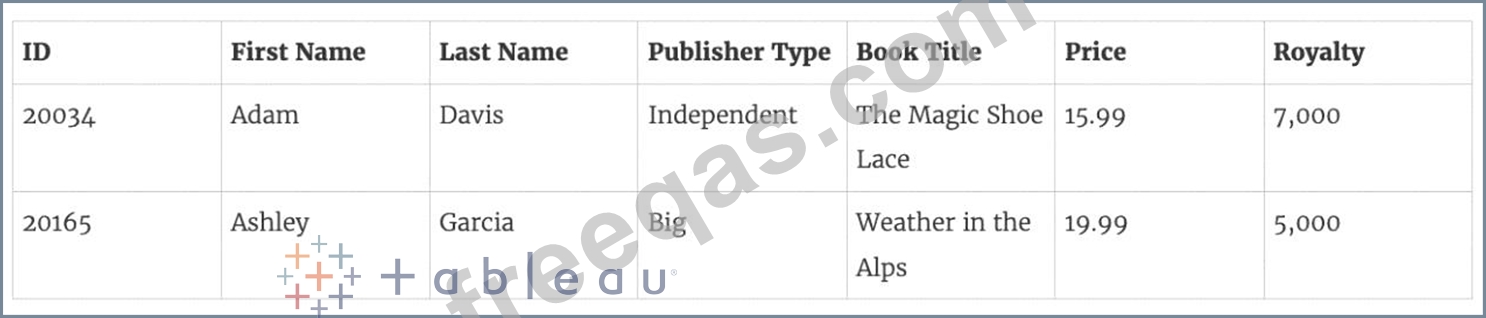
For example, consider the following two tables originating from a single data source:

We can combine these 2 tables, simply by joining the tables on ID to answer questions like, "How much was paid in royalties for authors from a given publisher?". By combining tables using a join, you can view and use related data from different tables in your analysis.
insert code
  • ««
  • «
  • …
  • 21
  • 22
  • 23
  • 24
  • 25
  • 26
  • 27
  • 28
  • 29
  • 30
  • …
  • »
  • »»
[×]

Download PDF File

Enter your email address to download Tableau.Desktop-Specialist.v2026-05-03.q171 Dumps

Email:

FreeQAs

Our website provides the Largest and the most Latest vendors Certification Exam materials around the world.

Using dumps we provide to Pass the Exam, we has the Valid Dumps with passing guranteed just which you need.

  • DMCA
  • About
  • Contact Us
  • Privacy Policy
  • Terms & Conditions
©2026 FreeQAs

www.freeqas.com materials do not contain actual questions and answers from Cisco's certification exams.
