FreeQAs
 Request Exam  Contact
  • Home
  • View All Exams
  • New QA's
  • Upload
PRACTICE EXAMS:
  • Oracle
  • Fortinet
  • Juniper
  • Microsoft
  • Cisco
  • Citrix
  • CompTIA
  • VMware
  • ISC
  • SAP
  • EMC
  • PMI
  • HP
  • Salesforce
  • Other
  • Oracle
    Oracle
  • Fortinet
    Fortinet
  • Juniper
    Juniper
  • Microsoft
    Microsoft
  • Cisco
    Cisco
  • Citrix
    Citrix
  • CompTIA
    CompTIA
  • VMware
    VMware
  • ISC
    ISC
  • SAP
    SAP
  • EMC
    EMC
  • PMI
    PMI
  • HP
    HP
  • Salesforce
    Salesforce
  1. Home
  2. Tableau Certification
  3. TDA-C01 Exam
  4. Tableau.TDA-C01.v2026-02-04.q167 Dumps
  • ««
  • «
  • …
  • 25
  • 26
  • 27
  • 28
  • 29
  • 30
  • 31
  • 32
  • 33
  • 34
  • …
  • »
  • »»
Download Now

Question 141

You have the following table.
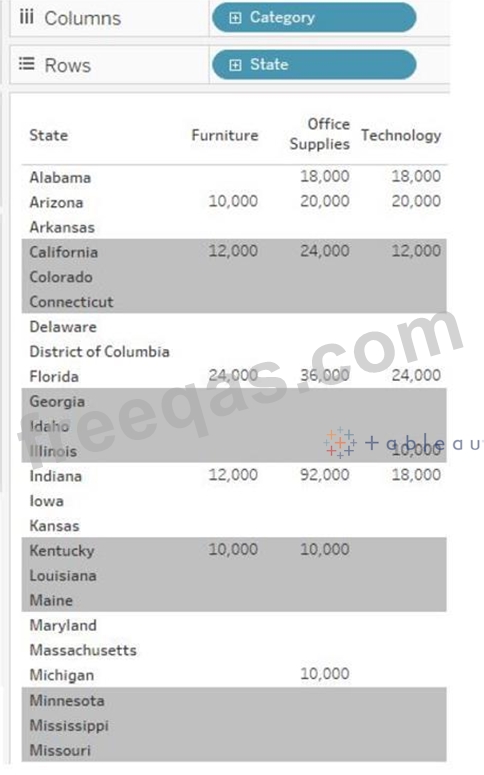
You need each record to alternate between grey and white.
What should you change in the Format Shading pane?

Correct Answer: A
To have each record alternate between grey and white, you should change the row banding size to 1 in the Format Shading pane. This setting will ensure that each row has a different shading from the one above and below it, creating an alternating pattern of grey and white rows. References: The answer can be verified through practical application within Tableau or by consulting Tableau's official learning resources, such as Tableau Help: Format Shading or Tableau Training Pass: Formatting.
insert code

Question 142

You need to change the values of a dimension without creating a new field.
What should you do?

Correct Answer: B
You can create aliases for the members of a dimension by right-clicking the dimension in the Data pane or in the view and selecting Aliases. This changes how the values are displayed in the view, but not the underlying data. For example, you can create an alias for "Central" as "Midwest".
In Tableau, aliases can be used to change the way dimension members appear without altering the underlying data. This is useful for display purposes and does not create a new field within the dataset.
insert code

Question 143

You have the following dashboard.

When a user selects a only on the map the data on the bar chart must show only the data for the selected city. The data in the bar chart must change only when the user selects a different city How should you configure the dashboard action? (Use the dropdowns in the Answers Area to select the correct options.)

Correct Answer:
insert code

Question 144

You are subscribed to several views.
You need to unsubscribe from the views.
What should you use?

Correct Answer: A
To unsubscribe from the views, you should use the My Content area of Tableau web pages. This area allows you to manage your subscriptions, as well as your workbooks, views, and data sources. You can select the views you want to unsubscribe from, click Actions, and then click Unsubscribe. You can also change the subscription options, such as the schedule, the format, or the message. Reference:
Create a Subscription to a View or Workbook - Tableau
Tableau Certified Data Analyst Study Guide
insert code

Question 145

You have the following dashboard that contains two sheets.
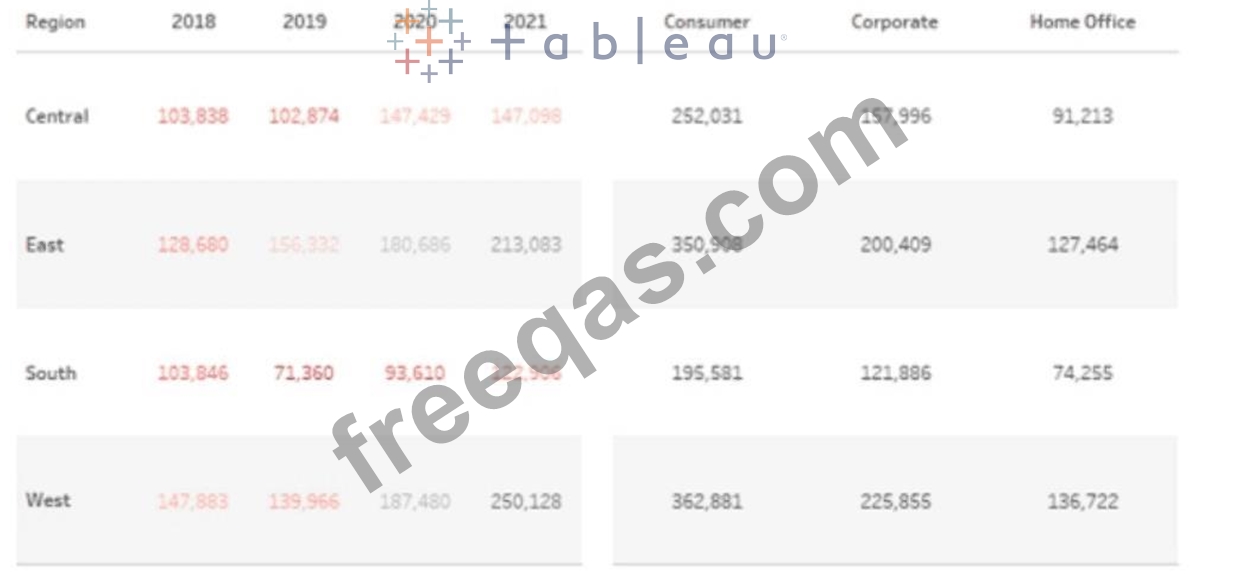
You want to minimize the whitespace between the sheets.
What should you configure?

Correct Answer: C
To minimize the whitespace between the sheets, you should configure the padding of the sheets and the dashboard. Padding is the amount of space between the edge of a sheet or dashboard and its content. You can adjust the padding by using the Layout tab in the Format pane. You can reduce the padding for each sheet by selecting the sheet and changing the values for the inner and outer padding. You can also reduce the padding for the dashboard by selecting the dashboard and changing the values for the outer padding. Reducing the padding will make the sheets and the dashboard more compact and eliminate unnecessary whitespace. References:
* Format Dashboards - Tableau
* Tableau Certified Data Analyst Study Guide
insert code
  • ««
  • «
  • …
  • 25
  • 26
  • 27
  • 28
  • 29
  • 30
  • 31
  • 32
  • 33
  • 34
  • …
  • »
  • »»
[×]

Download PDF File

Enter your email address to download Tableau.TDA-C01.v2026-02-04.q167 Dumps

Email:

FreeQAs

Our website provides the Largest and the most Latest vendors Certification Exam materials around the world.

Using dumps we provide to Pass the Exam, we has the Valid Dumps with passing guranteed just which you need.

  • DMCA
  • About
  • Contact Us
  • Privacy Policy
  • Terms & Conditions
©2026 FreeQAs

www.freeqas.com materials do not contain actual questions and answers from Cisco's certification exams.
