FreeQAs
 Request Exam  Contact
  • Home
  • View All Exams
  • New QA's
  • Upload
PRACTICE EXAMS:
  • Oracle
  • Fortinet
  • Juniper
  • Microsoft
  • Cisco
  • Citrix
  • CompTIA
  • VMware
  • ISC
  • SAP
  • EMC
  • PMI
  • HP
  • Salesforce
  • Other
  • Oracle
    Oracle
  • Fortinet
    Fortinet
  • Juniper
    Juniper
  • Microsoft
    Microsoft
  • Cisco
    Cisco
  • Citrix
    Citrix
  • CompTIA
    CompTIA
  • VMware
    VMware
  • ISC
    ISC
  • SAP
    SAP
  • EMC
    EMC
  • PMI
    PMI
  • HP
    HP
  • Salesforce
    Salesforce
  1. Home
  2. Tableau Certification
  3. TDS-C01 Exam
  4. Tableau.TDS-C01.v2022-09-30.q57 Dumps
  • ««
  • «
  • …
  • 4
  • 5
  • 6
  • 7
  • 8
  • 9
  • 10
  • 11
  • 12
  • 13
  • »
Download Now

Question 46

Which of the following are valid ways to show Mark Labels in the visualisation?

Correct Answer: A,B,D
Explanation
The following showcase how you can show mark labels. Using the Sample Superstore dataset:
1) Let's create a Bar chart showing the sales for each sub-category:

2) Now you can show labels by:
2.1) Click on Show Mark Labels Icon in the Toolbar ( easiest )


2.2) Drag Sales to the Text icon in the Marks Card:
2.3) Click on Analysis -> Show mark labels from the Tableau menu bar:
insert code

Question 47

Which of the following returns the Absolute Value of a given number?

Correct Answer: A
Explanation
From the official Tableau website:


insert code

Question 48

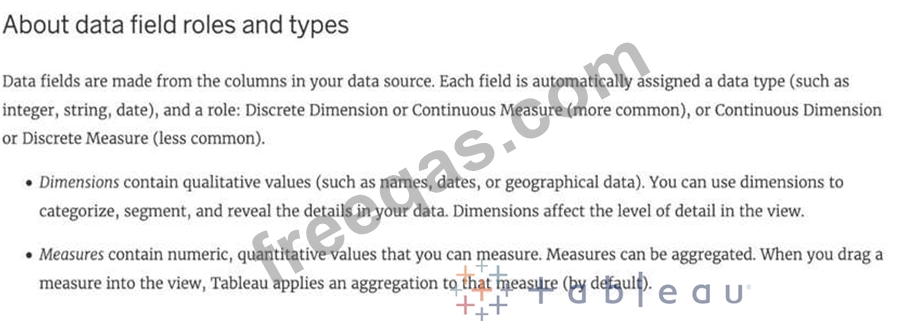
Broadly speaking, after an importing a dataset in Tableau Desktop, all fields in it are broken down into
_______________________
Correct Answer: A
Explanation
When you connect to a new data source, Tableau assigns each field in the data source as dimension or measure in the Data pane, depending on the type of data the field contains. You use these fields to build views of your data.
Further,
insert code

Question 49

Which of the following is a valid way to create Sets in Tableau?

Correct Answer: A
Explanation
There are two types of sets: dynamic sets and fixed sets. The members of a dynamic set change when the underlying data changes. Dynamic sets can only be based on a single dimension.
To create a dynamic set:
1) In the Data pane, right-click a dimension and select Create > Set.
2) In the Create Set dialog box, configure your set. You can configure your set using the following tabs:
General: Use the General tab to select one or more values that will be considered when computing the set.
You can alternatively select the Use all option to always consider all members even when new members are added or removed.

None of the other options exist, and therefore are incorrect answers.
insert code

Question 50

Is it possible to make a Measure discrete?

Correct Answer: B
Explanation
Of course! Follow along:
Right click on any measure, and choose Discrete as shown:

Once you do this, the green pill becomes blue in colour, indicating that it is now Discrete!
insert code
  • ««
  • «
  • …
  • 4
  • 5
  • 6
  • 7
  • 8
  • 9
  • 10
  • 11
  • 12
  • 13
  • »
[×]

Download PDF File

Enter your email address to download Tableau.TDS-C01.v2022-09-30.q57 Dumps

Email:

FreeQAs

Our website provides the Largest and the most Latest vendors Certification Exam materials around the world.

Using dumps we provide to Pass the Exam, we has the Valid Dumps with passing guranteed just which you need.

  • DMCA
  • About
  • Contact Us
  • Privacy Policy
  • Terms & Conditions
©2026 FreeQAs

www.freeqas.com materials do not contain actual questions and answers from Cisco's certification exams.