A developer is working on an automation. The automated process must log into Citrix and click on the "Generate Shipment Details" button. Ideally, this generates a table of shipping records. If the generated table displays only the header row and no data is available, then it should be marked as an exception since the data is incomplete. What is this type of exception?
Correct Answer: C
Question 117
What tags are verified in Internet Explorer to assess if an application is in the Interactive or Complete state?
Correct Answer: D
To assess if an application is in the Interactive or Complete state, the following tags are verified: 1. Desktop applications - A wm_null message is sent to check the existence of the <wnd>, <ctrl>, <java>, or <uia> tags. If they exist, the activity is executed. 2. Web applications: a. Internet Explorer - The <webctrl> tag is used to check if the Ready state of the HTML document is set to Complete. Additionally, the Busy state has to be set to "False". b. Others - The <webctrl> tag is used to check if the Ready state of the HTML document is Complete. 3. SAP applications - First the presence of the <wnd> tag verified, after which a SAP specific API is used to detect if the session is busy or not. UiPath Documentation Exam Topic: Describe the use of various Classic UI synchronization activities; for example, ElementExists, FindElement, and FindText
Question 118
In this exercise, you will create a UiPath automation that performs the steps below. To achieve this, you will use the REFrameWork as the starting template and follow the UiPath development best practices.
Correct Answer:
Here are the steps performed by the Robot: 1. Log in to https://www.acme-test.com. 2. On the landing page, Dashboard, click on the Work items menu item. Scrape the data in all the pages of the table, page by page, ensuring error handling and recovery. 3. For each page: - Filter the records where Status is 'Open'; - Filter the records where Description is 'Calculate Client Security Hash'; - Filter the records where WIID is less than 600000; - Append the resulting datatable into an Excel worksheet, you shouldn't worry about the headers and format of the output file. Constraints to follow in the development, using the REFrameWork: 1. TransactionItem datatype should be a String. The process should recover and retry in case of errors in navigation between WorkItems page. One transaction is the action of scraping one web page.By navigating to the next page, the next transaction will execute. (Same as ACME Process 4 Dispatcher from the UiPath Academy). 2. Create a separate workflow file for the Login to ACME. File input arguments: URL ; Username ; Password . 3. Create a separate workflow file for closing ACME. 3. Add the ACME_URL and ACME_Credential to the Config file. 4. Populate InitAllApplications.xaml from the Framework folder with Invoking the Login to ACME and navigation to the Work Items. 5. Populate CloseAllApplications.xaml from the Framework folder with Invoking the Close ACME. 6. Populate KillAllProcesses.xaml from the Framework folder with killing the process used. 7. Populate the Process.xaml file with the following actions: Web scraping, Filtering and Appending to Excel. Important Note: Don't use external file references outside of the project folder (including Orchestrator Assets). Place all the used files within the project folder, zip that folder and upload it to the UiPath Certification Platform. Zip ALL the used workflow files AND the output Excel file. Then upload the .zip file to the UiPath Certification Platform. ALL THE BEST!
Question 119
Which activity can you use if you want to loop through a collection of items? Options are :
Correct Answer: A
Question 120
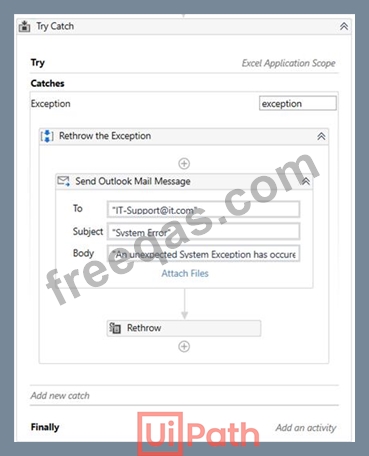
Please select the incorrect statement about Rethrow activity.
Correct Answer: D
Rethrow activity is used when additional activities need to be added before the exception is thrown. You cannot specify the type of error to be thrown. Instead, you place Rethrow activity in the Catch handler of a TryCatch, and the type of the error is the same as the type of the previously caught error. Please note, that the Finally block is not executed if the error was rethrown. Example: Before an unexpected System Exception is thrown, the error is caught in TryCatch activity, a mail message is sent to the IT support team, and then the error is rethrown to end the execution. Exam Topic: Identify and describe the use of the error handling activities such as Try Catch, Throw, Rethrow, Retry Scope, and Global Exception Handler