FreeQAs
 Request Exam  Contact
  • Home
  • View All Exams
  • New QA's
  • Upload
PRACTICE EXAMS:
  • Oracle
  • Fortinet
  • Juniper
  • Microsoft
  • Cisco
  • Citrix
  • CompTIA
  • VMware
  • ISC
  • SAP
  • EMC
  • PMI
  • HP
  • Salesforce
  • Other
  • Oracle
    Oracle
  • Fortinet
    Fortinet
  • Juniper
    Juniper
  • Microsoft
    Microsoft
  • Cisco
    Cisco
  • Citrix
    Citrix
  • CompTIA
    CompTIA
  • VMware
    VMware
  • ISC
    ISC
  • SAP
    SAP
  • EMC
    EMC
  • PMI
    PMI
  • HP
    HP
  • Salesforce
    Salesforce
  1. Home
  2. UiPath Certification
  3. UiPath-ASAPv1 Exam
  4. UiPath.UiPath-ASAPv1.v2024-06-15.q95 Dumps
  • «
  • 1
  • 2
  • 3
  • 4
  • 5
  • 6
  • 7
  • 8
  • 9
  • 10
  • …
  • »
  • »»
Download Now

Question 21

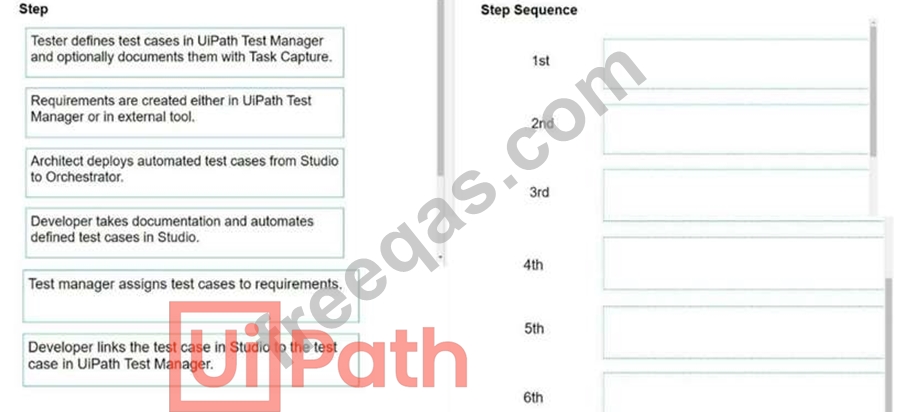
Arrange the flow steps in UiPath Test Manager before deployment in the right order.
Instructions: Drag the Description found on the left and drop on the correct Step Sequence found on the right.
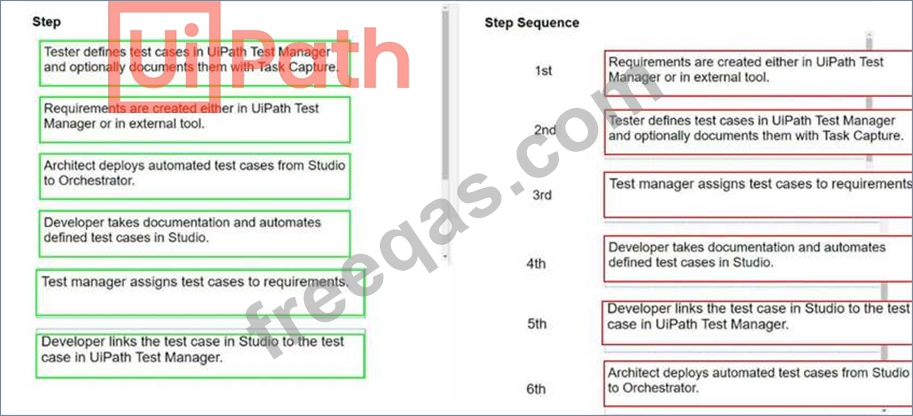
Correct Answer:
insert code

Question 22

What type of applications can be built using UiPath Apps?

Correct Answer: D
UiPath Apps is a low-code platform for developing user interfaces for RPA projects built with UiPath.
It allows you to create apps using a web browser, a rich library of drag-and-drop controls, and automations from the UiPath Platform. UiPath Apps supports APIs, legacy applications, and data sources that are not easily programmable. You can build custom business applications that connect to data in any underlying cloud or on-premises system using the power of automation. You can also design apps that run in multiple form factors, such as a full-page console, a sidebar, or any other size for either desktop or mobile devices. You can use UiPath Apps to create simple or complex applications with base user interaction and advanced functionality, such as conditional logic, data validation, and error handling. You can also integrate and manage UiPath RPA automations within your apps, using attended or unattended robots to interact with back-end systems. UiPath Apps is not primarily focused on data analysis and machine learning, although you can use UiPath activities and integrations to perform such tasks within your automations. Reference:
Apps - Introduction - UiPath Documentation Portal
Introducing UiPath Apps: A Robot-Powered Low-Code Platform
UiPath Apps
insert code

Question 23

In the license estimation process, what might indicate the need for additional licenses during the process design stage?

Correct Answer: B
This answer is correct because high runtime, high volume, and low SLA indicate that the automation process is complex, frequent, and critical, which requires more resources and licenses to execute and manage. For example, more unattended robots may be needed to run the process without human intervention, more Orchestrator tenants may be needed to isolate and scale the process across different environments, and more Studio licenses may be needed to design and test the process12 References:
Automation Pricing - Complete UiPath Enterprise Solution | UiPath
UiPath Pricing 2024: Its 3 RPA Pricing Models, Clearly Explained
insert code

Question 24

What are the characteristics of a semi-structured document?

Correct Answer: A
Semi-structured documents are documents that have some degree of structure, but not enough to be easily processed by traditional data management systems. They usually have a common schema or layout, but the data fields may vary in number, position, or content. They may also contain unstructured elements such as text, images, or handwriting. Examples of semi-structured documents are invoices, receipts, purchase orders, utility bills, and contracts. These documents are often used in business processes and require data extraction and classification. UiPath Document Understanding provides out-of-the-box Machine Learning Models to handle semi-structured documents in a template-less approach12.
References:
Introducing Document Understanding - UiPath
Document Understanding - About ML Packages - UiPath Documentation Portal
insert code

Question 25

What is the difference between 'Add Transaction Item' activity and "Add Queue Item' activity?

Correct Answer: C
According to the UiPath documentation1, the Add Transaction Item activity adds a new item in the queue and starts a transaction. The status of the item is set to InProgress. This means that the item is locked for processing by the current robot and cannot be retrieved by other robots until the transaction is completed or abandoned. The Add Transaction Item activity also returns the item as a QueueItem variable, which can be used to access its properties and data. The Add Queue Item activity adds a new item in an Orchestrator queue.
The status of the item will be New. This means that the item is available for processing by any robot that uses the Get Transaction Item activity. The Add Queue Item activity does not return the item as a variable, but it allows setting its priority, reference, and deadline. Therefore, the correct answer is C. The status of the queue item added with 'Add Transaction Item' is "InProgress" The status of the queue item added with 'Add Queue Item' is "New'. References: 1: Queues and Transactions - UiPath Documentation Portal
insert code
  • «
  • 1
  • 2
  • 3
  • 4
  • 5
  • 6
  • 7
  • 8
  • 9
  • 10
  • …
  • »
  • »»
[×]

Download PDF File

Enter your email address to download UiPath.UiPath-ASAPv1.v2024-06-15.q95 Dumps

Email:

FreeQAs

Our website provides the Largest and the most Latest vendors Certification Exam materials around the world.

Using dumps we provide to Pass the Exam, we has the Valid Dumps with passing guranteed just which you need.

  • DMCA
  • About
  • Contact Us
  • Privacy Policy
  • Terms & Conditions
©2026 FreeQAs

www.freeqas.com materials do not contain actual questions and answers from Cisco's certification exams.
