FreeQAs
 Request Exam  Contact
  • Home
  • View All Exams
  • New QA's
  • Upload
PRACTICE EXAMS:
  • Oracle
  • Fortinet
  • Juniper
  • Microsoft
  • Cisco
  • Citrix
  • CompTIA
  • VMware
  • SAP
  • EMC
  • PMI
  • HP
  • Salesforce
  • Other
  • Oracle
    Oracle
  • Fortinet
    Fortinet
  • Juniper
    Juniper
  • Microsoft
    Microsoft
  • Cisco
    Cisco
  • Citrix
    Citrix
  • CompTIA
    CompTIA
  • VMware
    VMware
  • SAP
    SAP
  • EMC
    EMC
  • PMI
    PMI
  • HP
    HP
  • Salesforce
    Salesforce
  1. Home
  2. WatchGuard Certification
  3. Essentials Exam
  4. WatchGuard.Essentials.v2022-08-08.q73 Dumps
  • ««
  • «
  • …
  • 6
  • 7
  • 8
  • 9
  • 10
  • 11
  • 12
  • 13
  • 14
  • 15
  • …
  • »
  • »»
Download Now

Question 46

Which of these actions adds a host to the temporary or permanent blocked sites list? (Select three.)

Correct Answer: A,C,D
A: You can configure a deny policy to automatically block sites that originate traffic that does not comply with the policy rulese
1.From Policy Manager, double-click the PCAnywhere policy.
2.Click the Properties tab. Select the Auto-block sites that attempt to connect checkbox.
Reference:https://www.watchguard.com/training/fireware/80/defense8.htm
C: The blocked sites list shows all the sites currently blocked as a result of the rules defined in Policy Manager. From this tab, you can add sites to the temporary blocked sites list, or remove temporary blocked sites.
Reference:http://www.watchguard.com/training/fireware/82/monitoa6.htm
D: You can usePolicy Manager to permanently add sites to the Blocked Sites list.
1.select Setup > Default Threat Protection > Blocked Sites.
2.Click Add.
The Add Site dialog box appears.
Reference:http://www.watchguard.com/help/docs/wsm/xtm_11/en-US/index.html#cshid=en-
US/intrusionprevention/blocked_sites_permanent_c.html
insert code

Question 47

Match the monitoring tool to the correct task.
Which tool can view a list of users connected to the Firebox? (Select one)

Correct Answer: E
Explanation/Reference:
You can view a list of users connected to the Firebox through HostWatch, and you can also use Authentication List, which identifies the IP addresses and user names of all the users that are authenticated to the Firebox.
Reference: Fireware Basics, Courseware: WatchGuard System Manager 10, pages 15, 34, 59, 181
insert code

Question 48

Which authentication servers can you use with your Firebox? (Select four.)
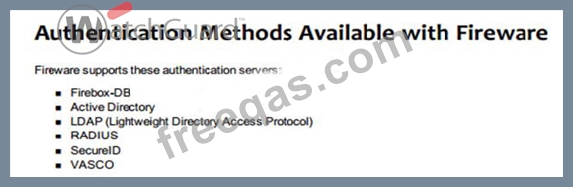
Correct Answer: A,B,C,G
insert code

Question 49

In the default Firebox configuration file, which policies control management access to the device? (Select two.)

Correct Answer: A,D
Ping is generated by default as the explanation states but Ping does not manage the device. The policies that manage the device are WatchGuard & WatchGuard Web UI
insert code

Question 50

How can you prevent connections to the Fireware Web UI from computers on optional interface Eth2? (Select one.)

Correct Answer: C
insert code
  • ««
  • «
  • …
  • 6
  • 7
  • 8
  • 9
  • 10
  • 11
  • 12
  • 13
  • 14
  • 15
  • …
  • »
  • »»
[×]

Download PDF File

Enter your email address to download WatchGuard.Essentials.v2022-08-08.q73 Dumps

Email:

FreeQAs

Our website provides the Largest and the most Latest vendors Certification Exam materials around the world.

Using dumps we provide to Pass the Exam, we has the Valid Dumps with passing guranteed just which you need.

  • DMCA
  • About
  • Contact Us
  • Privacy Policy
  • Terms & Conditions
©2026 FreeQAs

www.freeqas.com materials do not contain actual questions and answers from Cisco's certification exams.
