FreeQAs
 Request Exam  Contact
  • Home
  • View All Exams
  • New QA's
  • Upload
PRACTICE EXAMS:
  • Oracle
  • Fortinet
  • Juniper
  • Microsoft
  • Cisco
  • Citrix
  • CompTIA
  • VMware
  • SAP
  • EMC
  • PMI
  • HP
  • Salesforce
  • Other
  • Oracle
    Oracle
  • Fortinet
    Fortinet
  • Juniper
    Juniper
  • Microsoft
    Microsoft
  • Cisco
    Cisco
  • Citrix
    Citrix
  • CompTIA
    CompTIA
  • VMware
    VMware
  • SAP
    SAP
  • EMC
    EMC
  • PMI
    PMI
  • HP
    HP
  • Salesforce
    Salesforce
  1. Home
  2. CheckPoint Certification
  3. 156-215.80 Exam
  4. CheckPoint.156-215.80.v2022-08-21.q419 Dumps
  • ««
  • «
  • …
  • 61
  • 62
  • 63
  • 64
  • 65
  • 66
  • 67
  • 68
  • 69
  • 70
  • …
  • »
  • »»
Download Now

Question 321

Fill in the blank: The R80 utility fw monitor is used to troubleshoot _____________

Correct Answer: C
Explanation
Check Point's FW Monitor is a powerful built-in tool for capturing network traffic at the packet level. The FW Monitor utility captures network packets at multiple capture points along the FireWall inspection chains.
These captured packets can be inspected later using the WireShark
insert code

Question 322

What are the three types of UserCheck messages?

Correct Answer: A
Explanation/Reference:
Reference: https://sc1.checkpoint.com/documents/R80.10/WebAdminGuides/EN/ CP_R80.10_DataLossPrevention_AdminGuide/html_frameset.htm?topic=documents/R80.10/ WebAdminGuides/EN/CP_R80.10_DataLossPrevention_AdminGuide/94711
insert code

Question 323

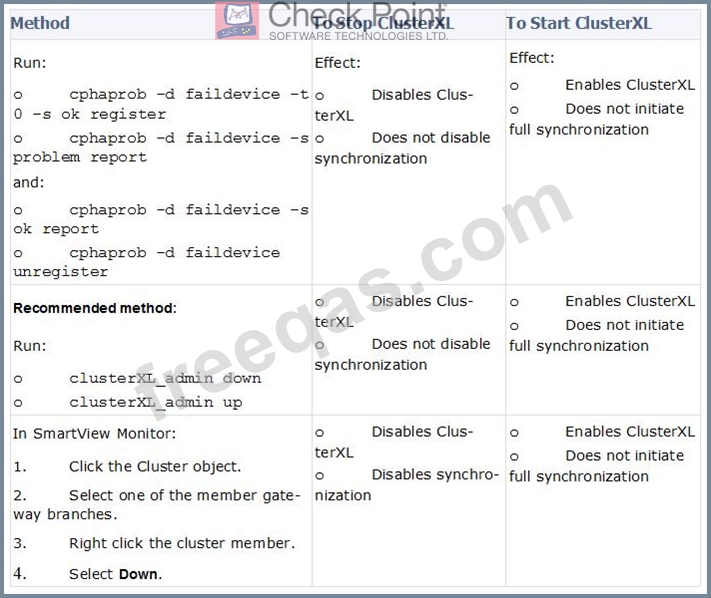
Where can you trigger a failover of the cluster members?
Log in to Security Gateway CLI and run command clusterXL_admin down.
In SmartView Monitor right-click the Security Gateway member and select Cluster member stop.
Log into Security Gateway CLI and run command cphaprob down.
Correct Answer: C
Explanation
How to Initiate Failover

References:
insert code

Question 324

The ________ feature allows administrators to share a policy with other policy packages.

Correct Answer: D
insert code

Question 325

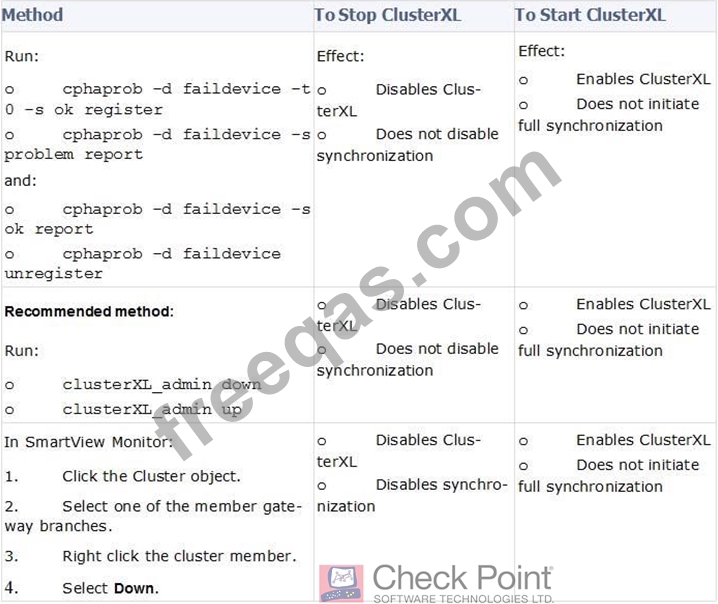
Where can you trigger a failover of the cluster members?
1. Log in to Security Gateway CLI and run command clusterXL_admin down.
2. In SmartView Monitor right-click the Security Gateway member and select Cluster member down.
3. Log into Security Gateway CLI and run command cphaprob down.
Correct Answer: C
Explanation/Reference:
Explanation:
How to Initiate Failover

Reference: https://sc1.checkpoint.com/documents/R76/CP_R76_ClusterXL_AdminGuide/7298.htm
insert code
  • ««
  • «
  • …
  • 61
  • 62
  • 63
  • 64
  • 65
  • 66
  • 67
  • 68
  • 69
  • 70
  • …
  • »
  • »»
[×]

Download PDF File

Enter your email address to download CheckPoint.156-215.80.v2022-08-21.q419 Dumps

Email:

FreeQAs

Our website provides the Largest and the most Latest vendors Certification Exam materials around the world.

Using dumps we provide to Pass the Exam, we has the Valid Dumps with passing guranteed just which you need.

  • DMCA
  • About
  • Contact Us
  • Privacy Policy
  • Terms & Conditions
©2026 FreeQAs

www.freeqas.com materials do not contain actual questions and answers from Cisco's certification exams.
