FreeQAs
 Request Exam  Contact
  • Home
  • View All Exams
  • New QA's
  • Upload
PRACTICE EXAMS:
  • Oracle
  • Fortinet
  • Juniper
  • Microsoft
  • Cisco
  • Citrix
  • CompTIA
  • VMware
  • ISC
  • SAP
  • EMC
  • PMI
  • HP
  • Salesforce
  • Other
  • Oracle
    Oracle
  • Fortinet
    Fortinet
  • Juniper
    Juniper
  • Microsoft
    Microsoft
  • Cisco
    Cisco
  • Citrix
    Citrix
  • CompTIA
    CompTIA
  • VMware
    VMware
  • ISC
    ISC
  • SAP
    SAP
  • EMC
    EMC
  • PMI
    PMI
  • HP
    HP
  • Salesforce
    Salesforce
  1. Home
  2. CompTIA Certification
  3. XK0-005 Exam
  4. CompTIA.XK0-005.v2024-03-22.q272 Dumps
  • «
  • 1
  • 2
  • 3
  • 4
  • 5
  • 6
  • 7
  • 8
  • 9
  • 10
  • …
  • »
  • »»
Download Now

Question 6

While inspecting a recently compromised Linux system, the administrator identified a number of processes that should not have been running:

Which of the following commands should the administrator use to terminate all of the identified processes?

Correct Answer: A
Explanation
The pkill -9 -f "upload*.sh" command will terminate all of the identified processes. This command will send a SIGKILL signal (-9) to all processes whose full command line matches the pattern "upload*.sh" (-f). This signal will force the processes to terminate immediately without giving them a chance to clean up or save their state. The kill -9 "upload*.sh" command is invalid, as kill requires a process ID (PID), not a pattern. The killall -9 "upload*.sh" command is incorrect, as killall requires an exact process name, not a pattern. The skill
-9 "upload*.sh" command is incorrect, as skill requires a username or a session ID (SID), not a pattern. References: CompTIA Linux+ (XK0-005) Certification Study Guide, Chapter 15: Managing Memory and Process Execution, page 470.
insert code

Question 7

A systems administrator installed a new software program on a Linux server. When the systems administrator tries to run the program, the following message appears on the screen.

Which of the following commands will allow the systems administrator to check whether the system supports virtualization?

Correct Answer: B
Explanation
The command that will allow the systems administrator to check whether the system supports virtualization is lscpu. This command will display information about the CPU architecture, such as the number of CPUs, cores, sockets, threads, model name, frequency, cache size, and flags. One of the flags is vmx (for Intel processors) or svm (for AMD processors), which indicates that the CPU supports hardware virtualization. If the flag is present, it means that the system supports virtualization. If the flag is absent, it means that the system does not support virtualization or that it is disabled in the BIOS settings.
The other options are not correct commands for checking whether the system supports virtualization. The dmidecode -s system-version command will display the version of the system, such as the product name or serial number, but not the CPU information. The sysctl -a command will display all the kernel parameters, but not the CPU flags. The cat /sys/devices/system/cpu/possible command will display the range of possible CPUs that can be online or offline, but not the CPU features. References: lscpu(1) - Linux manual page; How To Check If Virtualization is Enabled in Windows 10 / 11
insert code

Question 8

A user reported issues when trying to log in to a Linux server. The following outputs were received:
Given the outputs above. which of the following is the reason the user is una-ble to log in to the server?

Correct Answer: D
Explanation
The user1 password is expired. This can be inferred from the output of the chage -l user1 command, which shows the password expiration information for user1. The output shows that the password expired on
2020-10-01, and the account expired on 2020-10-08. This means that user1 cannot log in to the server unless the password and account are reactivated by the system administrator.
The other options are not correct based on the outputs above. User1 does not need to set a long password, because the output of the passwd -S user1 command shows that the password has a minimum length of 5 characters, which is met by user1's password. User1 is not in the incorrect group, because the output of the groups user1 command shows that user1 belongs to the app group, which is presumably the correct group for accessing the server. The user1 shell assignment is not incorrect, because the output of the grep user1
/etc/passwd command shows that user1 has /bin/bash as the default shell, which is a valid and common shell for Linux users.
insert code

Question 9

A Linux administrator cloned an existing Linux server and built a new server from that clone. The administrator encountered the following error after booting the cloned server:

The administrator performed the commands listed below to further troubleshoot and mount the missing filesystem:
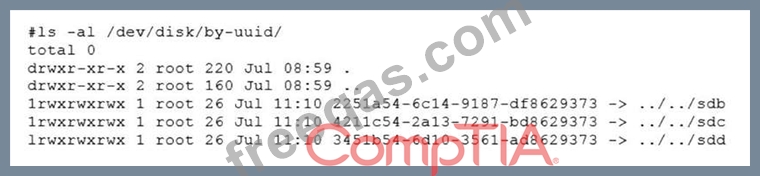
Which of the following should administrator use to resolve the device mismatch issue and mount the disk?

Correct Answer: A
Explanation
The administrator should use the command mount disk by device-id to resolve the device mismatch issue and mount the disk. The issue is caused by the cloned server having a different device name for the disk than the original server. The output of blkid shows that the disk has the device name /dev/sdb1 on the cloned server, but the output of cat /etc/fstab shows that the disk is expected to have the device name /dev/sda1. The command mount disk by device-id will mount the disk by using its unique identifier (UUID) instead of its device name. The UUID can be obtained from the output of blkid or lsblk -f. The command will mount the disk to the specified mount point (/data) and resolve the issue. The other options are incorrect because they either do not mount the disk (fsck -A), do not use the correct identifier (mount disk by-label or mount disk by-blkid), or do not exist (mount disk by-blkid). References: CompTIA Linux+ (XK0-005) Certification Study Guide, Chapter 10: Managing Storage, pages 318-319.
insert code

Question 10

A Linux engineer set up two local DNS servers (10.10.10.10 and 10.10.10.20) and was testing email connectivity to the local mail server using the mail command on a local machine when the following error appeared:

The local machine DNS settings are:
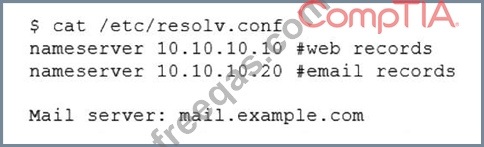
Which of the following commands could the engineer use to query the DNS server to get mail server information?


Correct Answer: B
Explanation
The command dig @10.10.10.20 example.com mx will query the DNS server to get mail server information.
The dig command is a tool for querying DNS servers and displaying the results. The @ option specifies the DNS server to query, in this case 10.10.10.20. The mx option specifies the type of record to query, in this case mail exchange (MX) records, which identify the mail servers for a domain. The domain name to query is example.com. This command will show the MX records for example.com from the DNS server 10.10.10.20.
This is the correct command to use to accomplish the task. The other options are incorrect because they either use the wrong syntax (@example.com 10.10.10.20 instead of @10.10.10.20 example.com), the wrong type of record (a or ptr instead of mx), or the wrong domain name (example.com ns instead of example.com mx). References: CompTIA Linux+ (XK0-005) Certification Study Guide, Chapter 13: Managing Network Services, page 415.
insert code
  • «
  • 1
  • 2
  • 3
  • 4
  • 5
  • 6
  • 7
  • 8
  • 9
  • 10
  • …
  • »
  • »»
[×]

Download PDF File

Enter your email address to download CompTIA.XK0-005.v2024-03-22.q272 Dumps

Email:

FreeQAs

Our website provides the Largest and the most Latest vendors Certification Exam materials around the world.

Using dumps we provide to Pass the Exam, we has the Valid Dumps with passing guranteed just which you need.

  • DMCA
  • About
  • Contact Us
  • Privacy Policy
  • Terms & Conditions
©2026 FreeQAs

www.freeqas.com materials do not contain actual questions and answers from Cisco's certification exams.