FreeQAs
 Request Exam  Contact
  • Home
  • View All Exams
  • New QA's
  • Upload
PRACTICE EXAMS:
  • Oracle
  • Fortinet
  • IBM
  • Juniper
  • Microsoft
  • Cisco
  • Citrix
  • CompTIA
  • VMware
  • ISC
  • SAP
  • EMC
  • PMI
  • HP
  • Salesforce
  • Other
  • Oracle
    Oracle
  • Fortinet
    Fortinet
  • IBM
    IBM
  • Juniper
    Juniper
  • Microsoft
    Microsoft
  • Cisco
    Cisco
  • Citrix
    Citrix
  • CompTIA
    CompTIA
  • VMware
    VMware
  • ISC
    ISC
  • SAP
    SAP
  • EMC
    EMC
  • PMI
    PMI
  • HP
    HP
  • Salesforce
    Salesforce
  1. Home
  2. Databricks Certification
  3. Databricks-Certified-Professional-Data-Engineer Exam
  4. Databricks.Databricks-Certified-Professional-Data-Engineer.v2023-05-23.q104 Dumps
  • ««
  • «
  • …
  • 12
  • 13
  • 14
  • 15
  • 16
  • 17
  • 18
  • 19
  • 20
  • 21
  • …
  • »
  • »»
Download Now

Question 76

A data engineering manager has noticed that each of the queries in a Databricks SQL dashboard takes a few
minutes to update when they manually click the "Refresh" button. They are curious why this might be
occurring, so a team member provides a variety of reasons on why the delay might be occurring.
Which of the following reasons fails to explain why the dashboard might be taking a few minutes to update?

Correct Answer: D
insert code

Question 77

You are trying to calculate total sales made by all the employees by parsing a complex struct data type that stores employee and sales data, how would you approach this in SQL Table definition, batchId INT, performance ARRAY<STRUCT<employeeId: BIGINT, sales: INT>>, in-sertDate TIMESTAMP Sample data of performance column
1.[
2.{ "employeeId":1234
3."sales" : 10000},
4.
5.{ "employeeId":3232
6."sales" : 30000}
7.]
Calculate total sales made by all the employees?
Sample data with create table syntax for the data:
1.create or replace table sales as
2.select 1 as batchId ,
3.from_json('[{ "employeeId":1234,"sales" : 10000 },{ "employeeId":3232,"sales" : 30000 }]',
4. 'ARRAY<STRUCT<employeeId: BIGINT, sales: INT>>') as performance,
5. current_timestamp() as insertDate
6.union all
7.select 2 as batchId ,
8. from_json('[{ "employeeId":1235,"sales" : 10500 },{ "employeeId":3233,"sales" : 32000 }]',
9. 'ARRAY<STRUCT<employeeId: BIGINT, sales: INT>>') as performance,
10. current_timestamp() as insertDate
Correct Answer: C
Explanation
The answer is
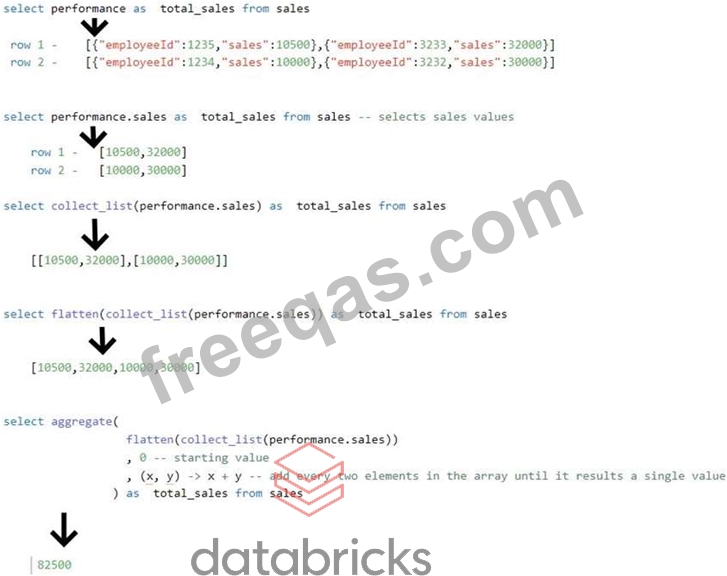
1.select aggregate(flatten(collect_list(performance.sales)), 0, (x, y) -> x + y)
2.as total_sales from sales
Nested Struct can be queried using the . notation performance.sales will give you access to all the sales values in the performance column.
Note: option D is wrong because it uses performance:sales not performance.sales. ":" this is only used when referring to JSON data but here we are dealing with a struct data type. for the exam please make sure to understand if you are dealing with JSON data or Struct data.

Other solutions:
we can also use reduce instead of aggregate
select reduce(flatten(collect_list(performance.sales)), 0, (x, y) -> x + y) as total_sales from sales we can also use explode and sum instead of using any higher-order funtions.
1.with cte as (
2. select
3. explode(flatten(collect_list(performance.sales))) sales from sales
4.)
5.select
6. sum(sales) from cte
Sample data with create table syntax for the data:
1.create or replace table sales as
2.select 1 as batchId ,
3.from_json('[{ "employeeId":1234,"sales" : 10000 },{ "employeeId":3232,"sales" : 30000 }]',
4. 'ARRAY<STRUCT<employeeId: BIGINT, sales: INT>>') as performance,
5. current_timestamp() as insertDate
6.union all
7.select 2 as batchId ,
8. from_json('[{ "employeeId":1235,"sales" : 10500 },{ "employeeId":3233,"sales" : 32000 }]',
9. 'ARRAY<STRUCT<employeeId: BIGINT, sales: INT>>') as performance,
10. current_timestamp() as insertDate
insert code

Question 78

Which of the following SQL command can be used to insert or update or delete rows based on a condition to check if a row(s) exists?

Correct Answer: A
Explanation
here is the additional documentation for your review.
https://docs.databricks.com/spark/latest/spark-sql/language-manual/delta-merge-into.html
1.MERGE INTO target_table_name [target_alias]
2. USING source_table_reference [source_alias]
3. ON merge_condition
4. [ WHEN MATCHED [ AND condition ] THEN matched_action ] [...]
5. [ WHEN NOT MATCHED [ AND condition ] THEN not_matched_action ] [...]
6.
7.matched_action
8. { DELETE |
9. UPDATE SET * |
10. UPDATE SET { column1 = value1 } [, ...] }
11.
12.not_matched_action
13. { INSERT * |
14. INSERT (column1 [, ...] ) VALUES (value1 [, ...])
insert code

Question 79

The data engineering team is using a SQL query to review data completeness every day to monitor the ETL job, and query output is being used in multiple dashboards which of the following ap-proaches can be used to set up a schedule and automate this process?

Correct Answer: B
Explanation
The answer is They can schedule the query to refresh every 12 hours from the SQL endpoint's page in Databricks SQL, The query pane view in Databricks SQL workspace provides the ability to add or edit and schedule individual queries to run.
You can use scheduled query executions to keep your dashboards updated or to enable routine alerts. By default, your queries do not have a schedule.
Note
If your query is used by an alert, the alert runs on its own refresh schedule and does not use the query schedule.
To set the schedule:
* Click the query info tab.
* Graphical user interface, text, application, email Description automatically generated
* Click the link to the right of Refresh Schedule to open a picker with schedule intervals.
* Graphical user interface, application Description automatically generated
* 3.Set the schedule.
* The picker scrolls and allows you to choose:
* *An interval: 1-30 minutes, 1-12 hours, 1 or 30 days, 1 or 2 weeks
* *A time. The time selector displays in the picker only when the interval is greater than 1 day and the day selection is greater than 1 week. When you schedule a specific time, Databricks SQL takes input in your computer's timezone and converts it to UTC. If you want a query to run at a certain time in UTC, you must adjust the picker by your local offset. For example, if you want a query to execute at 00:00 UTC each day, but your current timezone is PDT (UTC-7), you should select 17:00 in the picker:
* Graphical user interface Description automatically generated
insert code

Question 80

A data engineer has set up a notebook to automatically process using a Job. The data engineer's manager wants
to version control the schedule due to its complexity.
Which of the following approaches can the data engineer use to obtain a version-controllable con-figuration of
the Job's schedule?

Correct Answer: D
insert code
  • ««
  • «
  • …
  • 12
  • 13
  • 14
  • 15
  • 16
  • 17
  • 18
  • 19
  • 20
  • 21
  • …
  • »
  • »»
[×]

Download PDF File

Enter your email address to download Databricks.Databricks-Certified-Professional-Data-Engineer.v2023-05-23.q104 Dumps


Email:

FreeQAs

Our website provides the Largest and the most Latest vendors Certification Exam materials around the world.

Using dumps we provide to Pass the Exam, we has the Valid Dumps with passing guranteed just which you need.

  • DMCA
  • About
  • Contact Us
  • Privacy Policy
  • Terms & Conditions
©2026 FreeQAs

www.freeqas.com materials do not contain actual questions and answers from Cisco's certification exams.