FreeQAs
 Request Exam  Contact
  • Home
  • View All Exams
  • New QA's
  • Upload
PRACTICE EXAMS:
  • Oracle
  • Fortinet
  • IBM
  • Juniper
  • Microsoft
  • Cisco
  • Citrix
  • CompTIA
  • VMware
  • ISC
  • SAP
  • EMC
  • PMI
  • HP
  • Salesforce
  • Other
  • Oracle
    Oracle
  • Fortinet
    Fortinet
  • IBM
    IBM
  • Juniper
    Juniper
  • Microsoft
    Microsoft
  • Cisco
    Cisco
  • Citrix
    Citrix
  • CompTIA
    CompTIA
  • VMware
    VMware
  • ISC
    ISC
  • SAP
    SAP
  • EMC
    EMC
  • PMI
    PMI
  • HP
    HP
  • Salesforce
    Salesforce
  1. Home
  2. EMC Certification
  3. D-PVM-OE-01 Exam
  4. EMC.D-PVM-OE-01.v2025-08-22.q63 Dumps
  • ««
  • «
  • …
  • 5
  • 6
  • 7
  • 8
  • 9
  • 10
  • 11
  • 12
  • 13
  • 14
  • »
Download Now

Question 51

What are two characteristics of a SnapVX Clone?

Correct Answer: B,E
Step by Step Comprehensive Detailed Explanation:
* SnapVX Clones:SnapVX clones are full, writable copies of a source volume created using the SnapVX snapshot technology. They are independent volumes that can be used for various purposes, such as testing, development, or data analysis.
* Secure Snapshots:SnapVX offers the capability to create "secure snapshots." When a clone is derived from a secure snapshot, it inherits the same protection, making it immutable and preventing any modifications or deletion. This ensures data integrity and protection against accidental or malicious changes.
* Crash Consistent:SnapVX clones can be made crash consistent. This means that the clone captures a point-in-time copy of the source volume that is consistent with a database or application crash. This is important for ensuring data integrity and recoverability in situations where the source volume experiences an unexpected outage.
Why other options are incorrect:
* A. Maximum 1024 snaps per volume:This limit applies to the source volume, not the clones themselves. Each clone is an independent volume.
* C. Restores directly to the source volume:Clones are independent copies and do not directly restore to the source volume. Data can be copied or moved from the clone to the source if needed.
* D. Is Read-only:SnapVX clones are fully writable copies, not read-only.
References and documents of Dell's public documentation for PowerMax Operate v.2:
* Dell Solutions Enabler 10.0.0 TimeFinder SnapVX CLI User Guide:This guide provides detailed information about SnapVX features and commands, including how to create and manage clones. It confirms the ability to create secure clones and the option to make them crash consistent.
* Dell PowerMax Family: Essentials and Best Practices Guide:This guide offers a comprehensive overview of PowerMax technologies, including SnapVX. It highlights the benefits of SnapVX clones for various use cases.
insert code

Question 52

The web application server web_host_1 is deprecated. Remove all resources associated with the host to clean up the environment.
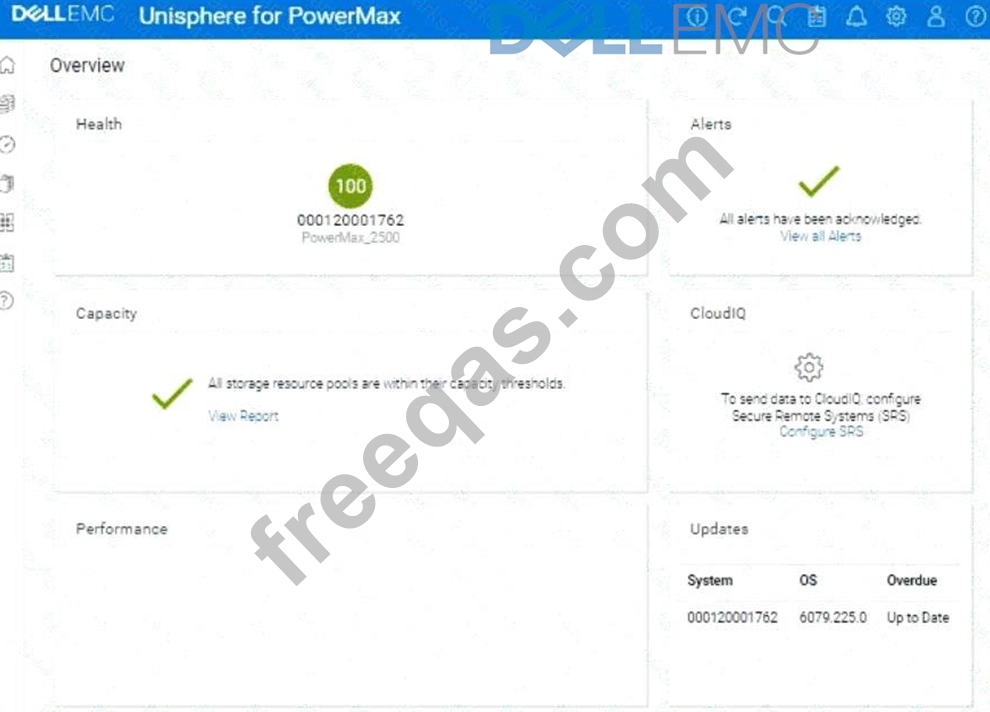
Using the simulator, complete the task.

Correct Answer:
See the explanation for step by step solution.
Explanation:
We need to remove all resources associated with a deprecated web application server named web_host_1 in the Unisphere for PowerMax simulator.
Here's a step-by-step guide on how to accomplish this, based on typical Unisphere functionality and the context of the question:
Steps:
1. Launch the Simulator and Navigate to the Hosts Section
* Open Unisphere for PowerMax in your web browser.
* Log in to the simulator.
* In the left-hand navigation pane, click onHosts>Hosts. This will take you to the Hosts management view.
2. Locate the Host web_host_1
* In the Hosts view, you'll see a list of all configured hosts.
* Find the host named web_host_1. You might need to use the search or filtering options if there are many hosts listed.
3. Identify Associated Resources
* Before deleting the host, it's crucial to identify all resources associated with it. These typically include:
* Masking Views:These define the LUNs that a host can access.
* Storage Groups:These contain the volumes presented to the host.
* Port Groups:These define the connectivity paths (ports) used by the host.
* How to Find Associated Resources:
* Click on the web_host_1 host entry. This should open a details view or properties page for the host.
* Look for tabs or sections labeled "Masking Views," "Storage Groups," or similar.
* Note down the names of any masking views and storage groups associated with web_host_1.
4. Remove the Host from Masking Views
* Navigate toHosts>Masking Views.
* Locate the masking views that you identified in Step 3 as being associated with web_host_1.
* Open each masking view's properties.
* Remove the Host:There should be an option to edit the host list within the masking view. Find web_host_1 in the list of hosts and remove it.
* Save Changes:Save the changes to the masking view.
* Repeatfor all masking views associated with web_host_1.
5. Delete or Modify Storage Groups
* Navigate toStorage>Storage Groups.
* Locate the storage groups that were associated with web_host_1.
* Two Options:
* If the storage group is ONLY used by web_host_1:You can delete the entire storage group.
Select the storage group and click theDeletebutton (or a similar option).
* If the storage group is shared with other hosts:You need to remove the volumes associated with web_host_1 from the storage group.
* Open the storage group's properties.
* Go to the "Volumes" tab.
* Identify the volumes that were presented to web_host_1.
* Select those volumes and choose the option to "Remove from Storage Group" or a similarly worded option.
* Save the changes to the storage group.
6. Delete the Host
* Go back toHosts>Hosts.
* Select web_host_1.
* Click theDeletebutton (or a similar option, like a trashcan icon).
* Confirm that you want to delete the host.
7. Verify Removal (Optional)
* After deleting the host and modifying the storage groups and masking views, you can verify that the resources have been properly cleaned up.
* Check theStorage GroupsandMasking Viewssections again to ensure that web_host_1 is no longer listed and that the storage groups have been either deleted or modified as intended.
insert code

Question 53

What does the symcf g discover command do when upgrading Solutions Enabler on a Linux host1?

Correct Answer: A
Step by Step Comprehensive Detailed Explanation:
When upgrading Solutions Enabler (SE) on a Linux host, the symcfg discover command plays a crucial role in preparing for the upgrade. Its primary function in this context is to:
* Identify the running SE version:Before proceeding with the upgrade, it's essential to know the current version of Solutions Enabler installed on the host. The symcfg discover command gathers information about the existing SE environment, including the version number. This information is used to determine the appropriate upgrade path and ensure compatibility.
Why other options are incorrect:
* B. Verifies that the SE daemons have been stopped:While stopping SE daemons is a necessary step before the upgrade, it's not the function of the symcfg discover command.
* C. Builds the SYMAPI database:The SYMAPI database is typically built during the initial installation or after a fresh discovery.
* D. Creates backups of the configuration directories:Backups are important, but they are usually handled separately as part of the upgrade process, not by the symcfg discover command itself.
References and documents of Dell's public documentation for PowerMax Operate v.2:
* Dell Solutions Enabler 10.0.0 Installation Guide:This guide provides detailed instructions for upgrading Solutions Enabler on different operating systems, including Linux. It explains the steps involved and the role of the symcfg discover command in the upgrade process. You can find this document on the Dell Support website by searching for "Solutions Enabler Installation Guide."
insert code

Question 54

Refer to the Exhibit.

Which service levels are available for CKD devices'?

Correct Answer: A
insert code

Question 55

Which compression algorithm is used on a PowerMax?

Correct Answer: B
insert code
  • ««
  • «
  • …
  • 5
  • 6
  • 7
  • 8
  • 9
  • 10
  • 11
  • 12
  • 13
  • 14
  • »
[×]

Download PDF File

Enter your email address to download EMC.D-PVM-OE-01.v2025-08-22.q63 Dumps

Email:

FreeQAs

Our website provides the Largest and the most Latest vendors Certification Exam materials around the world.

Using dumps we provide to Pass the Exam, we has the Valid Dumps with passing guranteed just which you need.

  • DMCA
  • About
  • Contact Us
  • Privacy Policy
  • Terms & Conditions
©2026 FreeQAs

www.freeqas.com materials do not contain actual questions and answers from Cisco's certification exams.
