An LTM Specialist is working with an LTM device configured with 10 virtual servers on the same domain with a different key/cert pair per virtual. For examplE. www.example.com; ftp.example.com; ssh.example.com; ftps.example.com.
What should the LTM Specialist do to reduce the number of objects on the LTM device?
A new VLAN vlan301 has been configured on a highly available LTM device in partition ApplicationA. A new directly connected backend server has been placed on vlan301. However, there are connectivity issues pinging the default gateway. The VLAN self IPs configured on the LTM devices are 192.168.0.251 and 192.168.0.252 with floating IP 192.168.0.253. The LTM Specialist needs to perform a packet capture to assist with troubleshooting the connectivity.
Which command should the LTM Specialist execute on the LTM device command line interface to capture the attempted pings to the LTM device default gateway on VLAN vlan301?
-- Exhibit --- Exhibit -Refer to the exhibit.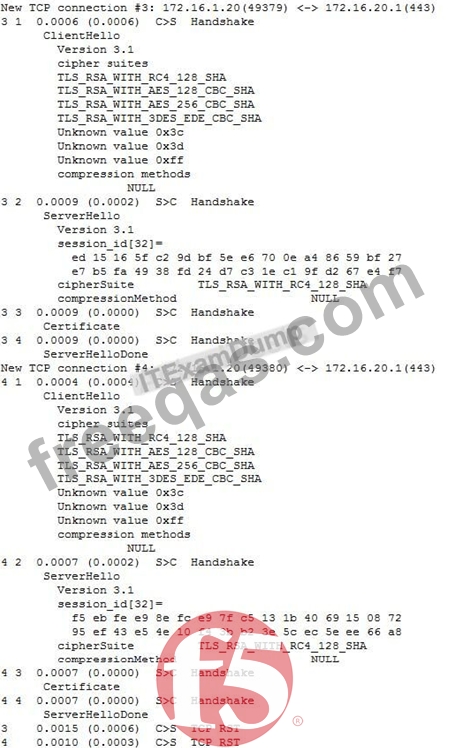
A company uses a complex piece of client software that connects to one or more virtual servers (VS) hosted on an LTM device. The client software is experiencing issues. An LTM Specialist must determine the cause of the problem. The LTM Specialist has the tcpdump extract. The client loses connection with the LTM device.
Where is the reset originating?
An LTM device has a virtual server configured as a Performance Layer 4 virtual listening on
0.0.0.0:0 to perform routing of packets to an upstream router. The client machine at IP address
192.168.0.4 is attempting to contact a host upstream of the LTM device on IP address 10.0.0.99.
The network flow is asymmetrical, and the following TCP capture displays:
# tcpdump -nnni 0.0 'host 192.168.0.4 and host 10.0.0.99' tcpdump: verbose output suppressed, use -v or -vv for full protocol decode listening on 0.0, link-type EN10MB (Ethernet), capture size 96 bytes
05:07:55.499954 IP 192.168.0.4.35345 > 10.0.0.99.443: S 3205656213:3205656213(0) ack
3267995082 win 1480 05:07:55.499983 IP 10.0.0.99.443 > 192.168.0.4.35345: R 1:1(0) ack 1 win 0 05:07:56.499960 IP 192.168.0.4.35345 > 10.0.0.99.443: S 3205656213:3205656213(0) ack
3267995082 win 1480 05:07:56.499990 IP 10.0.0.99.443 > 192.168.0.4.35345: R 1:1(0) ack 1 win 0 4 packets captured
Which option within the fastL4 profile needs to be enabled by the LTM Specialist to prevent the LTM device from rejecting the flow?
An application owner claims an LTM device is delaying delivery of an HTTP application. The LTM device has two VLANs, an internal and an external. The application servers reside on the internal VLAN. The virtual server and clients reside on the external VLAN.
With appropriate filters applied, which solution is most efficient for obtaining packet captures in order to investigate the claim of delayed delivery?

