Which discovery scan type is prone to miss a device, if the device is quiet and the entry foe that device is not present in the ARP table of adjacent devices?
Correct Answer: B
* Discovery Scan Types: FortiSIEM uses various scan types to discover devices on a network. * Layer 2 (L2) Scan: An L2 scan discovers devices based on ARP tables and MAC address information from adjacent devices. Limitation: If a device is quiet (not actively communicating) and its entry is not present in the ARP table of adjacent devices, the L2 scan may miss it. * Other Scan Types: CMDB Scan: Based on the existing Configuration Management Database (CMDB) entries. Range Scan: Scans a specified IP range for devices. Smart Scan: Uses a combination of methods to discover devices. * Reference: FortiSIEM 6.3 User Guide, Device Discovery section, which explains the different types of discovery scans and their characteristics.
Question 47
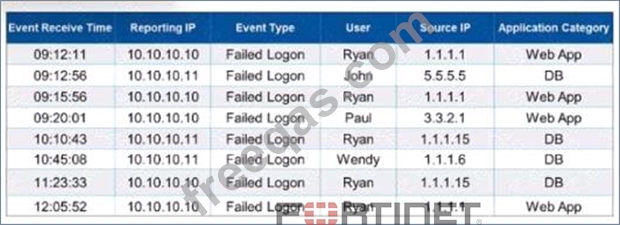
Refer to the exhibit. It events are grouped by Event Type and User attributes in FortiSIEM. how many results will be displayed?
Correct Answer: A
Grouping Events in FortiSIEM: Grouping events by specific attributes allows administrators to aggregate and analyze data more efficiently. Grouping Criteria: In this case, the events are grouped by "Event Type" and "User" attributes. Unique Combinations: To determine the number of results displayed, identify the unique combinations of the "Event Type" and "User" attributes in the provided data. * Failed Logon by Ryan(appears multiple times but is one unique combination) * Failed Logon by John * Failed Logon by Paul * Failed Logon by Wendy Unique Groupings: There are four unique groupings based on the given data: "Failed Logon" by "Ryan", "John", "Paul", and "Wendy". References: FortiSIEM 6.3 User Guide, Event Management and Reporting sections, which explain how events are grouped and reported based on selected attributes.
Question 48
An administrator is using SNMP and WMI credentials to discover a Windows device. How will the WMI method handle this?
Correct Answer: A
* WMI Method: Windows Management Instrumentation (WMI) is a set of specifications from Microsoft for consolidating the management of devices and applications in a network. * Log Collection: WMI is used to collect various types of logs from Windows devices. Security Logs: Contains records of security-related events such as login attempts and resource access. Application Logs: Contains logs generated by applications running on the system. System Logs: Contains logs related to the operating system and its components. * Comprehensive Data Collection: By using WMI, FortiSIEM can gather a wide range of event logs that are crucial for monitoring and analyzing the security and performance of Windows devices. * Reference: FortiSIEM 6.3 User Guide, Data Collection Methods section, which details the use of WMI for collecting event logs from Windows devices.
Question 49
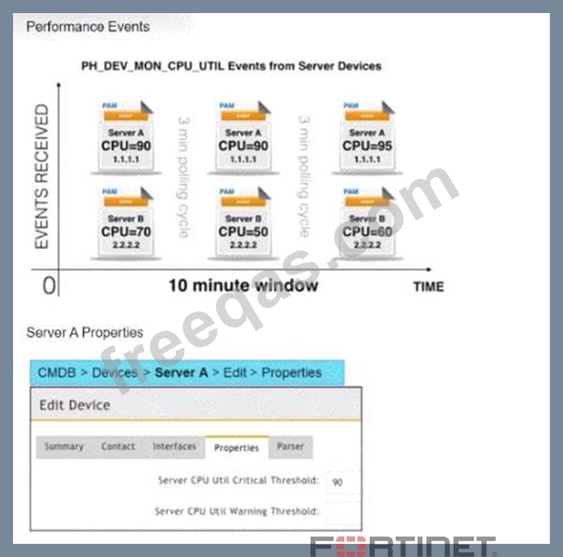
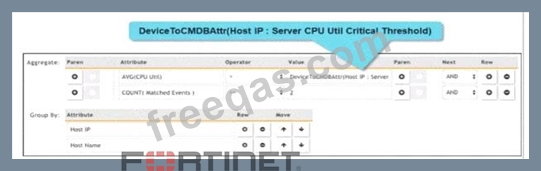
Refer to the exhibits. Three events are collected over a 10-minute time period from two servers: Server A and Server B. Based on the settings tor the rule subpattern. how many incidents will the servers generate?
Correct Answer: D
Event Collection Overview: The exhibits show three events collected over a 10-minute period from two servers, Server A and Server B. Rule Subpattern Settings: The rule subpattern specifies two conditions: * AVG(CPU Util) > DeviceToCMDBAttr(Host IP : Server CPU Util Critical Threshold): This checks if the average CPU utilization exceeds the critical threshold defined for each server. * COUNT(Matched Events) >= 2: This requires at least two matching events within the specified period. Server A Analysis: * Events: Three events (CPU=90, CPU=90, CPU=95). * Average CPU Utilization: (90+90+95)/3 = 91.67, which exceeds the critical threshold of 90. * Matched Events Count: 3, which meets the condition of being greater than or equal to 2. * Incident Generation: Server A meets both conditions, so it generates one incident. Server B Analysis: * Events: Three events (CPU=70, CPU=50, CPU=60). * Average CPU Utilization: (70+50+60)/3 = 60, which does not exceed the critical threshold of 90. * Matched Events Count: 3, but since the average CPU utilization condition is not met, no incident is generated. Conclusion: Based on the rule subpattern, Server A will generate one incident, and Server B will not generate any incidents. References: FortiSIEM 6.3 User Guide, Event Correlation Rules and Incident Management sections, which explain how incidents are generated based on rule subpatterns and event conditions.
Question 50
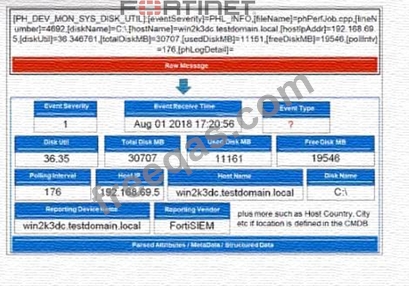
Refer to the exhibit. Which value will FortiSIEM use to populate theEvent Type field?
Correct Answer: C
Event Type Population: In FortiSIEM, the Event Type field is populated based on specific identifiers within the raw message or event log. Raw Message Analysis: The exhibit shows a raw message with various components, includingPH_DEV_MON_SYS_DISK_UTIL,PHL_INFO,phPerfJob, anddiskUtil. Primary Event Identifier: ThePH_DEV_MON_SYS_DISK_UTILat the beginning of the raw message is the primary identifier for the event type. It categorizes the type of event, in this case, a system disk utilization monitoring event. Event Type Field: FortiSIEM uses this primary identifier to populate the Event Type field, providing a clear categorization of the event. References: FortiSIEM 6.3 User Guide, Event Processing and Event Types section, details how event types are identified and populated in the system.