FreeQAs
 Request Exam  Contact
  • Home
  • View All Exams
  • New QA's
  • Upload
PRACTICE EXAMS:
  • Oracle
  • Fortinet
  • Juniper
  • Microsoft
  • Cisco
  • Citrix
  • CompTIA
  • VMware
  • SAP
  • EMC
  • PMI
  • HP
  • Salesforce
  • Other
  • Oracle
    Oracle
  • Fortinet
    Fortinet
  • Juniper
    Juniper
  • Microsoft
    Microsoft
  • Cisco
    Cisco
  • Citrix
    Citrix
  • CompTIA
    CompTIA
  • VMware
    VMware
  • SAP
    SAP
  • EMC
    EMC
  • PMI
    PMI
  • HP
    HP
  • Salesforce
    Salesforce
  1. Home
  2. Fortinet Certification
  3. NSE5_FSM-6.3 Exam
  4. Fortinet.NSE5_FSM-6.3.v2025-12-08.q63 Dumps
  • ««
  • «
  • …
  • 2
  • 3
  • 4
  • 5
  • 6
  • 7
  • 8
  • 9
  • 10
  • 11
  • …
  • »
  • »»
Download Now

Question 26

When configuring collectors located in geographically separated sites, what ports must be open on a front end firewall?

Correct Answer: B
* FortiSIEM Architecture: In FortiSIEM, collectors gather data from various sources and send this data to supervisors and workers within the FortiSIEM architecture.
* Communication Requirements: For collectors to effectively send data to the FortiSIEM system, specific communication channels must be open.
* Port Usage: The primary port used for secure communication between the collectors and the FortiSIEM infrastructure is HTTPS (port 443).
* Network Configuration: When configuring collectors in geographically separated sites, the HTTPS port must be open for the collectors to communicate with both the supervisor and the worker upload settings addresses. This ensures that the collected data can be securely transmitted to the appropriate processing and analysis components.
* Reference: FortiSIEM 6.3 Administration Guide, Network Ports section details the necessary ports for communication within the FortiSIEM architecture.
insert code

Question 27

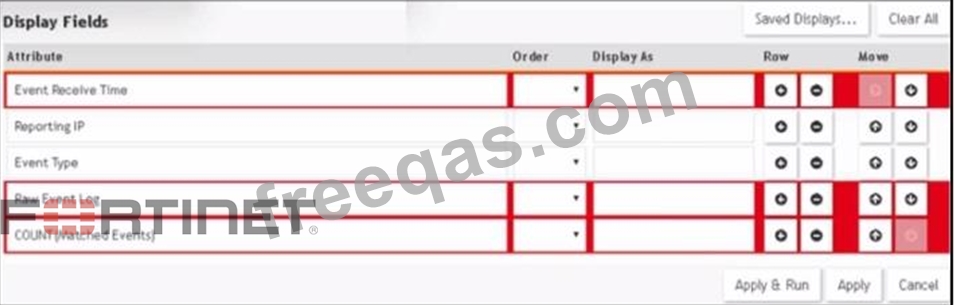
Refer to the exhibit.

A FortiSIEM administrator wants to group some attributes for a report, but is not able to do so successfully.
As shown in the exhibit, why are some of the fields highlighted in red?

Correct Answer: A
* Grouping Attributes in Reports: When creating reports in FortiSIEM, certain attributes can be grouped to summarize and organize the data.
* Unique Attributes: Attributes that are unique for each event cannot be grouped because they do not provide a meaningful aggregation or summary.
* Red Highlighting Explanation: The red highlighting in the exhibit indicates attributes that cannot be grouped together due to their unique nature. These unique attributes include Event Receive Time, Reporting IP, Event Type, Raw Event Log, and COUNT(Matched Events).
* Attribute Characteristics:
Event Receive Time is unique for each event.
Reporting IP and Event Type can vary greatly, making grouping them impractical in this context.
Raw Event Log represents the unprocessed log data, which is also unique.
COUNT(Matched Events) is a calculated field, not suitable for grouping.
* Reference: FortiSIEM 6.3 User Guide, Reporting section, explains the constraints on grouping attributes in reports.
insert code

Question 28

Device discovery information is stored in which database?

Correct Answer: D
insert code

Question 29

Which database is used for storing anomaly data, that is calculated for different parameters, such as traffic and device resource usage running averages, and standard deviation values?

Correct Answer: A
insert code

Question 30

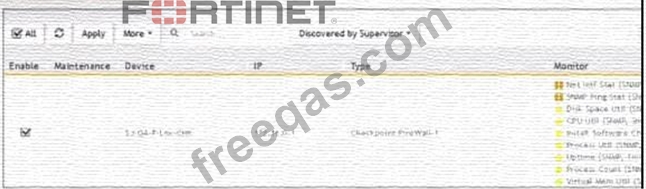
Refer to the exhibit.

What does the pauso icon indicate?

Correct Answer: D
Data Collection Status: FortiSIEM displays various icons to indicate the status of data collection for different devices.
Pause Icon: The pause icon specifically indicates that data collection is paused, but this can happen due to several reasons.
Common Cause for Pausing: One common cause for pausing data collection is an issue such as a change of password, which prevents the system from authenticating and collecting data.
Exhibit Analysis: In the provided exhibit, the presence of the pause icon next to the device suggests that data collection has encountered an issue that has caused it to pause.
References: FortiSIEM 6.3 User Guide, Device Management and Data Collection Status Icons section, which explains the different icons and their meanings.
insert code
  • ««
  • «
  • …
  • 2
  • 3
  • 4
  • 5
  • 6
  • 7
  • 8
  • 9
  • 10
  • 11
  • …
  • »
  • »»
[×]

Download PDF File

Enter your email address to download Fortinet.NSE5_FSM-6.3.v2025-12-08.q63 Dumps

Email:

FreeQAs

Our website provides the Largest and the most Latest vendors Certification Exam materials around the world.

Using dumps we provide to Pass the Exam, we has the Valid Dumps with passing guranteed just which you need.

  • DMCA
  • About
  • Contact Us
  • Privacy Policy
  • Terms & Conditions
©2025 FreeQAs

www.freeqas.com materials do not contain actual questions and answers from Cisco's certification exams.