FreeQAs
 Request Exam  Contact
  • Home
  • View All Exams
  • New QA's
  • Upload
PRACTICE EXAMS:
  • Oracle
  • Fortinet
  • Juniper
  • Microsoft
  • Cisco
  • Citrix
  • CompTIA
  • VMware
  • ISC
  • SAP
  • EMC
  • PMI
  • HP
  • Salesforce
  • Other
  • Oracle
    Oracle
  • Fortinet
    Fortinet
  • Juniper
    Juniper
  • Microsoft
    Microsoft
  • Cisco
    Cisco
  • Citrix
    Citrix
  • CompTIA
    CompTIA
  • VMware
    VMware
  • ISC
    ISC
  • SAP
    SAP
  • EMC
    EMC
  • PMI
    PMI
  • HP
    HP
  • Salesforce
    Salesforce
  1. Home
  2. Fortinet Certification
  3. NSE5_SSE_AD-7.6 Exam
  4. Fortinet.NSE5_SSE_AD-7.6.v2026-11-21.q45 Dumps
  • «
  • 1
  • 2
  • 3
  • 4
  • 5
  • 6
  • 7
  • 8
  • 9
  • 10
  • »
Download Now

Question 1

Which three authentication sources support secure identity verification and access control for FortiSASE remote users? (Choose three.)

Correct Answer: A,C,E
FortiSASE supports SAML, LDAP, and RADIUS as authentication mechanisms applicable to remote-user identity verification. The FortiSASE Administrator Study Guide explicitly identifies its authentication-server configuration objectives as describing remote authentication with LDAP and RADIUS and SAML single sign-on (SSO) . It further states that FortiSASE supports authentication through the local database, RADIUS, LDAP, and SAML for SSO.
SAML (A) provides federated SSO by allowing FortiSASE, acting as the service provider, to rely on an external identity provider for user authentication. SAML SSO is specifically supported for FortiSASE SWG and VPN deployments.
LDAP (C) enables integration with directory services such as Microsoft Active Directory. FortiSASE can query directory information and authenticate users against the LDAP infrastructure; LDAPS can be enabled for protected communications. The guide notes an important limitation: LDAP authentication is unavailable for SIA remote users using IPsec VPN, but LDAP remains a supported FortiSASE authentication source.
RADIUS (E) provides centralized remote authentication and supports PAP, CHAP, MS-CHAP, and MS- CHAPv2 authentication methods.
OIDC and TACACS+ are not identified as FortiSASE remote-user authentication sources in this course objective.
insert code

Question 2

The IT team is wondering whether they will need to continue using MDM tools for future FortiClient upgrades.
What options are available for handling future FortiClient upgrades?

Correct Answer: A
According to theFortiSASE 7.6 Feature Administration Guideand the latest updates to theNSE 5 SASE curriculum, FortiSASE has introduced native lifecycle management for FortiClient agents to reduce the operational burden on IT teams who previously relied solely on third-party MDM (Mobile Device Management) or GPO (Group Policy Objects) for every update.
TheEndpoint Upgradefeature, found underSystem > Endpoint Upgradein the FortiSASE portal, allows administrators to perform the following:
* Centralized Version Control: Administrators can see which versions are currently deployed and which "Recommended" versions are available from FortiGuard.
* Scheduled Rollouts: You can choose to upgrade all endpoints or specific endpoint groups at a designated time, ensuring that upgrades do not disrupt business operations.
* Status Monitoring: The portal provides a real-time dashboard showing the progress of the upgrade (e.
g.,Downloading,Installing,Reboot Pending, orSuccess).
* Manual vs. Managed: While MDM is still highly recommended for theinitial onboarding(the first time FortiClient is installed and connected to the SASE cloud), all subsequent upgrades can be handled natively by the FortiSASE portal.
Why other options are incorrect:
* Option B: Manual upgrades are inefficient for large-scale deployments (~400 users in this scenario) and are not the intended "feature-rich" solution provided by FortiSASE.
* Option C: "Onboarding" refers to the initial setup. Re-onboarding every time a version changes would be redundant and counterproductive.
* Option D: While the system canmanagethe upgrade, it is not "auto-upgraded on demand" by the client itself without administrative configuration in the portal. The administrator must still define the target version and schedule.
insert code

Question 3

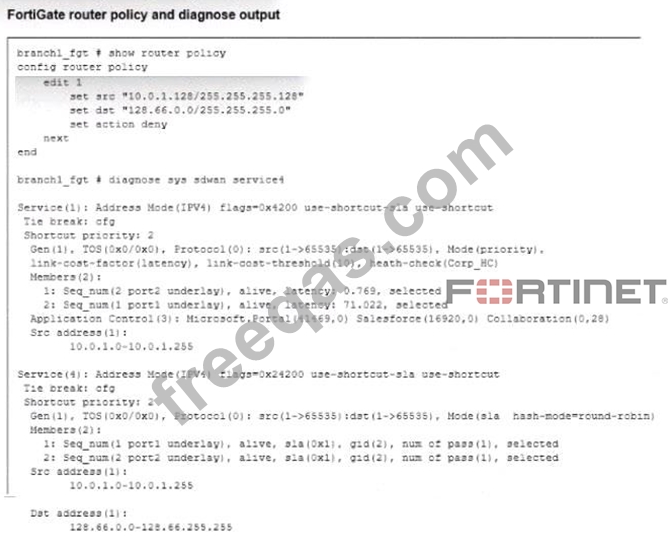
Refer to the exhibit.

How does FortiGate handle the traffic with the source IP 10.0.1 130 and the destination IP 128 66.0 125?

Correct Answer: C
The correct answer is C. FortiGate routes the traffic flow according to the FIB . The exhibit shows a regular policy route configured with source 10.0.1.128/255.255.255.128 and destination 128.66.0.0/255.
255.255.0. The test source 10.0.1.130 belongs to the 10.0.1.128/25 subnet, and destination 128.66.0.125 belongs to 128.66.0.0/24; therefore, the traffic matches this policy route.
Crucially, the route contains set action deny. For a router policy , this does not mean that FortiGate discards the packet as a firewall DENY would. It represents Stop Policy Routing . Fortinet explains that when a packet matches this action, FortiGate stops policy-route processing and routes the packet using the forwarding information base (FIB) .
Regular policy routes also have precedence over SD-WAN rules. Consequently, even though SD-WAN service 4 shown in the exhibit matches source 10.0.1.0-10.0.1.255 and destination 128.66.0.0-128.66.255.255, its round-robin selection of port1 and port2 does not control this flow. The matching regular policy route terminates policy routing first.
Study Guide Reference: SD-WAN Configuration and Monitoring > Policy Routes > Route Lookup and FIB Processing, pages 423-424.
insert code

Question 4

Refer to the exhibit, which shows the SD-WAN rule status and configuration.
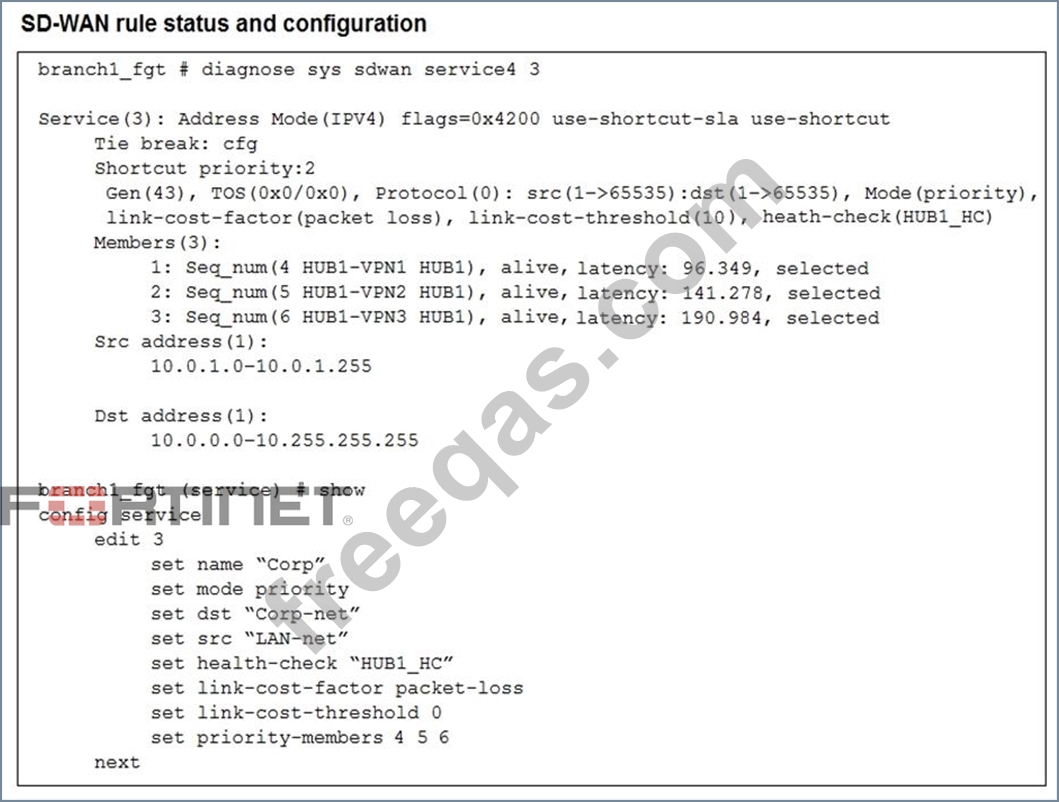
Based on the exhibit, which change in the measured latency will first make HUB1-VPN3 the new preferred member?

Correct Answer: A
If VPN3 latency drops to 80 ms (below threshold), while VPN2 is already over threshold, and if VPN1 later exceeds threshold, VPN3 becomes eligible and preferred.
insert code

Question 5

Which three reports are valid report types in FortiSASE? (Choose three.)

Correct Answer: A,D,E
Shadow IT Report: Leveraging the built-in CASB (Cloud Access Security Broker) capabilities, this report identifies "unsanctioned" or "risky" SaaS applications being used by employees. It helps organizations discover hidden security risks by cataloging cloud applications that have not been explicitly approved by the IT department.
Vulnerability Assessment Report: Since FortiSASE integrates with FortiClient and an embedded EMS, it can aggregate vulnerability scan data from managed endpoints. This report lists software vulnerabilities found on user devices (OS-level and application-level), providing a "Security Rating" or posture assessment that is critical for Zero Trust Network Access (ZTNA) enforcement.
Web Usage Summary Report: This report provides a high-level overview of web activity across the SASE deployment. It categorizes traffic by website categories (e.g., Social Media, Streaming, Malicious Sites), top users by bandwidth, and blocked requests, helping IT teams understand how internet resources are being consumed by remote workers.
insert code
  • «
  • 1
  • 2
  • 3
  • 4
  • 5
  • 6
  • 7
  • 8
  • 9
  • 10
  • »
[×]

Download PDF File

Enter your email address to download Fortinet.NSE5_SSE_AD-7.6.v2026-11-21.q45 Dumps

Email:

FreeQAs

Our website provides the Largest and the most Latest vendors Certification Exam materials around the world.

Using dumps we provide to Pass the Exam, we has the Valid Dumps with passing guranteed just which you need.

  • DMCA
  • About
  • Contact Us
  • Privacy Policy
  • Terms & Conditions
©2026 FreeQAs

www.freeqas.com materials do not contain actual questions and answers from Cisco's certification exams.