FreeQAs
 Request Exam  Contact
  • Home
  • View All Exams
  • New QA's
  • Upload
PRACTICE EXAMS:
  • Oracle
  • Fortinet
  • IBM
  • Juniper
  • Microsoft
  • Cisco
  • Citrix
  • CompTIA
  • VMware
  • ISC
  • SAP
  • EMC
  • PMI
  • HP
  • Salesforce
  • Other
  • Oracle
    Oracle
  • Fortinet
    Fortinet
  • IBM
    IBM
  • Juniper
    Juniper
  • Microsoft
    Microsoft
  • Cisco
    Cisco
  • Citrix
    Citrix
  • CompTIA
    CompTIA
  • VMware
    VMware
  • ISC
    ISC
  • SAP
    SAP
  • EMC
    EMC
  • PMI
    PMI
  • HP
    HP
  • Salesforce
    Salesforce
  1. Home
  2. Fortinet Certification
  3. NSE7_LED-7.0 Exam
  4. Fortinet.NSE7_LED-7.0.v2025-07-19.q49 Dumps
  • ««
  • «
  • …
  • 2
  • 3
  • 4
  • 5
  • 6
  • 7
  • 8
  • 9
  • 10
  • 11
  • »
Download Now

Question 36

Exhibit.

Exhibit.

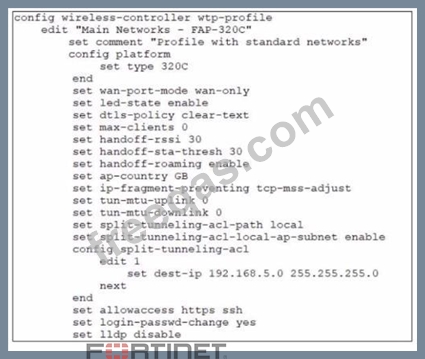
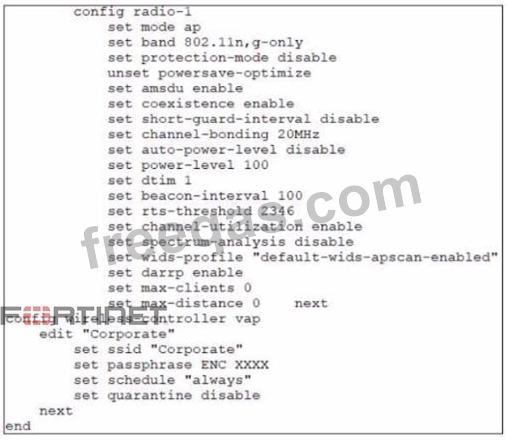
Refer to the exhibits
In the wireless configuration shown in the exhibits, an AP is deployed in a remote site and has a wireless network (VAP) called Corporate deployed to it The network is a tunneled network however clients connecting to a wireless network require access to a local printer Clients are trying to print to a printer on the remote site but are unable to do so Which configuration change is required to allow clients connected to the Corporate SSID to print locally?

Correct Answer: A
Explanation
According to the Fortinet documentation1, "Split tunneling allows you to specify which traffic is tunneled to the FortiGate and which traffic is sent directly to the Internet. This can improve performance and reduce bandwidth usage." Therefore, by configuring split-tunneling in the vap configuration, you can allow the clients connected to the Corporate SSID to access both the corporate network and the local printer. Option B is incorrect because split-tunneling is configured at the vap level, not the wtp-profile level. Option C is incorrect because blocking intra-SSID traffic prevents wireless clients on the same SSID from communicating with each other, which is not related to accessing a local printer. Option D is unnecessary and impractical because the printer does not need to be a wireless client on the Corporate wireless network to be accessible by the clients.
insert code

Question 37

An administrator is deploying a new FortiGate device using zero-touch provisioning. Before deployment, the administrator added the FortiGate serial number on FortiManager and configured all the FortiGate settings FortiGate has a factory default configuration. However, when the administrator connects FortiGate to the network, FortiManager does not start the installation automatically. Which two scenarios are likely to cause this issue? (Choose two.)

Correct Answer: A,B
https://docs.fortinet.com/document/fortimanager/7.6.1/administration-guide/155479/zero-touch-and-low- touch-provisioning
insert code

Question 38

Refer to the exhibit.

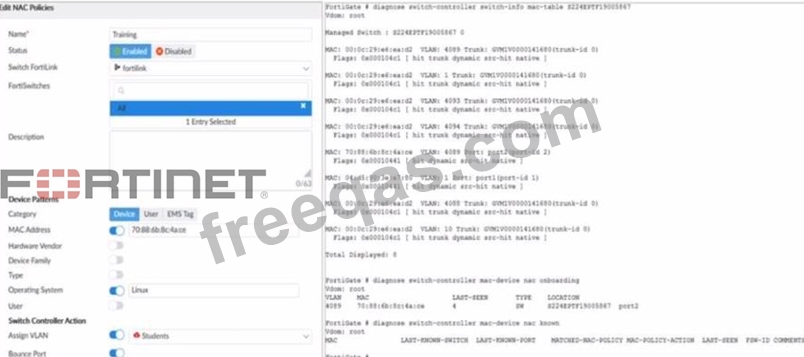
Examine the FortiManager configuration and FortiGate CLI output shown in the exhibit An administrator is testing the NAC feature The test device is connected to a managed FortiSwitch device
{S224EPTF19"53C7)onpOrt2
After applying the NAC policy on port2 and generating traffic on the test device the test device is not matching the NAC policy therefore the test device remains m the onboarding VLAN Based on the information shown in the exhibit which two scenarios are likely to cause this issue? (Choose two.)

Correct Answer: A,B
Explanation
According to the FortiManager configuration, the NAC policy is set to match devices with the MAC address of 00:0c:29:6a:2b:3c and the operating system of Linux.However, according to the FortiGate CLI output, the test device has a different MAC address of 00:0c:29:6a:2b:3d. Therefore, option B is true. Option A is also true because the FortiSwitch device status is shown as down, which means that the management communication between FortiGate and FortiSwitch is not working properly. This could prevent the NAC policy from being applied correctly. Option C is false because the device operating system detected by FortiGate is Linux, which matches the NAC policy. Option D is false because device detection is enabled on VLAN 4089, as shown by the command "config switch-controller vlan".
insert code

Question 39

Which FortiSwitch VLANs are automatically created on FortiGate when the first FortiSwitch device is discovered?

Correct Answer: A
insert code

Question 40

An administrator is testing the connectivity for a new VLAN The devices in the VLAN are connected to a FortiSwitch device that is managed by FortiGate Quarantine is disabled on FortiGate While testing the administrator noticed that devices can ping FortiGate and FortiGate can ping the devices The administrator also noticed that inter-VLAN communication works However intra-VLAN communication does not work Which scenario is likely to cause this issue?

Correct Answer: A
Explanation
According to the scenario, the devices in the VLAN are connected to a FortiSwitch device that is managed by FortiGate. Quarantine is disabled on FortiGate, which means that the devices are not blocked by any security policy. The devices can ping FortiGate and FortiGate can ping the devices, which means that the IP connectivity is working. Inter-VLAN communication works, which means that the routing between VLANs is working. However, intra-VLAN communication does not work, which means that the switching within the VLAN is not working. Therefore, option C is true because the FortiSwitch MAC address table is missing entries, which means that the FortiSwitch does not know how to forward frames to the destination MAC addresses within the VLAN. Option A is false because access VLAN is enabled on the VLAN, which means that the VLAN ID is added to the frames on ingress and removed on egress. This does not affect intra-VLAN communication. Option B is false because the native VLAN configured on the ports is incorrect, which means that the frames on the native VLAN are not tagged with a VLAN ID. This does not affect intra-VLAN communication. Option D is false because the FortiGate ARP table is missing entries, which means that FortiGate does not know how to map IP addresses to MAC addresses. This does not affect intra-VLAN communication.
insert code
  • ««
  • «
  • …
  • 2
  • 3
  • 4
  • 5
  • 6
  • 7
  • 8
  • 9
  • 10
  • 11
  • »
[×]

Download PDF File

Enter your email address to download Fortinet.NSE7_LED-7.0.v2025-07-19.q49 Dumps

Email:

FreeQAs

Our website provides the Largest and the most Latest vendors Certification Exam materials around the world.

Using dumps we provide to Pass the Exam, we has the Valid Dumps with passing guranteed just which you need.

  • DMCA
  • About
  • Contact Us
  • Privacy Policy
  • Terms & Conditions
©2026 FreeQAs

www.freeqas.com materials do not contain actual questions and answers from Cisco's certification exams.