You need to create a GKE cluster in an existing VPC that is accessible from on-premises. You must meet the following requirements:
* IP ranges for pods and services must be as small as possible.
* The nodes and the master must not be reachable from the internet.
* You must be able to use kubectl commands from on-premises subnets to manage the cluster.
How should you create the GKE cluster?
You have deployed an HTTP(s) load balancer, but health checks to port 80 on the Compute Engine virtual machine instance are failing, and no traffic is sent to your instances. You want to resolve the problem. Which commands should you run?
Your team deployed two applications in GKE that are exposed through an external Application Load Balancer. When queries are sent to www.mountkirkgames.com/sales and www.mountkirkgames.com/get-an-analysis, the correct pages are displayed. However, you have received complaints that www.mountkirkgames.com yields a 404 error. You need to resolve this error. What should you do?
You want to use Partner Interconnect to connect your on-premises network with your VPC. You already have an Interconnect partner.
What should you first?
You have the following private Google Kubernetes Engine (GKE) cluster deployment: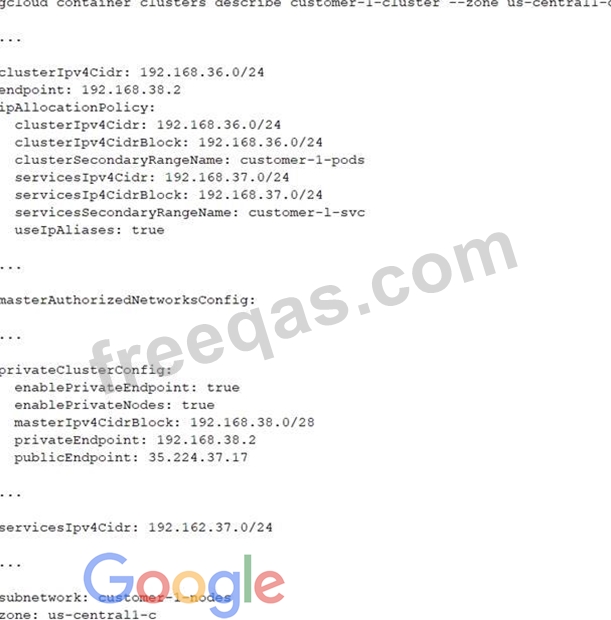
You have a virtual machine (VM) deployed in the same VPC in the subnetwork kubernetes- management with internal IP address 192.168.40 2/24 and no external IP address assigned.
You need to communicate with the cluster master using kubectl. What should you do?
Enter your email address to download Google.Professional-Cloud-Network-Engineer.v2026-11-25.q288 Dumps

