FreeQAs
 Request Exam  Contact
  • Home
  • View All Exams
  • New QA's
  • Upload
PRACTICE EXAMS:
  • Oracle
  • Fortinet
  • Juniper
  • Microsoft
  • Cisco
  • Citrix
  • CompTIA
  • VMware
  • ISC
  • SAP
  • EMC
  • PMI
  • HP
  • Salesforce
  • Other
  • Oracle
    Oracle
  • Fortinet
    Fortinet
  • Juniper
    Juniper
  • Microsoft
    Microsoft
  • Cisco
    Cisco
  • Citrix
    Citrix
  • CompTIA
    CompTIA
  • VMware
    VMware
  • ISC
    ISC
  • SAP
    SAP
  • EMC
    EMC
  • PMI
    PMI
  • HP
    HP
  • Salesforce
    Salesforce
  1. Home
  2. HP Certification
  3. HPE6-A85 Exam
  4. HP.HPE6-A85.v2025-02-08.q90 Dumps
  • «
  • 1
  • 2
  • 3
  • 4
  • 5
  • 6
  • 7
  • 8
  • 9
  • 10
  • …
  • »
  • »»
Download Now

Question 1

Which Protocol Data Unit (PDU) represents the data link layer PDU?

Correct Answer: B
A frame is the data link layer PDU that encapsulates the network layer PDU (packet) with a header and a trailer that contain information such as source and destination MAC addresses, frame type, error detection, etc. A frame is transmitted over a physical medium such as Ethernet, Wi-Fi, etc. Reference: https://www.arubanetworks.com/techdocs/ArubaOS_86_Web_Help/Content/arubaos-solutions/1-overview/networking-basics.htm
insert code

Question 2

A network technician is using Aruba Central to troubleshoot network issues.
Which dashboard can be used to view and acknowledge issues when beginning the troubleshooting process?

Correct Answer: A
The Alerts and Events dashboard displays all types of alerts and events generated for events pertaining to device provisioning, configuration, and user management. You can use the Config icon to configure alerts and notifications for different alert categories and severities1. You can also view the alerts and events in the List view and Summary view2.
References:
1 https://www.arubanetworks.com/techdocs/central/latest/content/nms/alerts/configuring-alerts.htm
2 https://www.arubanetworks.com/techdocs/central/latest/content/nms/alerts/viewing-alerts.htm
insert code

Question 3

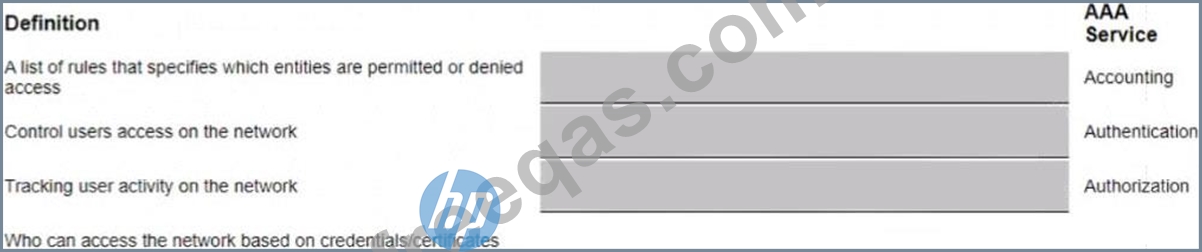
Match each AAA service with its correct definition (Matches may be used more than once or not at all)
Correct Answer:

Explanation:
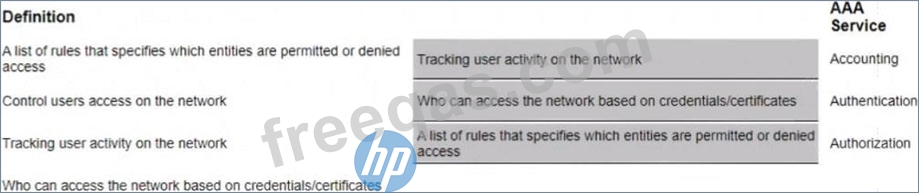
Here are the correct matches for each AAA (Authentication, Authorization, and Accounting) service with its definition:
Accounting: Tracking user activity on the network
Authentication: Who can access the network based on credentials/certificates Authorization: A list of rules that specifies which entities are permitted or denied access Accounting is concerned with keeping a record of user activity, Authentication is the process of verifying identity, and Authorization determines what an authenticated user is allowed to do on the network.
insert code

Question 4

You have been asked to onboard a new Aruba 6300M in a customer deployment You are working remotely rather than on-site You have a colleague installing the switch The colleague has provided you with a remote console session to configure the edge switch You have been asked to configure a link aggregation going back to the cores using interfaces 1/1/51 and 1/1/52 The Senior Engineer of the project has asked you to configure the switch and 1Q uplink with these guidelines
1. Add VLAN 20 to the local VLAN database with name Mgmt
2. Add L3 SVl on VLAN 20 for Management using address 10 in the 10.1.1 0/24 subnet 3. Add LAG 1 using LACP mode active for the uplink
4 use vlan 20 as the native vlan on the LAG 5. Make sure the interfaces are all ON.
Which configuration script will achieve the task?

Correct Answer: C
This configuration script will achieve the task as it follows the guidelines given by the Senior Engineer. It creates VLAN 20 with name Mgmt, adds L3 SVI on VLAN 20 with IP address 10.1.1.10/24, creates LAG 1 with LACP mode active for the uplink, uses VLAN 20 as the native VLAN on the LAG, and ensures that the interfaces are all ON. Reference: https://www.arubanetworks.com/techdocs/AOS-CX/10.04/HTML/5200-6790/GUID-8F0E7E8B-0F4B-4A3C-AE7F-0F1B5A7F9C5D.html Edge1# conf t vlan 20 name Mgmt interface vlan 20 ip address 10.1.1.10/24 no shut interface lag 1 no shut vlan trunk native 20 vlan trunk allowed all lacp mode active interface 1/1/51 no shut lag 1 interface 1/1/52 no shut lag 1 exit This script correctly creates VLAN 20 with the name 'Mgmt', adds an L3 SVI for management using the specified IP address, and configures LACP for link aggregation (LAG 1) using the active mode. It also sets VLAN 20 as the native VLAN on the LAG and ensures all interfaces are enabled ('no shut' is the command to bring up the interface if it has been administratively shut down).
insert code

Question 5

What can be done to dynamically set the PoE Priority on a switch port when deploying IP cameras APs. and other PoE devices?


Correct Answer: B
Profiling is a feature that allows Aruba switches to automatically identify and classify devices connected to them based on various attributes such as MAC address, DHCP options, LLDP information, etc. Profiling can be used to dynamically set the PoE priority on a switch port based on the device type and power requirements. For example, an IP camera may have a higher PoE priority than a printer or a PC. Profiling can also be used to apply other configuration settings such as VLANs, ACLs, QoS, etc. based on the device profile. Reference: https://www.arubanetworks.com/techdocs/ArubaOS_86_Web_Help/Content/arubaos-solutions/1-overview/profiling.htm
insert code
  • «
  • 1
  • 2
  • 3
  • 4
  • 5
  • 6
  • 7
  • 8
  • 9
  • 10
  • …
  • »
  • »»
[×]

Download PDF File

Enter your email address to download HP.HPE6-A85.v2025-02-08.q90 Dumps

Email:

FreeQAs

Our website provides the Largest and the most Latest vendors Certification Exam materials around the world.

Using dumps we provide to Pass the Exam, we has the Valid Dumps with passing guranteed just which you need.

  • DMCA
  • About
  • Contact Us
  • Privacy Policy
  • Terms & Conditions
©2026 FreeQAs

www.freeqas.com materials do not contain actual questions and answers from Cisco's certification exams.