Which of the following cannot define the maximum time-to-live (TTL) for a token?
Correct Answer: B
The maximum time-to-live (TTL) for a token is defined by the lowest value among the following factors: * The authentication method that issued the token. Each auth method can have a default and a maximum TTL for the tokens it generates. These values can be configured by the auth method's mount options or by the auth method's specific endpoints. * The mount endpoint configuration that the token is accessing. Each secrets engine can have a default and a maximum TTL for the leases it grants. These values can be configured by the secrets engine's mount options or by the secrets engine's specific endpoints. * A parent token TTL. If a token is created by another token, it inherits the remaining TTL of its parent token, unless the parent token has an infinite TTL (such as the root token).A child token cannot outlive its parent token. * System max TTL. This is a global limit for all tokens and leases in Vault. It can be configured by the system backend's max_lease_ttl option. The client system that uses the token cannot define the maximum TTL for the token, as this is determined by Vault's configuration and policies. The client system can only request a specific TTL for the token, but this request is subject to the limits imposed by the factors above. https://developer.hashicorp.com/vault/docs/concepts/tokens3, https://developer.hashicorp.com/vault/docs/concepts/lease2, https://developer.hashicorp.com/vault/docs/commands/auth/tune4, https://developer.hashicorp.com/vault/docs/commands/secrets/tune5, https://developer.hashicorp.com/vault/docs/commands/token/create6
Question 77
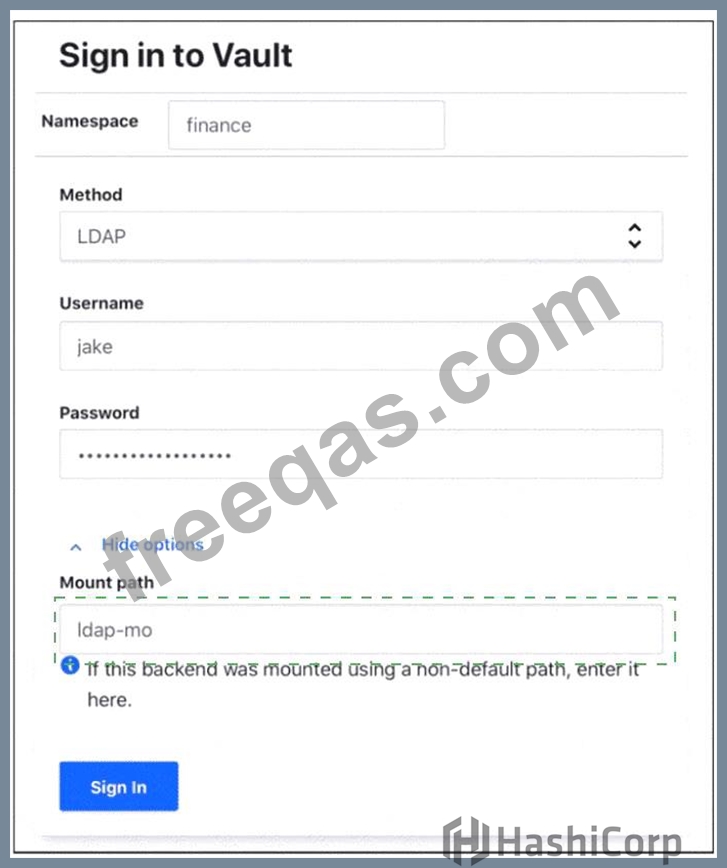
Where do you define the Namespace to log into using the Vault Ul? To answer this question Use your mouse to click on the screenshot in the location described above. An arrow indicator will mark where you have clicked. Click the "Answer" button once you have positioned the arrow to answer the question. You may need to scroll down to see the entire screenshot.
Correct Answer:
Explanation: The namespace can be defined in the "Mount path" field in the "Advanced options" section of the login screen. The mount path is the path where the auth method is enabled, and it can include a namespace prefix. For example, if the LDAP auth method is enabled at the path ns1/auth/ldap, where ns1 is the namespace, then the mount path field should be set to ns1/auth/ldap. This way, the Vault UI will log in to the correct namespace and auth method. Alternatively, the namespace can also be specified in the URL of the Vault UI, such as https://vault.example.com/ui/vault/auth/ns1/auth/ldap/login.
Question 78
Which of the following statements best describes the difference in cluster strategies between self-managed Vault and HashiCorp-managed Vault?
Correct Answer: A
Comprehensive and Detailed in Depth Explanation: * A:Correctly contrasts self-managed (user responsibility) with HCP Vault (HashiCorp-managed). Correct. * B:Both support replication; false. Incorrect. * C:HCP Vault doesn't require manual upgrades. Incorrect. * D:Reverses responsibilities; false. Incorrect. Overall Explanation from Vault Docs: "HCP Vault Dedicated is operated by HashiCorp... Self-managed Vault requires users to handle setup, maintenance, and scaling." Reference:https://developer.hashicorp.com/hcp/docs/vault/what-is-hcp-vault
Question 79
Vault operators can create two types of groups in Vault. What are the two types?
Correct Answer: A,D
Comprehensive and Detailed In-Depth Explanation: In HashiCorp Vault, operators can create two distinct types of groups within the Identity secrets engine: external groupsandinternal groups. These groups are used to manage and organize users and policies, facilitating access control and permissions management. * External Groups: These groups are designed to integrate with external identity providers or systems, such as LDAP or OIDC (OpenID Connect). External groups allow Vault to map groups from these external systems to Vault policies, enabling seamless access control for users authenticated via external auth methods. They can be created manually or automatically mapped (e.g., from LDAP group memberships to Vault policies). This is particularly useful when managing users who exist outside of Vault's internal identity store but need access to Vault resources. The documentation states: "External groups are usually associated with an auth method, such as LDAP or OIDC." * Internal Groups: These are created and managed directly within Vault's identity store. Internal groups are used to organize Vault entities (representing users or machines) and assign policies to them manually. They are ideal for scenarios where user management is entirely within Vault's ecosystem, without reliance on external identity providers. The documentation explains: "Internal groups are created in the identity store and map to other groups or entities." * Incorrect Options: * Security Groups: This term is not used in Vault's context for group types. While security is a core concern, "security groups" do not represent a specific category of groups in Vault. * Policy Groups: Policies in Vault define permissions, but there is no concept of "policy groups" as a distinct group type. Policies are attached to groups, not grouped themselves in this manner. The distinction between external and internal groups enhances flexibility in managing authentication and authorization, aligning with Vault's design to support both internal and federated identity systems. Reference:https://developer.hashicorp.com/vault/docs/secrets/identity#external-vs-internal-groups
Question 80
True or False? All Vault policies are deny by default.
Correct Answer: A
Comprehensive and Detailed in Depth Explanation: The statement isTrue. Vault operates on a default-deny model for policies. The HashiCorp Vault documentation states: "Vault policies implicitly deny all actions that are not explicitly permitted in the Vault policy." This ensures that access must be explicitly granted, enhancing security. The docs elaborate: "By default, a token has no policies attached beyond the default policy (which grants minimal permissions), and any action not explicitly allowed by an attached policy is denied." This principle underpins Vault's access control, making A correct. Reference: HashiCorp Vault Documentation - Policies Tutorial