FreeQAs
 Request Exam  Contact
  • Home
  • View All Exams
  • New QA's
  • Upload
PRACTICE EXAMS:
  • Oracle
  • Fortinet
  • IBM
  • Juniper
  • Microsoft
  • Cisco
  • Citrix
  • CompTIA
  • VMware
  • ISC
  • SAP
  • EMC
  • PMI
  • HP
  • Salesforce
  • Other
  • Oracle
    Oracle
  • Fortinet
    Fortinet
  • IBM
    IBM
  • Juniper
    Juniper
  • Microsoft
    Microsoft
  • Cisco
    Cisco
  • Citrix
    Citrix
  • CompTIA
    CompTIA
  • VMware
    VMware
  • ISC
    ISC
  • SAP
    SAP
  • EMC
    EMC
  • PMI
    PMI
  • HP
    HP
  • Salesforce
    Salesforce
  1. Home
  2. Juniper Certification
  3. JN0-637 Exam
  4. Juniper.JN0-637.v2025-05-21.q119 Dumps
  • ««
  • «
  • …
  • 12
  • 13
  • 14
  • 15
  • 16
  • 17
  • 18
  • 19
  • 20
  • 21
  • …
  • »
  • »»
Download Now

Question 76

How does an SRX Series device examine exception traffic?

Correct Answer: A
Exception traffic, including management and control plane traffic, is handled by examining host-inbound traffic configurations at the ingress interface and zone. It ensures traffic reaches necessary services like SSH and IKE securely. See Juniper Host Inbound Traffic Documentation for more.
SRX Series devices handle exception traffic (such as management traffic like SSH, Telnet, DNS queries, etc.) differently than regular transit traffic. Exception traffic is examined based onhost-inbound traffic for the ingress interface and zone. If traffic is destined for the device itself (e.g., management traffic or routing protocol messages), it must be allowed ashost-inbound trafficon both the ingress interface and zone.
Example Command:
bash
Copy code
set security zones security-zone trust host-inbound-traffic system-services ssh This ensures that traffic destined to the SRX device is inspected based on the ingress interface and zone.
insert code

Question 77

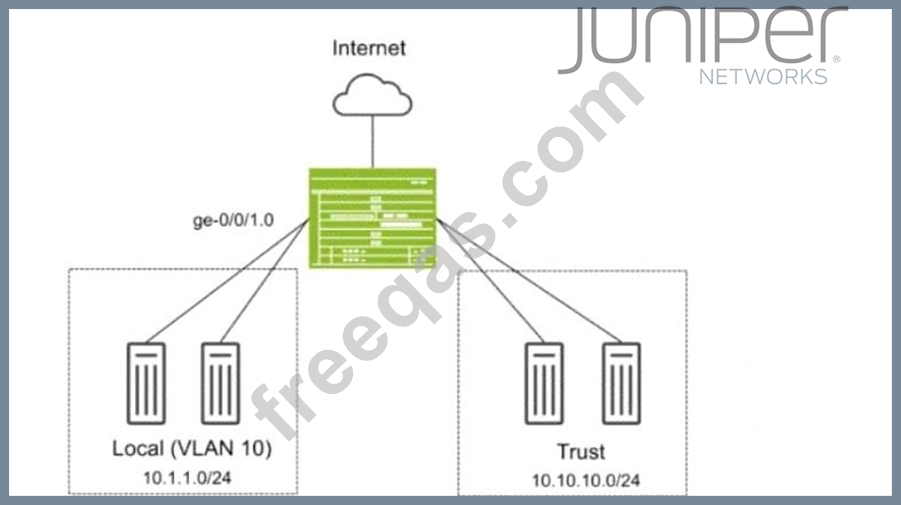
Exhibit:

You have deployed an SRX Series device as shown in the exhibit. The devices in the Local zone have recently been added, but their SRX interfaces have not been configured. You must configure the SRX to meet the following requirements:
* Devices in the 10.1.1.0/24 network can communicate with other devices in the same network but not with other networks or the SRX.
* You must be able to apply security policies to traffic flows between devices in the Local zone.
Which three configuration elements will be required as part of your configuration? (Choose three.)

Correct Answer: A,B,D
In this scenario, we need to configure the SRX Series device so that devices in the Local zone (VLAN 10,
10.1.1.0/24 network) can communicate with each other but not with other networks or the SRX itself.
Additionally, you must be able to apply security policies to traffic flows between the devices in the Local zone.
* Explanation of Answer A (Assigning Interface to Security Zone):
* You need to assign the interface ge-0/0/1.0 to the Local security zone. This is crucial because the SRX only applies security policies to interfaces assigned to security zones. Without this, traffic between devices in the Local zone won't be processed by security policies.
* Configuration:
set security zones security-zone Local interfaces ge-0/0/1.0
* Explanation of Answer B (Configuring Ethernet-Switching for VLAN 10):
* Since we are using Layer 2 switching between devices in VLAN 10, we need to configure the interface to operate in Ethernet switching mode and assign it to VLAN 10.
* Configuration:
set interfaces ge-0/0/1 unit 0 family ethernet-switching vlan-members 10
* Explanation of Answer D (Transparent Bridging Mode for Layer 2):
* The global mode for Layer 2 switching on the SRX device must be set to transparent-bridge.
This ensures that the SRX operates in Layer 2 mode and can switch traffic between devices without routing.
* Configuration:
set protocols l2-learning global-mode transparent-bridge
Summary:
* Interface Assignment: Interface ge-0/0/1.0 is assigned to the Local zone to allow policy enforcement.
* Ethernet-Switching: The interface is configured for Layer 2 Ethernet switching in VLAN 10.
* Transparent Bridging: The SRX is configured in Layer 2 transparent-bridge mode for switching between devices.
Juniper Security Reference:
* Layer 2 Bridging and Switching Overview: This mode allows the SRX to act as a Layer 2 switch for forwarding traffic between VLAN members without routing. Reference: Juniper Transparent Bridging Documentation.
insert code

Question 78

Exhibit

The show network-access aaa radius-servers command has been issued to solve authentication issues.
Referring to the exhibit, to which two authentication servers will the SRX Series device continue to send requests? (Choose TWO)

Correct Answer: A,B
insert code

Question 79

Exhibit:

Referring to the exhibit, a default static route on SRX-1 sends all traffic to ISP-A. You have configured APBR to send all requests for streaming video traffic to ISP-B. However, the return traffic from the streaming video server is coming through ISP-A, and the traffic is being dropped by SRX-1. You can only make changes on SRX-1.
How do you solve this problem?

Correct Answer: D
Explanation:
insert code

Question 80

You have deployed two SRX Series devices in an active/passive multimode HA scenario.
In this scenario, which two statements are correct? (Choose two.)


Correct Answer: C,D
Explanation:
insert code
  • ««
  • «
  • …
  • 12
  • 13
  • 14
  • 15
  • 16
  • 17
  • 18
  • 19
  • 20
  • 21
  • …
  • »
  • »»
[×]

Download PDF File

Enter your email address to download Juniper.JN0-637.v2025-05-21.q119 Dumps

Email:

FreeQAs

Our website provides the Largest and the most Latest vendors Certification Exam materials around the world.

Using dumps we provide to Pass the Exam, we has the Valid Dumps with passing guranteed just which you need.

  • DMCA
  • About
  • Contact Us
  • Privacy Policy
  • Terms & Conditions
©2026 FreeQAs

www.freeqas.com materials do not contain actual questions and answers from Cisco's certification exams.