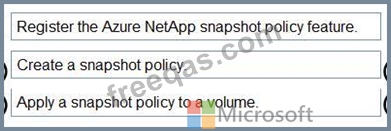
You have a Windows Virtual Desktop host pool named Pool1. Pool1 contains session hosts that use FSLogix profile containers hosted in Azure NetApp Files volumes.
You need to back up profile files by using snapshots.
Which three actions should you perform in sequence? To answer, move the appropriate actions from the list of actions to the answer area and arrange them in the correct order.

You have a Windows Virtual Desktop deployment.
You need to ensure that all the connections to the managed resources in the host pool require multi-factor authentication (MFA).
Which two settings should you modify in a conditional access policy? To answer, select the appropriate options in the answer area.
NOTE: Each correct selection is worth one point.

You have an Azure Virtual Desktop deployment that contains the resources shown in the following table.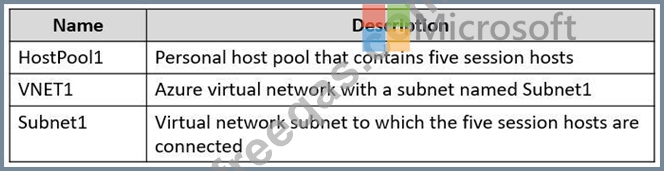
You need to enable just-in-time (JIT) VM access for all the session hosts.
What should you do first?
After you answer a question in this section, you will NOT be able to return to it. As a result, these questions will not appear in the review screen.
You have an Azure Virtual Desktop host pool that runs Windows 10 Enterprise multi-session.
User sessions are load-balanced between the session hosts. Idle session timeout is 30 minutes.
You plan to shut down a session host named Host1 to perform routine maintenance.
You need to prevent new user sessions to Host1 without disconnecting active user sessions.
Solution: From the properties of the virtual machine of Host1, you configure the Auto-shutdown settings.
Does this meet the goal?
Note: This question is part of a series of questions that present the same scenario. Each question in the series contains a unique solution that might meet the stated goals. Some question sets might have more than one correct solution, while others might not have a correct solution.
After you answer a question in this section, you will NOT be able to return to it. As a result, these questions will not appear in the review screen.
You have a Windows Virtual Desktop host pool named Pool1 that is integrated with an Azure Active Directory Domain Services (Azure AD DS) managed domain.
You need to configure idle session timeout settings for users that connect to the session hosts in Pool1.
Solution: From an Azure AD DS-joined computer, you modify the AADDC Computers GPO settings.
Does that meet the goal?

