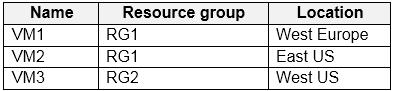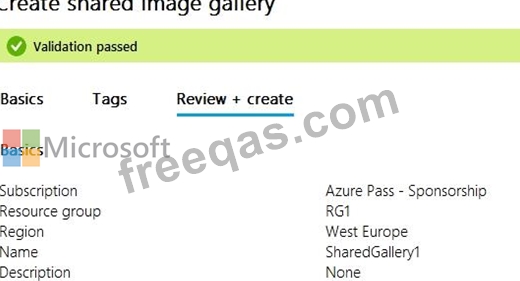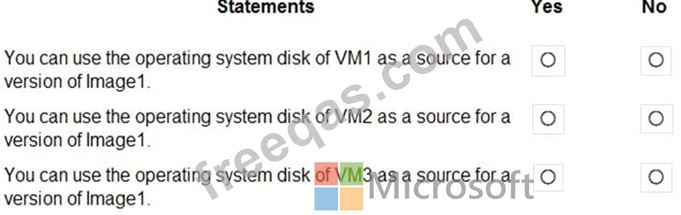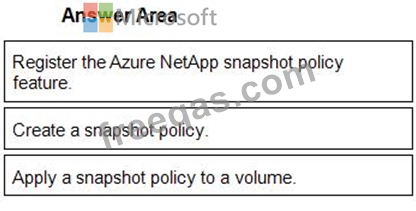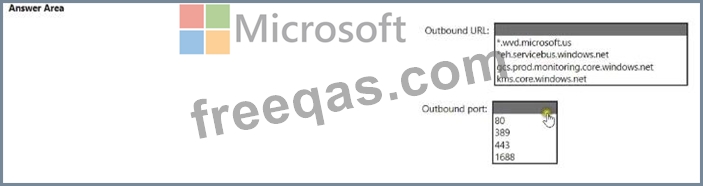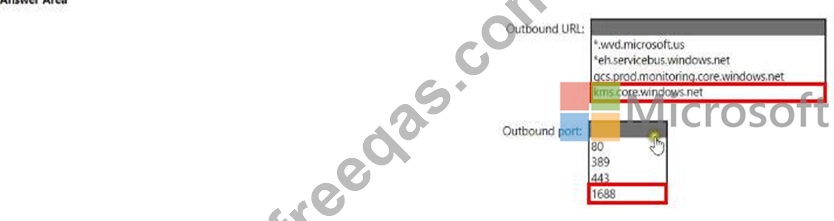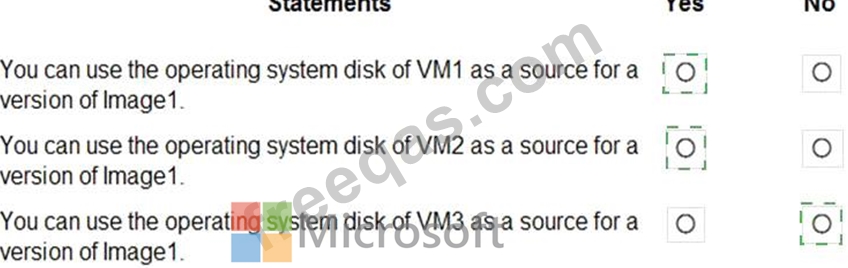
Explanation
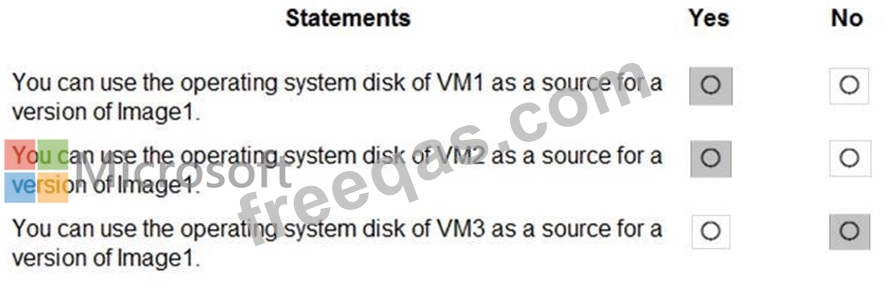
Reference:
https://www.robinhobo.com/windows-virtual-desktop-wvd-image-management-how-to-manage-and-deploy-cust
Topic 2, Contoso. Ltd
Case study
This is a case study. Case studies are not timed separately. You can use as much exam time as you would like to complete each case. However, there may be additional case studies and sections on this exam. You must manage your time to ensure that you are able to complete all questions included on this exam in the time provided.
To answer the questions included in a case study, you will need to reference information that is provided in the case study. Case studies might contain exhibits and other resources that provide more information about the scenario that is described in the case study. Each question is independent of the other questions in this case study.
At the end of this case study, a review screen will appear. This screen allows you to review your answers and to make changes before you move to the next section of the exam. After you begin a new section, you cannot return to this section.
To start the case study
To display the first question in this case study, click the button. Use the buttons in the left pane to explore the content of the case study before you answer the questions. Clicking these buttons displays information such as business requirements, existing environment, and problem statements. If the case study has an All Information tab, note that the information displayed is identical to the information displayed on the subsequent tabs. When you are ready to answer a question, click the button to return to the question.
Overview
Contoso, Ltd. is a law firm that has a main office in Montreal and branch offices in Paris and Seattle. The Seattle branch office opened recently.
Contoso has an Azure subscription and uses Microsoft 365.
Existing Infrastructure. Active Directory
The network contains an on-premises Active Directory domain named contoso.com and an Azure Active Directory (Azure AD) tenant. One of the domain controllers runs as an Azure virtual machine and connects to a virtual network named VNET1. All internal name resolution is provided by DNS server that run on the domain controllers.
The on-premises Active Directory domain contains the organizational units (OUs) shown in the following table.

The on-premises Active Directory domain contains the users shown in the following table.
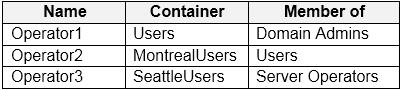
The Azure AD tenant contains the cloud-only users shown in the following table.
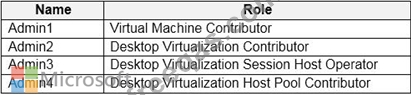
Existing Infrastructure. Network Infrastructure
All the Azure virtual networks are peered. The on-premises network connects to the virtual networks.
All servers run Windows Server 2019. All laptops and desktop computers run Windows 10 Enterprise.
Since users often work on confidential documents, all the users use their computer as a client for connecting to Remote Desktop Services (RDS).
In the West US Azure region, you have the storage accounts shown in the following table.

Existing Infrastructure. Remote Desktop Infrastructure
Contoso has a Remote Desktop infrastructure shown in the following table.

Requirements. Planned Changes
Contoso plans to implement the following changes:
* Implement FSLogix profile containers for the Paris offices.
* Deploy a Windows Virtual Desktop host pool named Pool4.
* Migrate the RDS deployment in the Seattle office to Windows Virtual Desktop in the West US Azure region.
Requirements. Pool4 Configuration
Pool4 will have the following settings:
* Host pool type: Pooled
* Max session limit: 7
* Load balancing algorithm: Depth-first
* Images: Windows 10 Enterprise multi-session
* Virtual machine size: Standard D2s v3
* Name prefix: Pool4
* Number of VMs: 5
* Virtual network: VNET4
Requirements. Technical Requirements
Contoso identifies the following technical requirements:
* Before migrating the RDS deployment in the Seattle office, obtain the recommended deployment configuration based on the current RDS utilization.
* For the Windows Virtual Desktop deployment in the Montreal office, disable audio output in the device redirection settings.
* For the Windows Virtual Desktop deployment in the Seattle office, store the FSLogix profile containers in Azure Storage.
* Enable Operator2 to modify the RDP Properties of the Windows Virtual Desktop deployment in the Montreal office.
* From a server named Server1, convert the user profile clicks to the FSLogix profile containers.
* Ensure that the Pool1 virtual machines only run during business hours.
* Use the principle of least privilege.