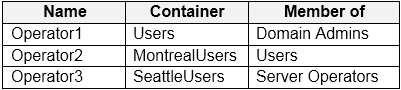
You network contains an on-premises Active Directory domain that syncs to an Azure Active Directory (Azure AD) tenant. The domain contains the users shown in the following table.
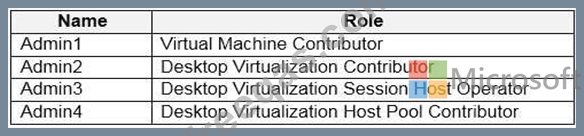
You have a Windows Virtual Desktop deployment that contains the application groups shown in the following table.
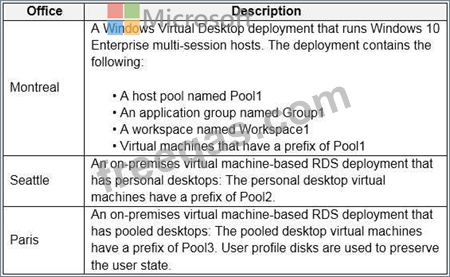
You have the workspaces shown in the following table.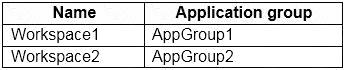
For each of the following statements, select Yes if the statement is true. Otherwise, select No.
NOTE: Each correct selection is worth one point.
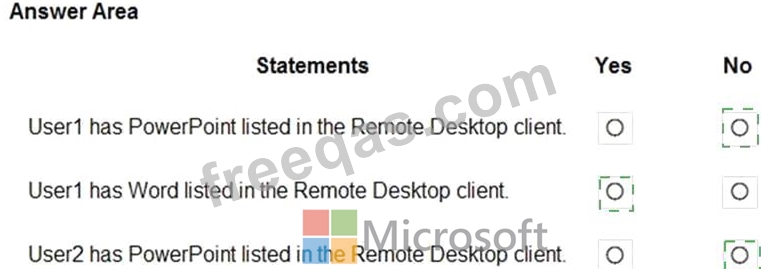
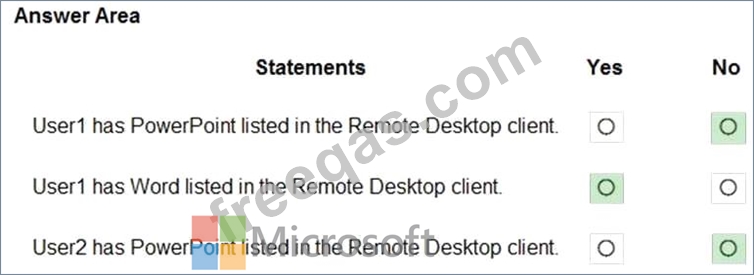
You have the devices shown in the following table.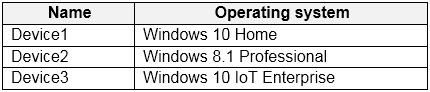
You plan to deploy Windows Virtual Desktop for client access to remove virtualized apps.
Which devices support the Remote Desktop client?
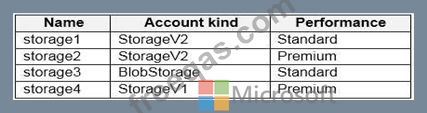
You have an Azure subscription that contains the storage accounts shown in the following table.
You have a custom generalized Windows 10 image.
You plan to deploy an Azure Virtual Desktop host pool that will use the custom image and FSLogix profile containers.
You need to recommend which storage accounts to use for the custom image and the profile containers. The solution must meet the following requirements:
Minimize costs to store the image.
Maximize performance of the profile containers.
Which account should you recommend for each type of content? To answer, drag the appropriate accounts to the correct content type. Each account may be used once, more than once, or not at all. You many need to drag the split bar between panes or scroll to view content.
NOTE: Each correct selection is worth one point.

Your network contains an on-premises Active Directory domain that syncs to an Azure Active Directory (Azure AD) tenant. The domain contains the domain controllers shown in the following table.
The DNS servers are configured to forward requests to an external DNS service.
You create a new virtual network named VNET2 that is peered to VNET1 and has gateway transit enabled.
You plan to implement an Azure Virtual Desktop host pool in VNET2. The session hosts will be joined to the Active Directory domain.
You need to configure DNS to meet the following requirements:
Ensure that Azure Virtual Desktop users can resolve on-premises servers and Azure resources.
Ensure that azure Virtual Desktop remains operational if a DNS server fails.
Minimize administrative effort.
What should you configure?
Note: This question is part of a series of questions that present the same scenario. Each question in the series contains a unique solution that might meet the stated goals. Some question sets might have more than one correct solution, while others might not have a correct solution.
After you answer a question in this section, you will NOT be able to return to it. As a result, these questions will not appear in the review screen.
You have a Windows Virtual Desktop host pool that contains five session hosts. The session hosts run Windows 10 Enterprise multi-session.
You need to prevent users from accessing the internet from Windows Virtual Desktop sessions. The session hosts must be allowed to access all the required Microsoft services.
Solution: You modify the IP configuration of each session host.
Does that meet the goal?