FreeQAs
 Request Exam  Contact
  • Home
  • View All Exams
  • New QA's
  • Upload
PRACTICE EXAMS:
  • Oracle
  • Fortinet
  • IBM
  • Juniper
  • Microsoft
  • Cisco
  • Citrix
  • CompTIA
  • VMware
  • ISC
  • SAP
  • EMC
  • PMI
  • HP
  • Salesforce
  • Other
  • Oracle
    Oracle
  • Fortinet
    Fortinet
  • IBM
    IBM
  • Juniper
    Juniper
  • Microsoft
    Microsoft
  • Cisco
    Cisco
  • Citrix
    Citrix
  • CompTIA
    CompTIA
  • VMware
    VMware
  • ISC
    ISC
  • SAP
    SAP
  • EMC
    EMC
  • PMI
    PMI
  • HP
    HP
  • Salesforce
    Salesforce
  1. Home
  2. Microsoft Certification
  3. AZ-140 Exam
  4. Microsoft.AZ-140.v2024-04-07.q156 Dumps
  • ««
  • «
  • …
  • 21
  • 22
  • 23
  • 24
  • 25
  • 26
  • 27
  • 28
  • 29
  • 30
  • …
  • »
  • »»
Download Now

Question 121

You plan to deploy Windows Virtual Desktop.
Users have the devices shown in the following table.
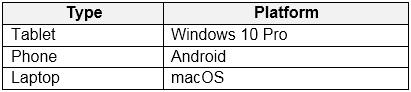
From which device types can the users connect to Windows Virtual Desktop resources by using the Remote Desktop client app and the Remote Desktop web client? To answer, select the appropriate options in the answer area.
NOTE: Each correct selection is worth one point.

Correct Answer:

Reference:
https://docs.microsoft.com/en-us/azure/virtual-desktop/connect-web
https://docs.microsoft.com/en-us/azure/virtual-desktop/connect-android
https://docs.microsoft.com/en-us/azure/virtual-desktop/connect-macos
insert code

Question 122

Your network contains an on-premises Active Directory domain named contoso.com that syncs to an Azure Active Directory (Azure AD) tenant.
You have an Azure subscription that contains an Azure Virtual Desktop host pool.
You create an Azure Storage account named storage1.
You need to use FSLogix profile containers in storage1 to store user profiles for a group named Group1. The solution must use the principle of least privilege.
What should you include in the solution? To answer, select the appropriate options in the answer area.

Correct Answer:

Reference:
https://docs.microsoft.com/en-us/azure/storage/files/storage-files-identity-ad-ds-enable
https://docs.microsoft.com/en-us/azure/virtual-desktop/create-file-share
insert code

Question 123

You have an Azure Virtual Desktop host pool named Pool1 and an Azure Storage account named storage1. Pool1 and storage1 are in the same Azure region.
The current network utilization of the session hosts during peak hours is 95%.
You plan to use FSLogix profile containers stored in storage1 for users that connect to Pool1.
You need to configure the session hosts and storage1 to minimize network latency when loading and updating profiles.
What should you do? To answer, select the appropriate options in the answer area.
NOTE: Each correct selection is worth one point.

Correct Answer:

Reference:
https://docs.microsoft.com/en-us/azure/architecture/example-scenario/wvd/windows-virtual-desktop-fslogix
insert code

Question 124

You deploy a Windows Virtual Desktop host pool named Pool1.
You have an Azure Storage account named store1 that stores FSLogix profile containers in a share named profiles.
You need to configure the path to the storage containers for the session hosts.
Which path should you use?

Correct Answer: C
https://docs.microsoft.com/en-us/azure/virtual-desktop/store-fslogix-profile Azure offers multiple storage solutions that you can use to store your FSLogix profile container. We recommend storing FSLogix profile containers on Azure Files for most of our customers.
insert code

Question 125

Which users can create Pool4, and which users can join session hosts to the domain? To answer, select the appropriate options in the answer area.
NOTE: Each correct selection is worth one point.

Correct Answer:

Topic 2, Litware, Inc
Existing Environment
Identity Environment
The network contains an on-premises Active Directory domain named litware.com that syncs to an Azure Active Directory (Azure AD) tenant named litware.com.
The Azure AD tenant contains the users shown in the following table.

All users are registered for Azure Multi-Factor Authentication (MFA).
Existing Environment. Cloud Services
Litware has a Microsoft 365 E5 subscription associated to the Azure AD tenant. All users are assigned Microsoft 365 Enterprise E5 licenses.
Litware has an Azure subscription associated to the Azure AD tenant. The subscription contains the resources shown in the following table.

Litware uses custom virtual machine images and custom scripts to automatically provision Azure virtual machines and join the virtual machines to the on-premises Active Directory domain.
Network and DNS
The offices connect to each other by using a WAN link. Each office connects directly to the internet.
All DNS queries for internet hosts are resolved by using DNS servers in the Boston office, which point to root servers on the internet. The Chennai office has caching-only DNS servers that forward queries to the DNS servers in the Boston office.
Requirements. Planned Changes
Litware plans to implement the following changes:
Deploy Windows Virtual Desktop environments to the East US Azure region for the users in the Boston office and to the South India Azure region for the users in the Chennai office.
Implement FSLogix profile containers.
Optimize the custom virtual machine images for the Windows Virtual Desktop session hosts.
Use PowerShell to automate the addition of virtual machines to the Windows Virtual Desktop host pools.
Requirements. Performance Requirements
Litware identifies the following performance requirements:
Minimize network latency of the Windows Virtual Desktop connections from the Boston and Chennai offices.
Minimize latency of the Windows Virtual Desktop host authentication in each Azure region.
Minimize how long it takes to sign in to the Windows Virtual Desktop session hosts.
Requirements. Authentication Requirements
Litware identifies the following authentication requirements:
Enforce Azure MFA when accessing Windows Virtual Desktop apps.
Force users to reauthenticate if their Windows Virtual Desktop session lasts more than eight hours.
Requirements. Security Requirements
Litware identifies the following security requirements:
Explicitly allow traffic between the Windows Virtual Desktop session hosts and Microsoft 365.
Explicitly allow traffic between the Windows Virtual Desktop session hosts and the Windows Virtual Desktop infrastructure.
Use built-in groups for delegation.
Delegate the management of app groups to CloudAdmin1, including the ability to publish app groups to users and user groups.
Grant Admin1 permissions to manage workspaces, including listing which apps are assigned to the app groups.
Minimize administrative effort to manage network security.
Use the principle of least privilege.
Requirements. Deployment Requirements
Litware identifies the following deployment requirements:
Use PowerShell to generate the token used to add the virtual machines as session hosts to a Windows Virtual Desktop host pool.
Minimize how long it takes to provision the Windows Virtual Desktop session hosts based on the custom virtual machine images.
Whenever possible, preinstall agents and apps in the custom virtual machine images.
insert code
  • ««
  • «
  • …
  • 21
  • 22
  • 23
  • 24
  • 25
  • 26
  • 27
  • 28
  • 29
  • 30
  • …
  • »
  • »»
[×]

Download PDF File

Enter your email address to download Microsoft.AZ-140.v2024-04-07.q156 Dumps

Email:

FreeQAs

Our website provides the Largest and the most Latest vendors Certification Exam materials around the world.

Using dumps we provide to Pass the Exam, we has the Valid Dumps with passing guranteed just which you need.

  • DMCA
  • About
  • Contact Us
  • Privacy Policy
  • Terms & Conditions
©2026 FreeQAs

www.freeqas.com materials do not contain actual questions and answers from Cisco's certification exams.
