-
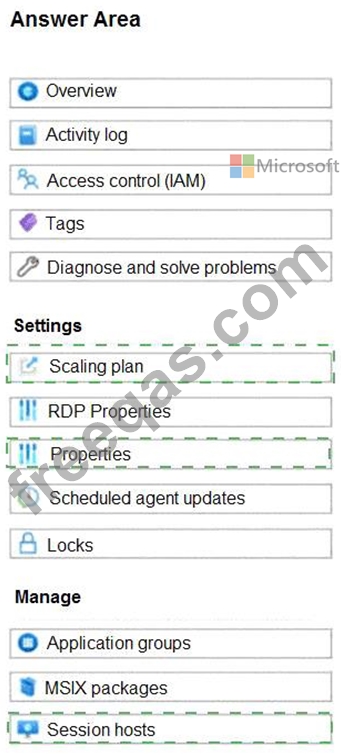
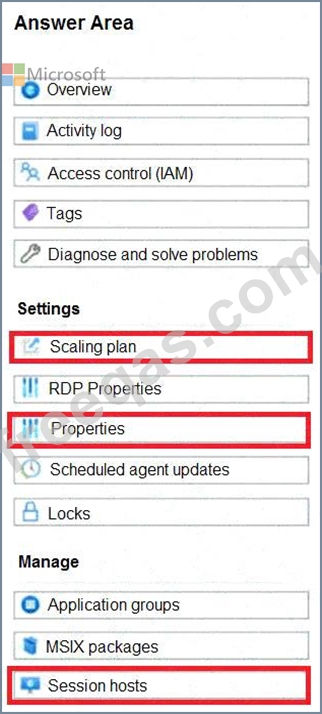
You have an Azure Virtual Desktop deployment that contains a host pool named HostPool1.
You need to perform the following configurations for HostPool1:
* Set the scale factor of the remote session to 125 percent.
* Generate a registration key that expires after five days.
* Enable Start VM on connect.
Which three settings should you modify? To answer, select the appropriate settings in the answer area.
NOTE: Each correct selection is worth one point.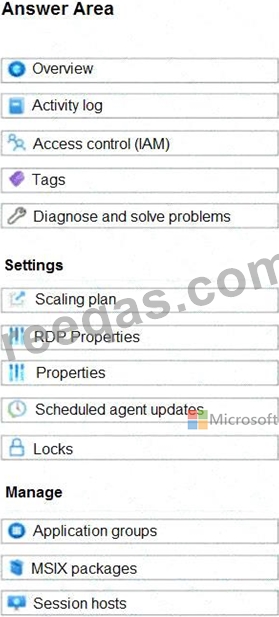
You are automating the deployment of an Azure Virtual Desktop host pool.
You deploy the Azure Resource Manager (ARM) template shown in the following exhibit.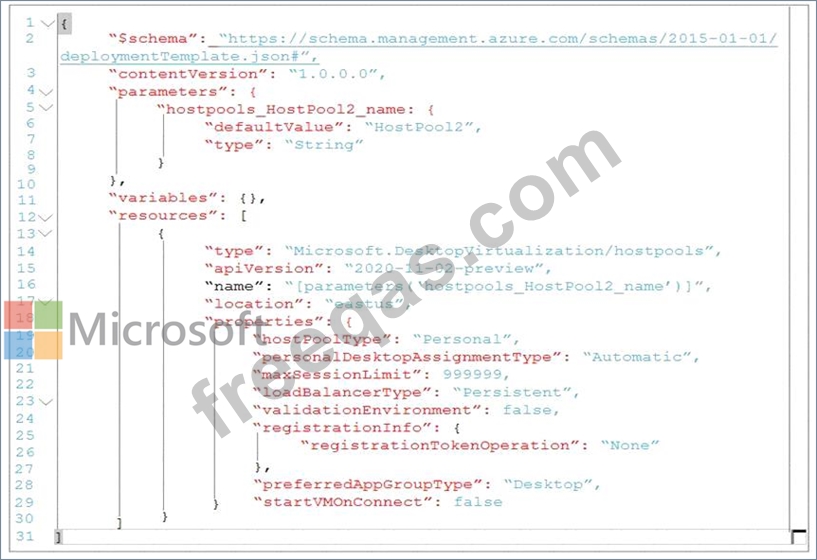
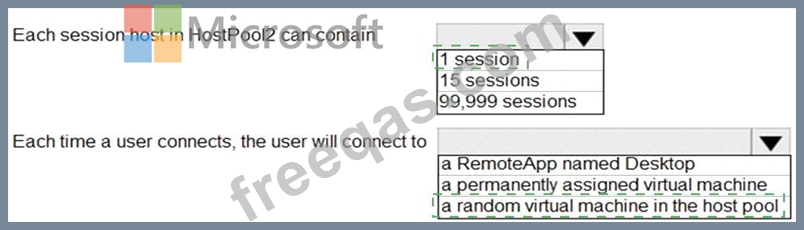
Use the drop-down menus to select the answer choice that completes each statement based on the information presented in the Dockerfile.
NOTE: Each correct selection is worth one point.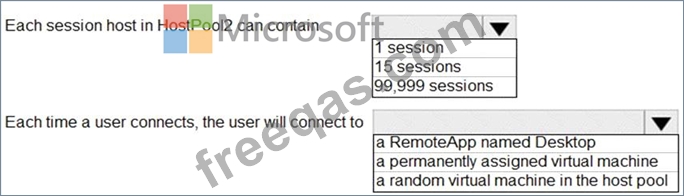
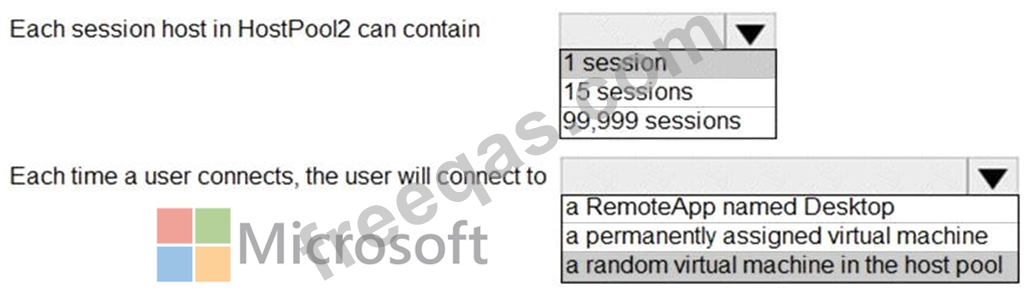
You have a hybrid Azure Active Directory (Azure AD) tenant.
You plan to deploy an Azure Virtual Desktop personal host pool. The host pool will contain 15 virtual machines that run Windows 10 Enterprise. The virtual machines will be joined to the on-premises Active Directory domain and used by the members of a domain group named Department1.
You need to ensure that each user is added automatically to the local Administrators group on the virtual machine to which the user signs in.
What should you configure?
Case Study 1 - Contoso, Ltd
Overview
Contoso, Ltd. is a law firm that has a main office in Montreal and branch offices in Paris and Seattle. The Seattle branch office opened recently.
Contoso has an Azure subscription and uses Microsoft 365.
Existing Infrastructure. Active Directory
The network contains an on-premises Active Directory domain named contoso.com and an Azure Active Directory (Azure AD) tenant. One of the domain controllers runs as an Azure virtual machine and connects to a virtual network named VNET1. All internal name resolution is provided by DNS server that run on the domain controllers.
The on-premises Active Directory domain contains the organizational units (OUs) shown in the following table.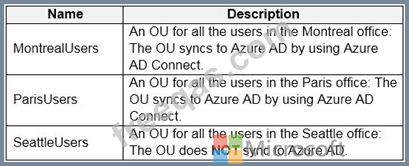
The on-premises Active Directory domain contains the users shown in the following table.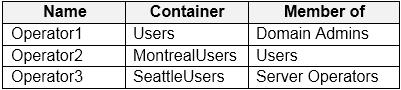
The Azure AD tenant contains the cloud-only users shown in the following table.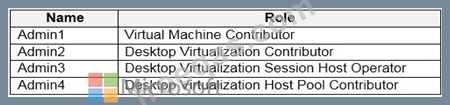
Existing Infrastructure. Network Infrastructure
All the Azure virtual networks are peered. The on-premises network connects to the virtual networks.
All servers run Windows Server 2019. All laptops and desktop computers run Windows 10 Enterprise.
Since users often work on confidential documents, all the users use their computer as a client for connecting to Remote Desktop Services (RDS).
In the West US Azure region, you have the storage accounts shown in the following table.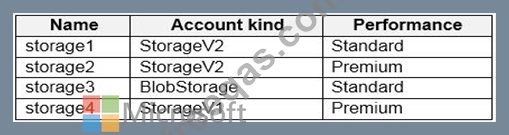
Existing Infrastructure. Remote Desktop Infrastructure
Contoso has a Remote Desktop infrastructure shown in the following table.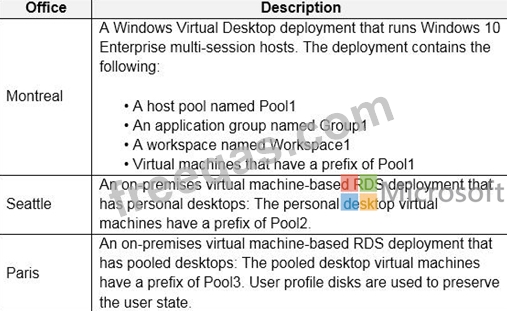
Requirements. Planned Changes
Contoso plans to implement the following changes:
- Implement FSLogix profile containers for the Paris offices.
- Deploy a Azure Virtual Desktop host pool named Pool4.
- Migrate the RDS deployment in the Seattle office to Azure Virtual
Desktop in the West US Azure region.
Requirements. Pool4 Configuration
Pool4 will have the following settings:
- Host pool type: Pooled
- Max session limit: 7
- Load balancing algorithm: Depth-first
- Images: Windows 10 Enterprise multi-session
- Virtual machine size: Standard D2s v3
- Name prefix: Pool4
- Number of VMs: 5
- Virtual network: VNET4
Requirements. Technical Requirements
Contoso identifies the following technical requirements:
- Before migrating the RDS deployment in the Seattle office, obtain the recommended deployment configuration based on the current RDS utilization.
- For the Azure Virtual Desktop deployment in the Montreal office,
disable audio output in the device redirection settings.
- For the Azure Virtual Desktop deployment in the Seattle office, store the FSLogix profile containers in Azure Storage.
- Enable Operator2 to modify the RDP Properties of the Azure Virtual
Desktop deployment in the Montreal office.
- From a server named Server1, convert the user profile clicks to the
FSLogix profile containers.
- Ensure that the Pool1 virtual machines only run during business
hours.
- Use the principle of least privilege.
Drag and Drop Question
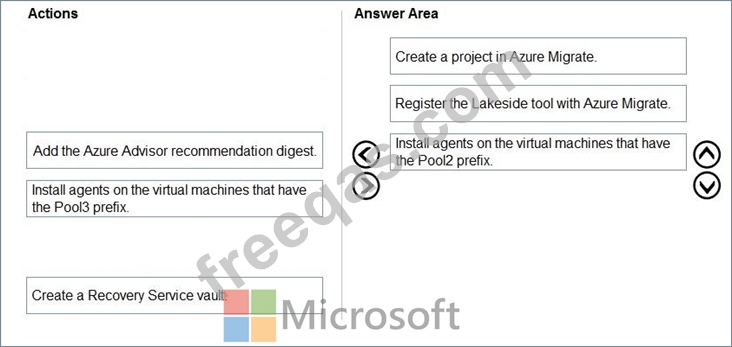
You need to evaluate the RDS deployment in the Seattle office. The solution must meet the technical requirements.
Which three actions should you perform in sequence? To answer, move the appropriate actions from the list of actions to the answer area and arrange them in the correct order.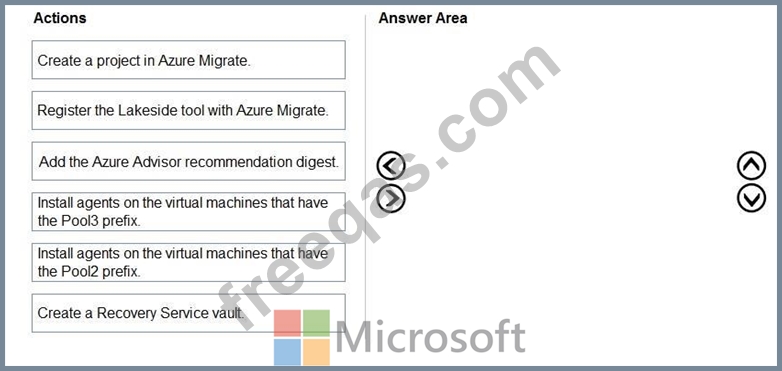
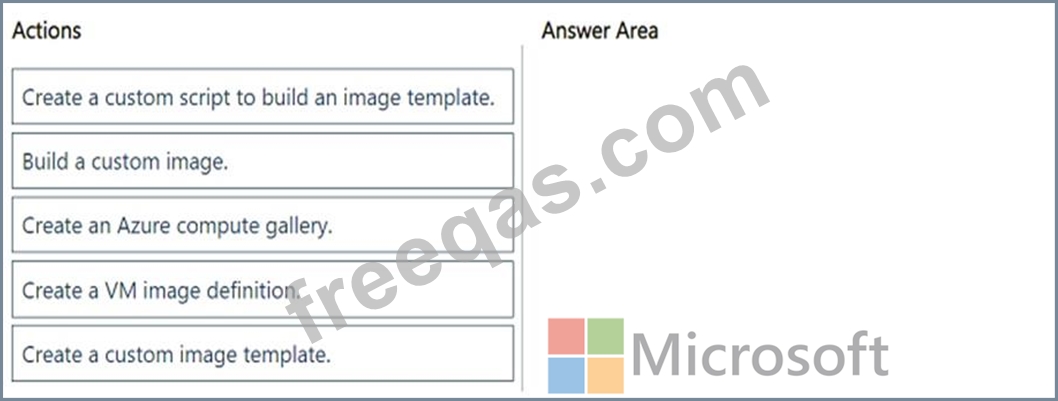
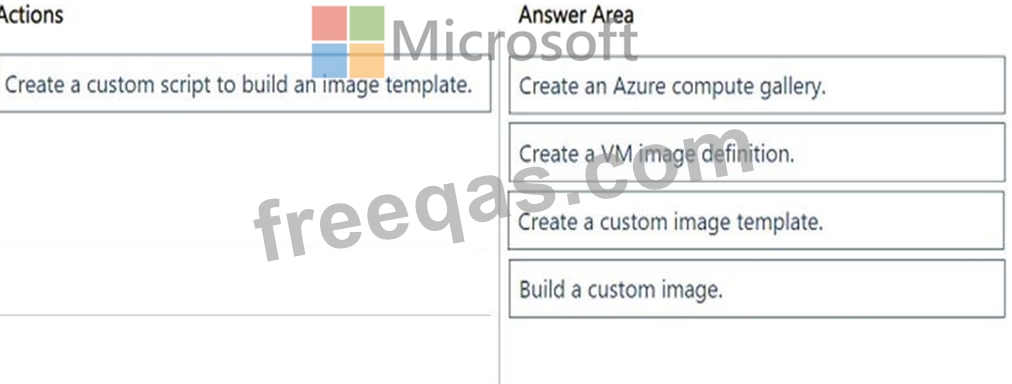
Drag and Drop Question
You have an Azure subscription that contains an Azure Virtual Desktop host pool named Pool1.
You plan to deploy session hosts to Pool1 by using a custom image that will be hosted in Azure Compute Gallery.
You need to build the custom image for the session hosts. The session hosts must have time zone redirection enabled and Storage Sense disabled. The solution must minimize administrative effort.
Which four actions should you perform in sequence? To answer, move the appropriate actions from the list of actions to the answer area and arrange them in the correct order.