FreeQAs
 Request Exam  Contact
  • Home
  • View All Exams
  • New QA's
  • Upload
PRACTICE EXAMS:
  • Oracle
  • Fortinet
  • Juniper
  • Microsoft
  • Cisco
  • Citrix
  • CompTIA
  • VMware
  • ISC
  • SAP
  • EMC
  • PMI
  • HP
  • Salesforce
  • Other
  • Oracle
    Oracle
  • Fortinet
    Fortinet
  • Juniper
    Juniper
  • Microsoft
    Microsoft
  • Cisco
    Cisco
  • Citrix
    Citrix
  • CompTIA
    CompTIA
  • VMware
    VMware
  • ISC
    ISC
  • SAP
    SAP
  • EMC
    EMC
  • PMI
    PMI
  • HP
    HP
  • Salesforce
    Salesforce
  1. Home
  2. Microsoft Certification
  3. AZ-140 Exam
  4. Microsoft.AZ-140.v2026-11-28.q348 Dumps
  • «
  • 1
  • 2
  • 3
  • 4
  • 5
  • 6
  • 7
  • 8
  • 9
  • 10
  • …
  • »
  • »»
Download Now

Question 21

You have a Windows Virtual Desktop deployment.
You plan to create the host pools shown in the following table.

You need to recommend the virtual machine size for each host pool. The solution must minimize costs.
Which size should you recommend for each pool? To answer, select the appropriate options in the answer area.
NOTE: Each correct selection is worth one point.

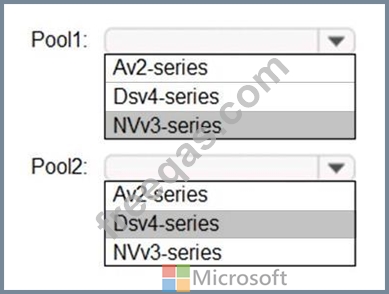
Correct Answer:

Explanation

Reference:
https://docs.microsoft.com/en-us/azure/virtual-machines/sizes
https://docs.microsoft.com/en-us/azure/virtual-machines/nvv3-series
https://docs.microsoft.com/en-us/azure/virtual-machines/dv4-dsv4-series
insert code

Question 22

Your on-premises network contains an Active Directory domain named contoso.com that syncs with Azure AD.
You deploy an Azure Virtual Desktop pooled host pool named HostPool1 that contains five hybrid-joined session hosts.
You need to ensure that all the user sessions of HostPool1 meet the following requirements:
* Users must use roaming user profiles.
* Users must use Folder Redirection.
The solution must minimize administrative effort.
What should you use to meet each requirement? To answer, select the appropriate options in the answer area.
NOTE: Each correct selection is worth one point.
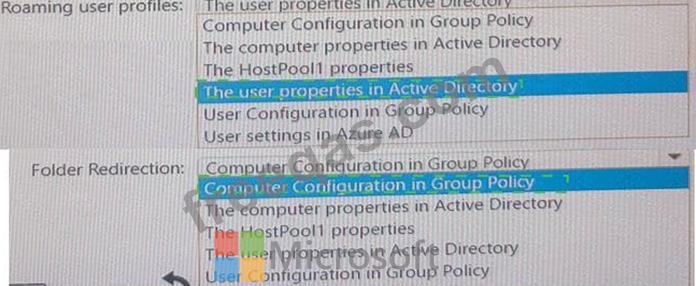
Correct Answer:

Explanation
insert code

Question 23

You have an on-premises network.
All users have computers that run Windows 10 Pro.
You plan to deploy Azure Virtual Desktop to meet the department requirements shown in the following table.

You need to recommend licenses for the departments. The solution must minimize costs.
Which license should you recommend for each department? To answer, select the appropriate options in the answer area.
NOTE: Each correct selection is worth one point.
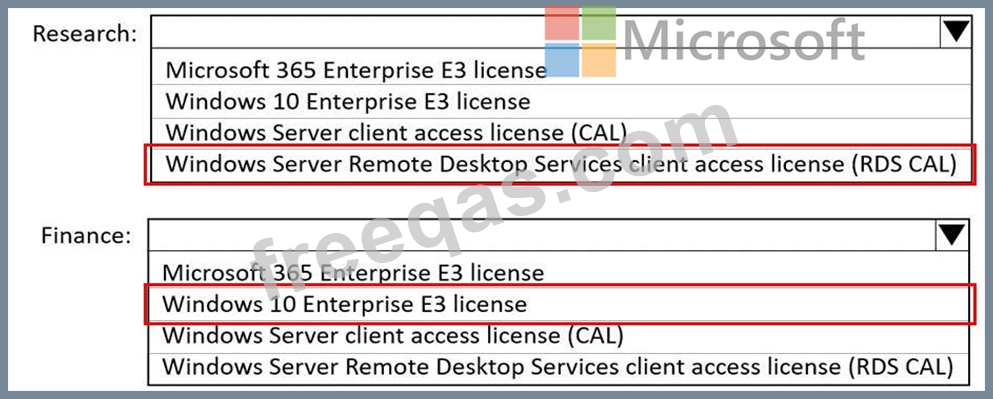
Correct Answer:

Reference:
https://docs.microsoft.com/en-us/azure/virtual-desktop/windows-10-multisession-faq
https://azure.microsoft.com/en-us/pricing/details/virtual-desktop/#pricing
insert code

Question 24

Your on-premises network contains 20 Windows 10 devices.
You have an Azure Virtual Desktop deployment.
You need to deploy the Microsoft Remote Desktop client (MSRDC) to the devices. The MSRDC must be available to everyone who sign in to the devices.
What should you do?

Correct Answer: A
Although your users can install the client directly after downloading it, if you're deploying to multiple devices, you may want to also deploy the client to them through other means. Deploying using group policies or the Microsoft Endpoint Configuration Manager lets you run the installer silently using a command line. Run the following commands to deploy the client per-device or per-user.
Per-device installation
msiexec.exe /I <path to the MSI> /qn ALLUSERS=1
Reference:
https://docs.microsoft.com/en-us/windows-server/remote/remote-desktop-
services/clients/windowsdesktop-admin
insert code

Question 25

Your company has the offices shown in the following table.

The company has an Azure Active Directory (Azure AD) tenant named contoso.com that contains a user named User1.
Users connect to a Windows Virtual Desktop deployment named WVD1. WVD1 contains session hosts that have public IP addresses from the 52.166.253.0/24 subnet.
Contoso.com has a conditional access policy that has the following settings:
Name: Policy1
Assignments:
Users and groups: User1
Cloud apps or actions: Windows Virtual Desktop
Access controls:
Grant: Grant access, Require multi-factor authentication
Enable policy: On
For each of the following statements, select Yes if the statement is true. Otherwise, select No.
NOTE: Each correct selection is worth one point.
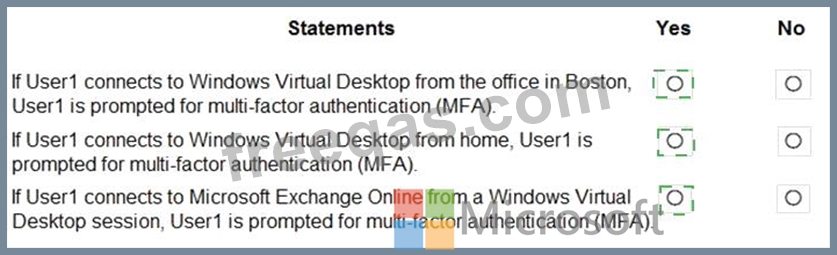
Correct Answer:

Explanation

Reference:
https://docs.microsoft.com/en-us/azure/active-directory/authentication/tutorial-enable-azure-mfa
insert code
  • «
  • 1
  • 2
  • 3
  • 4
  • 5
  • 6
  • 7
  • 8
  • 9
  • 10
  • …
  • »
  • »»
[×]

Download PDF File

Enter your email address to download Microsoft.AZ-140.v2026-11-28.q348 Dumps

Email:

FreeQAs

Our website provides the Largest and the most Latest vendors Certification Exam materials around the world.

Using dumps we provide to Pass the Exam, we has the Valid Dumps with passing guranteed just which you need.

  • DMCA
  • About
  • Contact Us
  • Privacy Policy
  • Terms & Conditions
©2026 FreeQAs

www.freeqas.com materials do not contain actual questions and answers from Cisco's certification exams.
