You need to configure Azure Cosmos DB.
Which settings should you use? To answer, select the appropriate options in the answer area.
NOTE: Each correct selection is worth one point.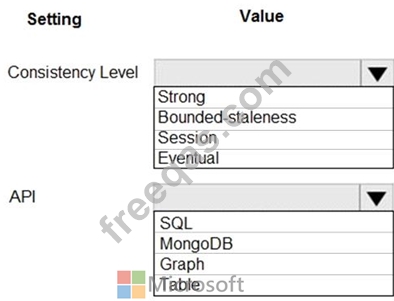

You need to add YAML markup at line CS17 to ensure that the ContentUploadService can access Azure Storage access keys.
How should you complete the YAML markup? To answer, drag the appropriate YAML segments to the correct locations. Each YAML segment may be used once, more than once, or not at all. You may need to drag the split bar between panes or scroll to view content.
NOTE: Each correct selection is worth one point.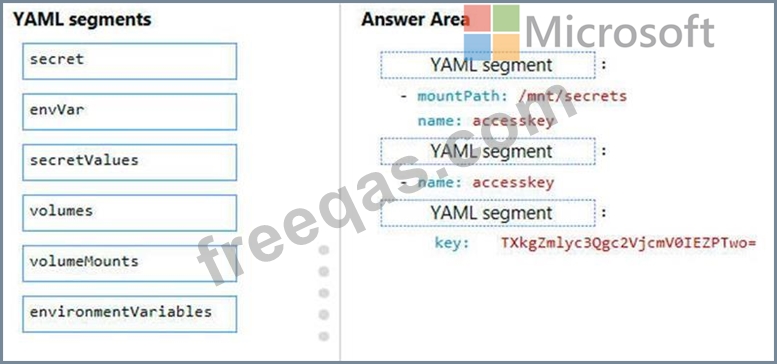


You need to grant access to the retail store location data for the inventory service development effort. What should you use?
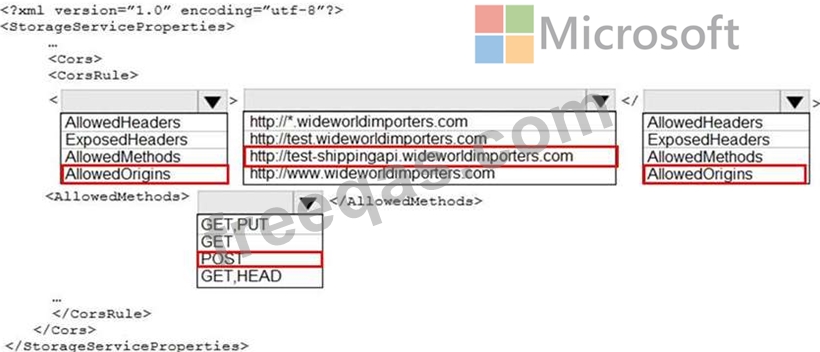
You need to resolve the Shipping web site error.
How should you configre the Azure Table Storage service? To answer, select the appropriate options in the answer area.
NOTE: Each correct selection is worth one point.
You are validating the configuration of an Azure Search indexer.
The service has been configured with an indexer that uses the Import Data option. The index is configured using options as shown in the Index Configuration exhibit. (Click the Index Configuration tab.)
You use an Azure table as the data source for the import operation. The table contains three records with item inventory data that matches the fields in the Storage data exhibit. These records were imported when the index was created. (Click the Storage Data tab.) When users search with no filter, all three records are displayed.
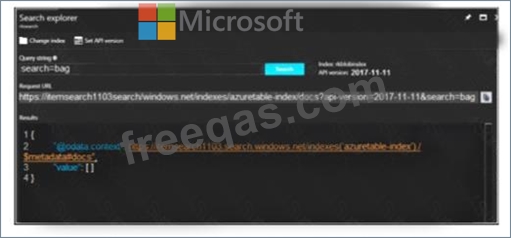
When users search for items by description, Search explorer returns no records. The Search Explorer exhibit shows the query and results for a test. In the test, a user is trying to search for all items in the table that have a description that contains the word bag. (Click the Search Explorer tab.) You need to resolve the issue.
For each of the following statements, select Yes if the statement is true. Otherwise, select No.
NOTE: Each correct selection is worth one point.


