FreeQAs
 Request Exam  Contact
  • Home
  • View All Exams
  • New QA's
  • Upload
PRACTICE EXAMS:
  • Oracle
  • Fortinet
  • Juniper
  • Microsoft
  • Cisco
  • Citrix
  • CompTIA
  • VMware
  • ISC
  • SAP
  • EMC
  • PMI
  • HP
  • Salesforce
  • Other
  • Oracle
    Oracle
  • Fortinet
    Fortinet
  • Juniper
    Juniper
  • Microsoft
    Microsoft
  • Cisco
    Cisco
  • Citrix
    Citrix
  • CompTIA
    CompTIA
  • VMware
    VMware
  • ISC
    ISC
  • SAP
    SAP
  • EMC
    EMC
  • PMI
    PMI
  • HP
    HP
  • Salesforce
    Salesforce
  1. Home
  2. Microsoft Certification
  3. AZ-400 Exam
  4. Microsoft.AZ-400.v2022-05-09.q150 Dumps
  • ««
  • «
  • …
  • 15
  • 16
  • 17
  • 18
  • 19
  • 20
  • 21
  • 22
  • 23
  • 24
  • …
  • »
  • »»
Download Now

Question 91

You have several Azure virtual machines that run Windows Server 2019.
You need to identify the distinct event IDs of each virtual machine as shown in the following table.

How should you complete the Azure Monitor query? To answer, drag the appropriate values to the correct locations. Each value may be used once, more than once, or not at all. You may need to drag the split bar between panes or scroll to view content.

Correct Answer:

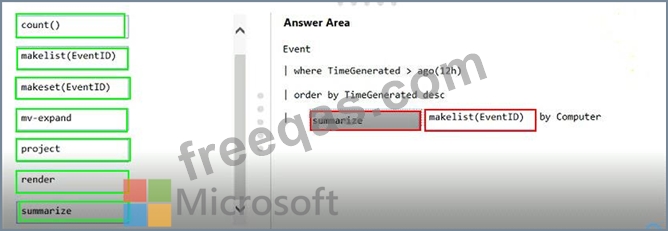
You can use makelist to pivot data by the order of values in a particular column. For example, you may want to explore the most common order events take place on your machines. You can essentially pivot the data by the order of EventIDs on each machine.
Example:
Event
| where TimeGenerated > ago(12h)
| order by TimeGenerated desc
| summarize makelist(EventID) by Computer
Reference:
https://docs.microsoft.com/en-us/azure/azure-monitor/log-query/advanced-aggregations
insert code

Question 92

You have several Azure virtual machines that run Windows Server 2019.
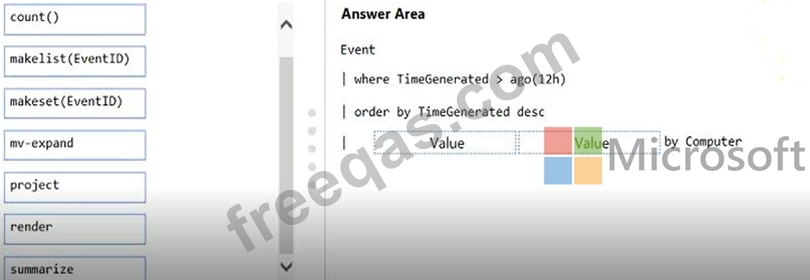
You need to identify the distinct event IDs of each virtual machine as shown in the following table.

How should you complete the Azure Monitor query? To answer, drag the appropriate values to the correct locations. Each value may be used once, more than once, or not at all. You may need to drag the split bar between panes or scroll to view content.
Correct Answer:

Reference:
https://docs.microsoft.com/en-us/azure/azure-monitor/log-query/advanced-aggregations
insert code

Question 93

You are configuring Azure Pipelines for three projects in Azure DevOps as shown in the following table.

Which version control system should you recommend for each project? To answer, drag the appropriate version control systems to the correct projects. Each version control system may be used once, more than once, or not at all. You may need to drag the split bar between panes or scroll to view content.
NOTE: Each correct selection is worth one point.

Correct Answer:

Explanation

Project1:Git in Azure Repos
Project2: Github Enterprise
GitHub Enterprise is the on-premises version of GitHub.com. GitHub Enterprise includes the same great set of features as GitHub.com but packaged for running on your organization's local network. All repository data is stored on machines that you control, and access is integrated with your organization's authentication system (LDAP, SAML, or CAS).
Project3: Bitbucket cloud
One downside, however, is that Bitubucket does not include support for SVN but this can be easily amended migrating the SVN repos to Git with tools such as SVN Mirror for Bitbucket .
Note: SVN is a centralized version control system.
insert code

Question 94

You manage the Git repository for a large enterprise application.
During the development of the application, you use a file named Config.json.
You need to prevent Config.json from being committed to the source control whenever changes to the application are committed.
Which three actions should you perform in sequence? To answer, move the appropriate actions from the list of actions to the answer area and arrange them in the correct order.

Correct Answer:

Explanation

Step 1: Delete and recreate the repository.
Step 2: Add Config.json to the .gitignore file
Each line in the .gitignore excludes a file or set of files that match a pattern.
Example:
# ignore a single file
Config.json
Step 3: Run the git add .gitignore command
At the initial commit we want basically move from Untracked to Staged, for staging we have to indicate which file we want to move or specify a pattern, as example:
Reference:
http://hermit.no/how-to-find-the-best-gitignore-for-visual-studio-and-azure-devops/
https://geohernandez.net/how-to-add-an-existing-repository-into-azure-devops-repo-with-git/
insert code

Question 95

You configure an Azure Application Insights availability test.
You need to notify the customer services department at your company by email when availability is degraded.
You create an Azure logic app that will handle the email and follow up actions.
Which type of trigger should you use to invoke the logic app?


Correct Answer: A
insert code
  • ««
  • «
  • …
  • 15
  • 16
  • 17
  • 18
  • 19
  • 20
  • 21
  • 22
  • 23
  • 24
  • …
  • »
  • »»
[×]

Download PDF File

Enter your email address to download Microsoft.AZ-400.v2022-05-09.q150 Dumps

Email:

FreeQAs

Our website provides the Largest and the most Latest vendors Certification Exam materials around the world.

Using dumps we provide to Pass the Exam, we has the Valid Dumps with passing guranteed just which you need.

  • DMCA
  • About
  • Contact Us
  • Privacy Policy
  • Terms & Conditions
©2026 FreeQAs

www.freeqas.com materials do not contain actual questions and answers from Cisco's certification exams.