FreeQAs
 Request Exam  Contact
  • Home
  • View All Exams
  • New QA's
  • Upload
PRACTICE EXAMS:
  • Oracle
  • Fortinet
  • IBM
  • Juniper
  • Microsoft
  • Cisco
  • Citrix
  • CompTIA
  • VMware
  • ISC
  • SAP
  • EMC
  • PMI
  • HP
  • Salesforce
  • Other
  • Oracle
    Oracle
  • Fortinet
    Fortinet
  • IBM
    IBM
  • Juniper
    Juniper
  • Microsoft
    Microsoft
  • Cisco
    Cisco
  • Citrix
    Citrix
  • CompTIA
    CompTIA
  • VMware
    VMware
  • ISC
    ISC
  • SAP
    SAP
  • EMC
    EMC
  • PMI
    PMI
  • HP
    HP
  • Salesforce
    Salesforce
  1. Home
  2. Microsoft Certification
  3. AZ-400 Exam
  4. Microsoft.AZ-400.v2023-11-06.q439 Dumps
  • ««
  • «
  • …
  • 11
  • 12
  • 13
  • 14
  • 15
  • 16
  • 17
  • 18
  • 19
  • 20
  • …
  • »
  • »»
Download Now

Question 71

You use Azure Pipelines lo manage the build and deployment of apps.
You are planning the release strategies for a new app. You need to choose strategies for the following scenarios:
* Releases will be made available to users who are grouped by their tolerance for software faults.
* Code will be deployed to enable functionality that will be available in later releases of the app.
* When a new release occurs, the existing deployment will remain active to minimize recovery time if a return to the previous version is required.


Correct Answer:

Explanation

Box 1: Progressive exposure
Continuous Delivery may sequence multiple deployment "rings" for progressive exposure (also known as
"controlling the blast radius"). Progressive exposure groups users who get to try new releases to monitor their experience in "rings." The first deployment ring is often a "canary" used to test new versions in production before a broader rollout. CD automates deployment from one ring to the next and may optionally depend on an approval step, in which a decision maker signs off on the changes electronically. CD may create an auditable record of the approval in order to satisfy regulatory procedures or other control objectives.

Box 2: Feature flags
Feature flags support a customer-first DevOps mindset, to enable (expose) and disable (hide) features in a solution, even before they are complete and ready for release.
Box 3: Blue/green
Blue/green deployments which means that instead of replacing the previous version (here we refer to this version as blue), we bring up the new version (here referred to as the green version) next to the existing version, but not expose it to the actual users right away. On the condition of having successfully validated that the green version works correctly, we will promote this version to the public version by changing the routing configuration without downtime. If something is wrong with the green version we can revert back without users every noticing interruptions.
Reference:
https://docs.microsoft.com/en-us/azure/devops/learn/what-is-continuous-delivery
https://docs.microsoft.com/en-us/azure/devops/migrate/phase-features-with-feature-flags
https://medium.com/@denniszielke/continuous-kubernetes-blue-green-deployments-on-azure-using-nginx-appga
insert code

Question 72

You need to increase the security of your team's development process.
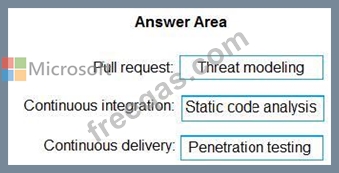
Which type of security tool should you recommend for each stage of the development process? To answer, drag the appropriate security toots to the correct stages. Each security tool may be used once, more than once, or not at all. You may need to drag the split bar between panes or scroll to view content NOTE: Each correct selection is worth one point.

Correct Answer:

Explanation

Box 1: Threat modeling
Threat modeling's motto should be, "The earlier the better, but not too late and never ignore." Box 2: Static code analysis Validation in the CI/CD begins before the developer commits his or her code. Static code analysis tools in the IDE provide the first line of defense to help ensure that security vulnerabilities are not introduced into the CI/CD process.
Box 3: Penetration testing
Once your code quality is verified, and the application is deployed to a lower environment like development or QA, the process should verify that there are not any security vulnerabilities in the running application. This can be accomplished by executing automated penetration test against the running application to scan it for vulnerabilities.
References:
https://docs.microsoft.com/en-us/azure/devops/articles/security-validation-cicd-pipeline?view=vsts
insert code

Question 73

You plan to deploy a runbook that will create Azure AD user accounts.
You need to ensure that runbooks can run the Azure PowerShell cmdlets for Azure Active Directory.
To complete this task, sign in to the Microsoft Azure portal.
Correct Answer:
See solution below.
Explanation
Azure Automation now ships with the Azure PowerShell module of version 0.8.6, which introduced the ability to non-interactively authenticate to Azure using OrgId (Azure Active Directory user) credential-based authentication. Using the steps below, you can set up Azure Automation to talk to Azure using this authentication type.
Step 1: Find the Azure Active Directory associated with the Azure subscription to manage:
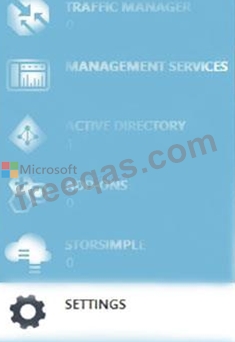
1. Log in to the Azure portal as the service administrator for the Azure subscription you want to manage using Azure Automation. You can find this user by logging in to the Azure portal as any user with access to this Azure subscription, then clicking Settings, then Administrators.

2. Note the name of the directory associated with the Azure subscription you want to manage. You can find this directory by clicking Settings, then Subscriptions.

Step 2: Create an Azure Active Directory user in the directory associated with the Azure subscription to manage:
You can skip this step if you already have an Azure Active Directory user in this directory. and plan to use this OrgId to manage Azure.
1. In the Azure portal click on Active Directory service.

2. Click the directory name that is associated with this Azure subscription.
3. Click on the Users tab and then click the Add User button.
4. For type of user, select "New user in your organization." Enter a username for the user to create.
5. Fill out the user's profile. For role, pick "User." Don't enable multi-factor authentication. Multi-factor accounts cannot be used with Azure Automation.
6. Click Create.
7. Jot down the full username (including part after @ symbol) and temporary password.
Step 3: Allow this Azure Active Directory user to manage this Azure subscription.
1. Click on Settings (bottom Azure tab under StorSimple)

2. Click Administrators
3. Click the Add button. Type the full user name (including part after @ symbol) of the Azure Active Directory user you want to set up to manage Azure. For subscriptions, choose the Azure subscriptions you want this user to be able to manage. Click the check mark.
Step 4: Configure Azure Automation to use this Azure Active Directory user to manage this Azure subscription Create an Azure Automation credential asset containing the username and password of the Azure Active Directory user that you have just created. You can create a credential asset in Azure Automation by clicking into an Automation Account and then clicking the Assets tab, then the Add Setting button.

Note: Once you have set up the Azure Active Directory credential in Azure and Azure Automation, you can now manage Azure from Azure Automation runbooks using this credential.
References:
https://azure.microsoft.com/sv-se/blog/azure-automation-authenticating-to-azure-using-azure-active-directory/
insert code

Question 74

You have a project in Azure DevOps that uses packages from multiple public feeds. Some of the feeds are unreliable.
You need to consolidate the packages into a single feed.
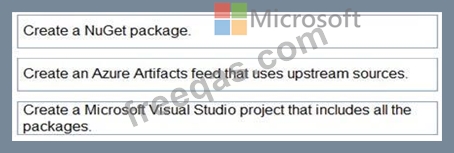
Which three actions should you perform in sequence? To answer, move the appropriate actions from the list of actions to the answer area and arrange them in the correct order.

Correct Answer:

Explanation

Step 1: Create a NuGet package.
NuGet and Maven are public package managers that support multiple feeds.
Step 2: Create an Azure Artifacts feed that uses upstream sources
If you want to use packages from multiple feeds, use upstream sources to bring packages from multiple feeds together into a single feed.
Step 3: Create a Micrtosoft Visual Studio project that includes all the packages Consume NuGet packages from upstream sources: Now you can open Visual Studio and install packages from the upstream sources you just configured.
Reference:
https://docs.microsoft.com/en-us/azure/devops/artifacts/how-to/set-up-upstream-sources
insert code

Question 75

You have an Azure DevOps organization named Contoso and an Azure subscription. The subscription contains an Azure virtual machine scale set named VMSS1 and an Azure Standard Load Balancer named LB1.
LB1 distributes incoming requests across VMSS1 instances.
You use Azure DevOps to build a web app named Appl and deploy App1 to VMSS1. App1 is accessible via HTTPS only and configured to require mutual authentication by using a client certificate.
You need to recommend a solution for implementing a health check of App1. The solution must meet the following requirements:
* Identify whether individual instances of VMSSl are eligible for an upgrade operation.
* Minimize administrative effort.
What should you include in the recommendation?


Correct Answer: C
insert code
  • ««
  • «
  • …
  • 11
  • 12
  • 13
  • 14
  • 15
  • 16
  • 17
  • 18
  • 19
  • 20
  • …
  • »
  • »»
[×]

Download PDF File

Enter your email address to download Microsoft.AZ-400.v2023-11-06.q439 Dumps

Email:

FreeQAs

Our website provides the Largest and the most Latest vendors Certification Exam materials around the world.

Using dumps we provide to Pass the Exam, we has the Valid Dumps with passing guranteed just which you need.

  • DMCA
  • About
  • Contact Us
  • Privacy Policy
  • Terms & Conditions
©2026 FreeQAs

www.freeqas.com materials do not contain actual questions and answers from Cisco's certification exams.