FreeQAs
 Request Exam  Contact
  • Home
  • View All Exams
  • New QA's
  • Upload
PRACTICE EXAMS:
  • Oracle
  • Fortinet
  • Juniper
  • Microsoft
  • Cisco
  • Citrix
  • CompTIA
  • VMware
  • ISC
  • SAP
  • EMC
  • PMI
  • HP
  • Salesforce
  • Other
  • Oracle
    Oracle
  • Fortinet
    Fortinet
  • Juniper
    Juniper
  • Microsoft
    Microsoft
  • Cisco
    Cisco
  • Citrix
    Citrix
  • CompTIA
    CompTIA
  • VMware
    VMware
  • ISC
    ISC
  • SAP
    SAP
  • EMC
    EMC
  • PMI
    PMI
  • HP
    HP
  • Salesforce
    Salesforce
  1. Home
  2. Microsoft Certification
  3. AZ-400 Exam
  4. Microsoft.AZ-400.v2023-11-06.q439 Dumps
  • ««
  • «
  • …
  • 35
  • 36
  • 37
  • 38
  • 39
  • 40
  • 41
  • 42
  • 43
  • 44
  • …
  • »
  • »»
Download Now

Question 191

You have a project in Azure DevOps. You have an Azure Resource Group deployment project in Microsoft Visual Studio that is checked in to the Azure DevOps project.
You need to create a release pipeline that will deploy resources by using Azure Resource Manager templates.
The solution must minimize administrative effort.
Which task type should you include in the solution?

Correct Answer: C
There are two different ways to deploy templates to Azure DevOps Services. Both methods provide the same results, so choose the one that best fits your workflow.
1. Add a single step to your build pipeline that runs the PowerShell script that's included in the Azure Resource Group deployment project (Deploy-AzureResourceGroup.ps1). The script copies artifacts and then deploys the template.
2. Add multiple Azure DevOps Services build steps, each one performing a stage task.
The first option has the advantage of using the same script used by developers in Visual Studio and providing consistency throughout the lifecycle.
Reference:
https://docs.microsoft.com/en-us/azure/vs-azure-tools-resource-groups-ci-in-vsts
insert code

Question 192

In Azure DevOps, you create Project3.
You need to meet the requirements of the project.
What should you do first?

Correct Answer: A
The first thing to do is to declare your SonarQube server as a service endpoint in your VSTS/DevOps project settings.
References:
https://docs.sonarqube.org/display/SCAN/Analyzing+with+SonarQube+Extension+for+vsts-TFS
insert code

Question 193

You are implementing a package management solution for a Node.js application by using Azure Artifacts.
You need to configure the development environment to connect to the package repository. The solution must minimize the likelihood that credentials will be leaked.
Which file should you use to configure each connection? To answer, drag the appropriate files to the correct connections. Each file may be used once, more than once, or not at all. You may need to drag the split bar between panes or scroll to view content NOTE: Each correct selection is worth one point.

Correct Answer:

Explanation

All Azure Artifacts feeds require authentication, so you'll need to store credentials for the feed before you can install or publish packages. npm uses .npmrc configuration files to store feed URLs and credentials. Azure DevOps Services recommends using two .npmrc files.
Feed registry information: The .npmrc file in the project
One .npmrc should live at the root of your git repo adjacent to your project's package.json. It should contain a
"registry" line for your feed and it should not contain credentials since it will be checked into git.
Credentials: The .npmrc file in the user's home folder
On your development machine, you will also have a .npmrc in $home for Linux or Mac systems or
$env.HOME for win systems. This .npmrc should contain credentials for all of the registries that you need to connect to. The NPM client will look at your project's .npmrc, discover the registry, and fetch matching credentials from $home/.npmrc or $env.HOME/.npmrc.
References:
https://docs.microsoft.com/en-us/azure/devops/artifacts/npm/npmrc?view=azure-devops&tabs=windows
insert code

Question 194

You need to configure a virtual machine named VM1 to securely access stored secrets in an Azure Key Vault named az400-11566895-kv.
To complete this task, sign in to the Microsoft Azure portal.

Correct Answer:
See solution below.
Explanation
You can use a system-assigned managed identity for a Windows virtual machine (VM) to access Azure Key Vault.
* Sign in to Azure portal
* Locate virtual machine VM1.
* Select Identity
* Enable the system-assigned identity for VM1 by setting the Status to On.

Note: Enabling a system-assigned managed identity is a one-click experience. You can either enable it during the creation of a VM or in the properties of an existing VM.
Reference:
https://docs.microsoft.com/en-us/azure/active-directory/managed-identities-azure-resources/tutorial-windows-vm
insert code

Question 195

You have several Azure virtual machines that run Windows Server 2019.
You need to identify the distinct event IDs of each virtual machine as shown in the following table.

How should you complete the Azure Monitor query? To answer, drag the appropriate values to the correct locations. Each value may be used once, more than once, or not at all. You may need to drag the split bar between panes or scroll to view content.
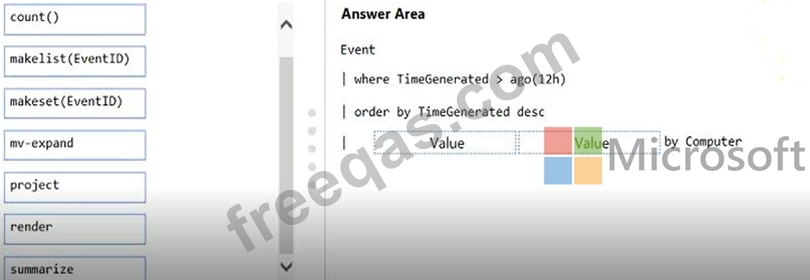
Correct Answer:

Reference:
https://docs.microsoft.com/en-us/azure/azure-monitor/log-query/advanced-aggregations
insert code
  • ««
  • «
  • …
  • 35
  • 36
  • 37
  • 38
  • 39
  • 40
  • 41
  • 42
  • 43
  • 44
  • …
  • »
  • »»
[×]

Download PDF File

Enter your email address to download Microsoft.AZ-400.v2023-11-06.q439 Dumps

Email:

FreeQAs

Our website provides the Largest and the most Latest vendors Certification Exam materials around the world.

Using dumps we provide to Pass the Exam, we has the Valid Dumps with passing guranteed just which you need.

  • DMCA
  • About
  • Contact Us
  • Privacy Policy
  • Terms & Conditions
©2026 FreeQAs

www.freeqas.com materials do not contain actual questions and answers from Cisco's certification exams.
