FreeQAs
 Request Exam  Contact
  • Home
  • View All Exams
  • New QA's
  • Upload
PRACTICE EXAMS:
  • Oracle
  • Fortinet
  • IBM
  • Juniper
  • Microsoft
  • Cisco
  • Citrix
  • CompTIA
  • VMware
  • ISC
  • SAP
  • EMC
  • PMI
  • HP
  • Salesforce
  • Other
  • Oracle
    Oracle
  • Fortinet
    Fortinet
  • IBM
    IBM
  • Juniper
    Juniper
  • Microsoft
    Microsoft
  • Cisco
    Cisco
  • Citrix
    Citrix
  • CompTIA
    CompTIA
  • VMware
    VMware
  • ISC
    ISC
  • SAP
    SAP
  • EMC
    EMC
  • PMI
    PMI
  • HP
    HP
  • Salesforce
    Salesforce
  1. Home
  2. Microsoft Certification
  3. AZ-400 Exam
  4. Microsoft.AZ-400.v2024-04-28.q185 Dumps
  • ««
  • «
  • …
  • 19
  • 20
  • 21
  • 22
  • 23
  • 24
  • 25
  • 26
  • 27
  • 28
  • …
  • »
  • »»
Download Now

Question 111

Your company plans to implement a new compliance strategy that will require all Azure web apps to be backed up every five hours.
You need to back up an Azure web app named az400-11566895-main every five hours to an Azure Storage account in your resource group.
To complete this task, sign in to the Microsoft Azure portal.

Correct Answer:
See solution below.
Explanation
With the storage account ready, you can configure backs up in the web app or App Service.
* Open the App Service az400-11566895-main, which you want to protect, in the Azure Portal and browse to Settings > Backups. Click Configure and a Backup Configuration blade should appear.
* Select the storage account.
* Click + to create a private container. You could name this container after the web app or App Service.
* Select the container.
* If you want to schedule backups, then set Scheduled Backup to On and configure a schedule: every five
* hours
* Select your retention. Note that 0 means never delete backups.
* Decide if at least one backup should always be retained.
* Choose if any connected databases should be included in the web app backup.
* Click Save to finalize the backup configuration.

Reference:
https://petri.com/backing-azure-app-service
insert code

Question 112

You need to use Azure Automation Sure Configuration to manage the ongoing consistency of virtual machine configurations.
Which five actions should you perform in sequence? To answer, move the appropriate actions from the list of actions to the answer area and arrange them in the correct order.
NOTE: More than one order of answer choices in correct. You writ receive credit for any of the orders you select.
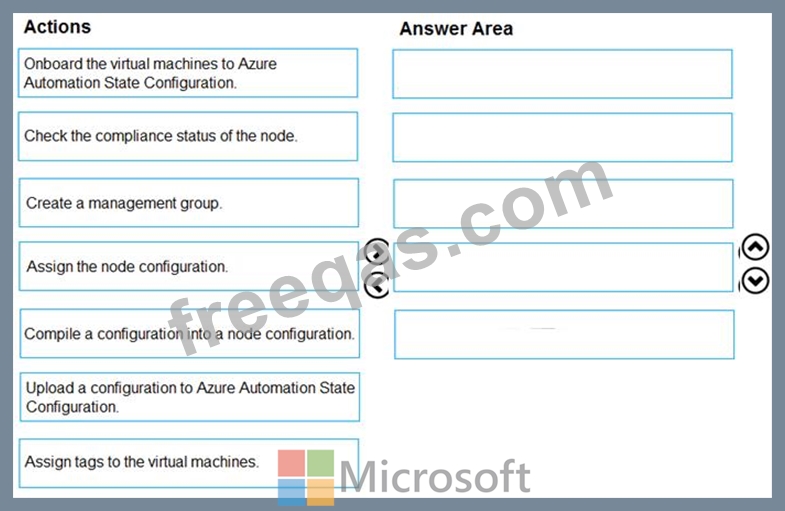
Correct Answer:

Explanation:
References:
https://docs.microsoft.com/en-us/azure/automation/automation-dsc-getting-started
insert code

Question 113

You need to configure Azure Automation for the computers in Pool7.
Which three actions should you perform in sequence? To answer, move the appropriate actions from the list of actions to the answer area and arrange them m the correct order.

Correct Answer:

Explanation
insert code

Question 114

Your company has four projects. The version control requirements for each project are shown in the following table.
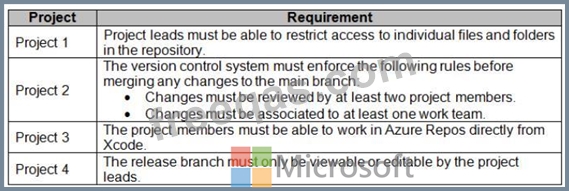
You plan to use Azure Repos for all the projects.
Which version control system should you use for each project? To answer, drag the appropriate version control systems to the correct projects. Each version control system may be used once, more than once, or not at all.
You may need to drag the split bar between panes or scroll to view content.
NOTE: Each correct selection is worth one point.

Correct Answer:

Explanation
1 -> TFVS Refer :
https://docs.microsoft.com/en-us/azure/devops/repos/tfvc/control-access-team-foundation-version-control?view=
2 -> TFVS Refer :
https://docs.microsoft.com/en-us/azure/devops/repos/tfvc/add-check-policies?view=azure-devops
3 -> Git Refer :
https://docs.microsoft.com/en-us/azure/devops/repos/git/share-your-code-in-git-xcode?view=azure-devops
4 -> TFVS Refer
:https://docs.microsoft.com/en-us/azure/devops/organizations/security/permissions?view=azure-devops#tfvc
insert code

Question 115

You have a project in Azure DevOps named Project1. Project1 contains a published wiki.
You need to change the order of pages in the navigation pane of the published wiki in the Azure DevOps portal.
What should you do?


Correct Answer: D
Explanation
Reorder a wiki page
You can reorder pages within the wiki tree view to have pages appear in the order and hierarchy you want.
You can drag-and-drop a page title in the tree view to do the following operations:
Change the parent-child relationship of a page
Change the order of the page within the hierarchy
Reference:
https://docs.microsoft.com/en-us/azure/devops/project/wiki/add-edit-wiki
insert code
  • ««
  • «
  • …
  • 19
  • 20
  • 21
  • 22
  • 23
  • 24
  • 25
  • 26
  • 27
  • 28
  • …
  • »
  • »»
[×]

Download PDF File

Enter your email address to download Microsoft.AZ-400.v2024-04-28.q185 Dumps

Email:

FreeQAs

Our website provides the Largest and the most Latest vendors Certification Exam materials around the world.

Using dumps we provide to Pass the Exam, we has the Valid Dumps with passing guranteed just which you need.

  • DMCA
  • About
  • Contact Us
  • Privacy Policy
  • Terms & Conditions
©2026 FreeQAs

www.freeqas.com materials do not contain actual questions and answers from Cisco's certification exams.