FreeQAs
 Request Exam  Contact
  • Home
  • View All Exams
  • New QA's
  • Upload
PRACTICE EXAMS:
  • Oracle
  • Fortinet
  • Juniper
  • Microsoft
  • Cisco
  • Citrix
  • CompTIA
  • VMware
  • ISC
  • SAP
  • EMC
  • PMI
  • HP
  • Salesforce
  • Other
  • Oracle
    Oracle
  • Fortinet
    Fortinet
  • Juniper
    Juniper
  • Microsoft
    Microsoft
  • Cisco
    Cisco
  • Citrix
    Citrix
  • CompTIA
    CompTIA
  • VMware
    VMware
  • ISC
    ISC
  • SAP
    SAP
  • EMC
    EMC
  • PMI
    PMI
  • HP
    HP
  • Salesforce
    Salesforce
  1. Home
  2. Microsoft Certification
  3. AZ-400 Exam
  4. Microsoft.AZ-400.v2026-08-16.q229 Dumps
  • ««
  • «
  • …
  • 35
  • 36
  • 37
  • 38
  • 39
  • 40
  • 41
  • 42
  • 43
  • 44
  • …
  • »
  • »»
Download Now

Question 191

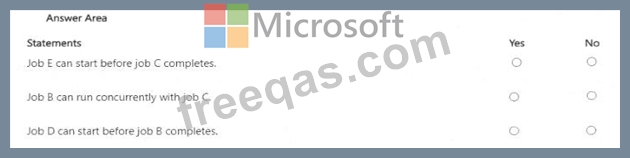
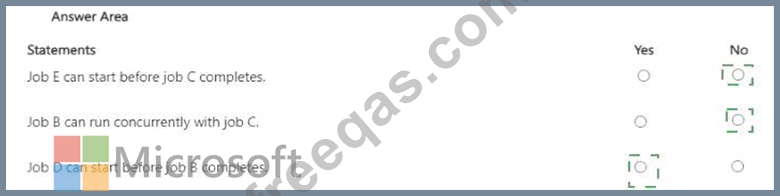
You have an Azure Pipelines pipeline that has the following definition.

For each of the following statements, select Yes if the statement is true. Otherwise, select No.
NOTE: Each correct selection is worth one point.
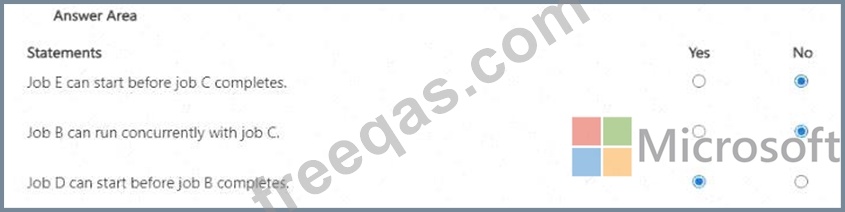
Correct Answer:

Explanation:
insert code

Question 192

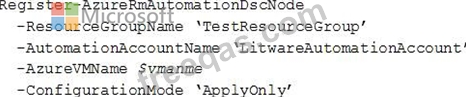
To resolve the current technical issue, what should you do to the Register-AzureRmAutomationDscNode command?
Correct Answer: A
Change the ConfigurationMode parameter from ApplyOnly to ApplyAndAutocorrect.
The Register-AzureRmAutomationDscNode cmdlet registers an Azure virtual machine as an APS Desired State Configuration (DSC) node in an Azure Automation account.
Scenario: Current Technical Issue
The test servers are configured correctly when first deployed, but they experience configuration drift over time. Azure Automation State Configuration fails to correct the configurations.
Azure Automation State Configuration nodes are registered by using the following command.

References: https://docs.microsoft.com/en-us/powershell/module/azurerm.automation/register-azurerma utomationdscnode?view=azurer mps-6.13.0
insert code

Question 193

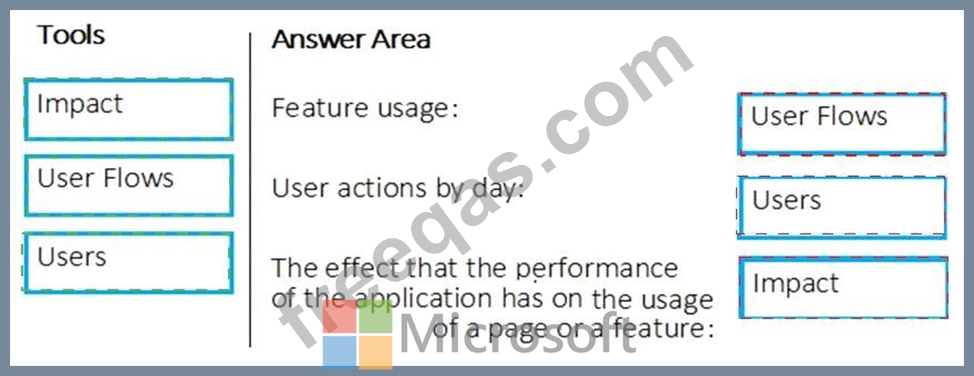
Your company wants to use Azure Application Insights to understand how user behaviors affect an application.
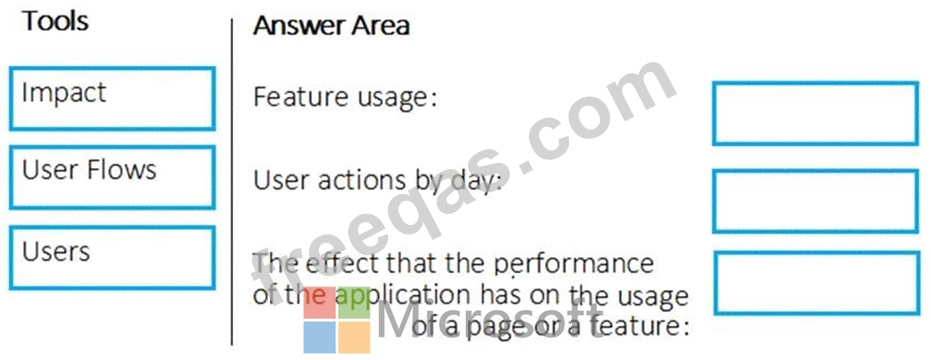
Which application Insights tool should you use to analyze each behavior? To answer, drag the appropriate tools to the correct behaviors. Each tool may be used once, more than once, or not at all. You may need to drag the split bar between panes or scroll to view content.
NOTE: Each correct selection is worth one point.
Correct Answer:

Explanation

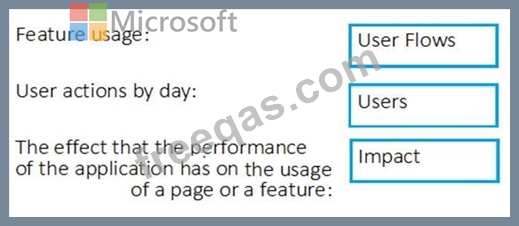
Box 1: User Flows
The User Flows tool visualizes how users navigate between the pages and features of your site. It's great for answering questions like:
How do users navigate away from a page on your site?
What do users click on a page on your site?
Where are the places that users churn most from your site?
Are there places where users repeat the same action over and over?
Box 2: Users
Box 3: Impact
Reference:
https://docs.microsoft.com/en-us/azure/azure-monitor/app/usage-flows
insert code

Question 194

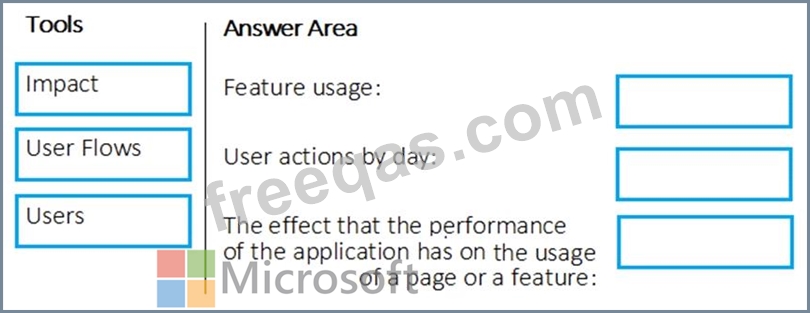
Your company wants to use Azure Application Insights to understand how user behaviors affect an application.
Which application Insights tool should you use to analyze each behavior? To answer, drag the appropriate tools to the correct behaviors. Each tool may be used once, more than once, or not at all. You may need to drag the split bar between panes or scroll to view content.
NOTE: Each correct selection is worth one point.
Correct Answer:

Reference:
https://docs.microsoft.com/en-us/azure/azure-monitor/app/usage-flows
insert code

Question 195

You plan to deploy a runbook that will create Azure AD user accounts.
You need to ensure that runbooks can run the Azure PowerShell cmdlets for Azure Active Directory.
To complete this task, sign in to the Microsoft Azure portal.

Correct Answer:
See solution below.
Explanation:
Azure Automation now ships with the Azure PowerShell module of version 0.8.6, which introduced the ability to non-interactively authenticate to Azure using OrgId (Azure Active Directory user) credential-based authentication. Using the steps below, you can set up Azure Automation to talk to Azure using this authentication type.
Step 1: Find the Azure Active Directory associated with the Azure subscription to manage:
1. Log in to the Azure portal as the service administrator for the Azure subscription you want to manage using Azure Automation. You can find this user by logging in to the Azure portal as any user with access to this Azure subscription, then clicking Settings, then Administrators.

2. Note the name of the directory associated with the Azure subscription you want to manage. You can find this directory by clicking Settings, then Subscriptions.

Step 2: Create an Azure Active Directory user in the directory associated with the Azure subscription to manage:
You can skip this step if you already have an Azure Active Directory user in this directory. and plan to use this OrgId to manage Azure.
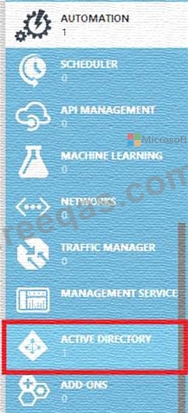
1. In the Azure portal click on Active Directory service.

2. Click the directory name that is associated with this Azure subscription.
3. Click on the Users tab and then click the Add User button.
4. For type of user, select "New user in your organization." Enter a username for the user to create.
5. Fill out the user's profile. For role, pick "User." Don't enable multi-factor authentication. Multi-factor accounts cannot be used with Azure Automation.
6. Click Create.
7. Jot down the full username (including part after @ symbol) and temporary password.
Step 3: Allow this Azure Active Directory user to manage this Azure subscription.
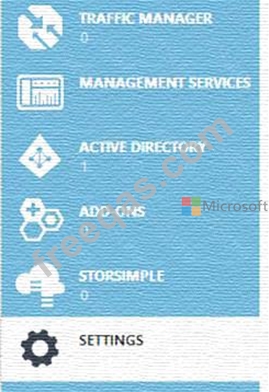
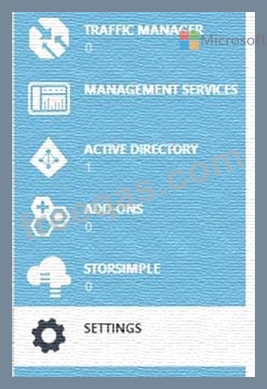
1. Click on Settings (bottom Azure tab under StorSimple)

2. Click Administrators
3. Click the Add button. Type the full user name (including part after @ symbol) of the Azure Active Directory user you want to set up to manage Azure. For subscriptions, choose the Azure subscriptions you want this user to be able to manage. Click the check mark.
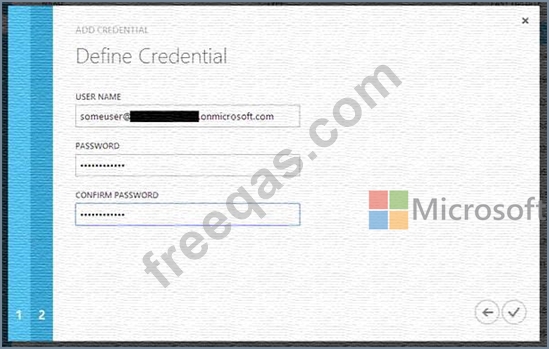
Step 4: Configure Azure Automation to use this Azure Active Directory user to manage this Azure subscription Create an Azure Automation credential asset containing the username and password of the Azure Active Directory user that you have just created. You can create a credential asset in Azure Automation by clicking into an Automation Account and then clicking the Assets tab, then the Add Setting button.

Note: Once you have set up the Azure Active Directory credential in Azure and Azure Automation, you can now manage Azure from Azure Automation runbooks using this credential.
References:
https://azure.microsoft.com/sv-se/blog/azure-automation-authenticating-to-azure-using-azure-active-directory/
insert code
  • ««
  • «
  • …
  • 35
  • 36
  • 37
  • 38
  • 39
  • 40
  • 41
  • 42
  • 43
  • 44
  • …
  • »
  • »»
[×]

Download PDF File

Enter your email address to download Microsoft.AZ-400.v2026-08-16.q229 Dumps

Email:

FreeQAs

Our website provides the Largest and the most Latest vendors Certification Exam materials around the world.

Using dumps we provide to Pass the Exam, we has the Valid Dumps with passing guranteed just which you need.

  • DMCA
  • About
  • Contact Us
  • Privacy Policy
  • Terms & Conditions
©2026 FreeQAs

www.freeqas.com materials do not contain actual questions and answers from Cisco's certification exams.