FreeQAs
 Request Exam  Contact
  • Home
  • View All Exams
  • New QA's
  • Upload
PRACTICE EXAMS:
  • Oracle
  • Fortinet
  • Juniper
  • Microsoft
  • Cisco
  • Citrix
  • CompTIA
  • VMware
  • ISC
  • SAP
  • EMC
  • PMI
  • HP
  • Salesforce
  • Other
  • Oracle
    Oracle
  • Fortinet
    Fortinet
  • Juniper
    Juniper
  • Microsoft
    Microsoft
  • Cisco
    Cisco
  • Citrix
    Citrix
  • CompTIA
    CompTIA
  • VMware
    VMware
  • ISC
    ISC
  • SAP
    SAP
  • EMC
    EMC
  • PMI
    PMI
  • HP
    HP
  • Salesforce
    Salesforce
  1. Home
  2. Microsoft Certification
  3. AZ-400 Exam
  4. Microsoft.AZ-400.v2026-08-16.q229 Dumps
  • ««
  • «
  • …
  • 33
  • 34
  • 35
  • 36
  • 37
  • 38
  • 39
  • 40
  • 41
  • 42
  • …
  • »
  • »»
Download Now

Question 181

Your company uses Git as a source code control system for a complex app named App1.
You plan to add a new functionality to App1.
You need to design a branching model for the new functionality.
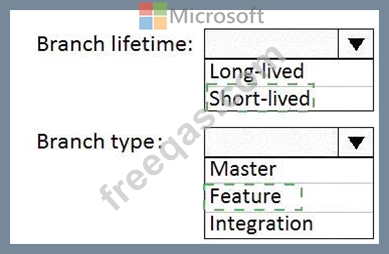
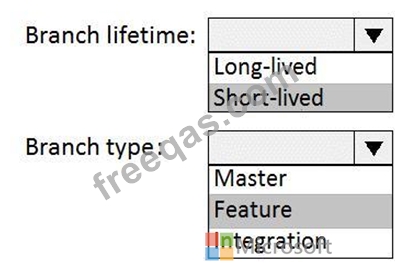
Which branch lifetime and branch time should you use in the branching model? To answer, select the appropriate options in the answer area.
NOTE: Each correct selection is worth one point.

Correct Answer:

Explanation

Branch lifetime: Short-lived
Branch type: Feature
Feature branches are used when developing a new feature or enhancement which has the potential of a development lifespan longer than a single deployment. When starting development, the deployment in which this feature will be released may not be known. No matter when the feature branch will be finished, it will always be merged back into the master branch.
References:
https://gist.github.com/digitaljhelms/4287848
insert code

Question 182

You have an Azure subscription that contains a resources group named RG1. RG1 contains the following resources:
* Four Azure virtual machines that run Windows Server and have Internet Information Services (IIS) installed
* SQL Server on an Azure virtual machine
* An Azure Load Balancer
You need to deploy an application to the virtual machines in RG1 by using Azure Pipelines.
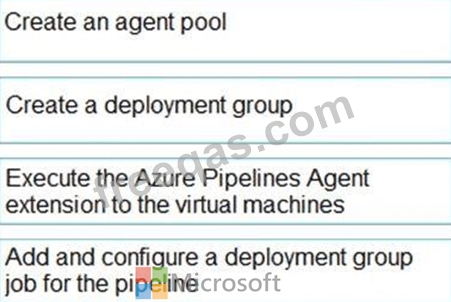
Which four actions should you perform in sequence? To answer, move the appropriate actions from the List of actions to the answer area and arrange them in the correct order.


Correct Answer:

Explanation:

Step 1: Create an agent pool
AzurePipelines provides a pre-defined agent pool named Azure Pipelines with Microsoft-hosted agents.
Step 2: Create a deployment group
Deployment groups make it easy to define logical groups of target machines for deployment, and install the required agent oneach machine.
Step 3: Execute the Azure Pipelines Agent extension to the virtual machines Install the Azure Pipelines Agent Azure VM extension Step 4: Add and configure a deployment group job for the pipeline Tasks that you define in a deployment group job run on some or all of the target servers, depending on the arguments you specify for the tasks and the job itself.
Reference:
https://docs.microsoft.com/en-us/azure/devops/pipelines/release/deployment-groups/howto-provision- deployment-group-agents
insert code

Question 183

You plan to create alerts that will be triggered based on the page load performance of a home page.
You have the Application Insights log query shown in the following exhibit.

Use the drop-down menus to select the answer choice that completes each statement based on the information presented in the graphic.
NOTE: Each correct selection is worth one point.

Correct Answer:

Explanation

Box 1: percentile_duration_95
Box 2: success
For example -
requests
| project name, url, success
| where success == "False"
This will return all the failed requests in my App Insights within the specified time range.
Reference:
https://devblogs.microsoft.com/premier-developer/alerts-based-on-analytics-query-using-custom-log-search/
insert code

Question 184

You have a GitHub repository.
You create a new repository in Azure DevOps.
You need to recommend a procedure to clone the repository from GitHub to Azure DevOps.
What should you recommend?

Correct Answer: D
Explanation
You can import an existing Git repo from GitHub, Bitbucket, GitLab, or other location into a new or empty existing repo in your project in Azure DevOps.
Import into a new repo
* Select Repos, Files.
* From the repo drop-down, select Import repository.
* If the source repo is publicly available, just enter the clone URL of the source repository and a name for your new Git repository.
References:
https://docs.microsoft.com/en-us/azure/devops/repos/git/import-git-repository?view=azure-devops
insert code

Question 185

You have the following Azure policy.

You assign the policy to the Tenant root group.
What is the effect of the policy?

Correct Answer: B
Explanation
Denies non HTTPS traffic.
insert code
  • ««
  • «
  • …
  • 33
  • 34
  • 35
  • 36
  • 37
  • 38
  • 39
  • 40
  • 41
  • 42
  • …
  • »
  • »»
[×]

Download PDF File

Enter your email address to download Microsoft.AZ-400.v2026-08-16.q229 Dumps

Email:

FreeQAs

Our website provides the Largest and the most Latest vendors Certification Exam materials around the world.

Using dumps we provide to Pass the Exam, we has the Valid Dumps with passing guranteed just which you need.

  • DMCA
  • About
  • Contact Us
  • Privacy Policy
  • Terms & Conditions
©2026 FreeQAs

www.freeqas.com materials do not contain actual questions and answers from Cisco's certification exams.