FreeQAs
 Request Exam  Contact
  • Home
  • View All Exams
  • New QA's
  • Upload
PRACTICE EXAMS:
  • Oracle
  • Fortinet
  • Juniper
  • Microsoft
  • Cisco
  • Citrix
  • CompTIA
  • VMware
  • ISC
  • SAP
  • EMC
  • PMI
  • HP
  • Salesforce
  • Other
  • Oracle
    Oracle
  • Fortinet
    Fortinet
  • Juniper
    Juniper
  • Microsoft
    Microsoft
  • Cisco
    Cisco
  • Citrix
    Citrix
  • CompTIA
    CompTIA
  • VMware
    VMware
  • ISC
    ISC
  • SAP
    SAP
  • EMC
    EMC
  • PMI
    PMI
  • HP
    HP
  • Salesforce
    Salesforce
  1. Home
  2. Microsoft Certification
  3. DP-100 Exam
  4. Microsoft.DP-100.v2022-03-09.q103 Dumps
  • ««
  • «
  • …
  • 9
  • 10
  • 11
  • 12
  • 13
  • 14
  • 15
  • 16
  • 17
  • 18
  • …
  • »
  • »»
Download Now

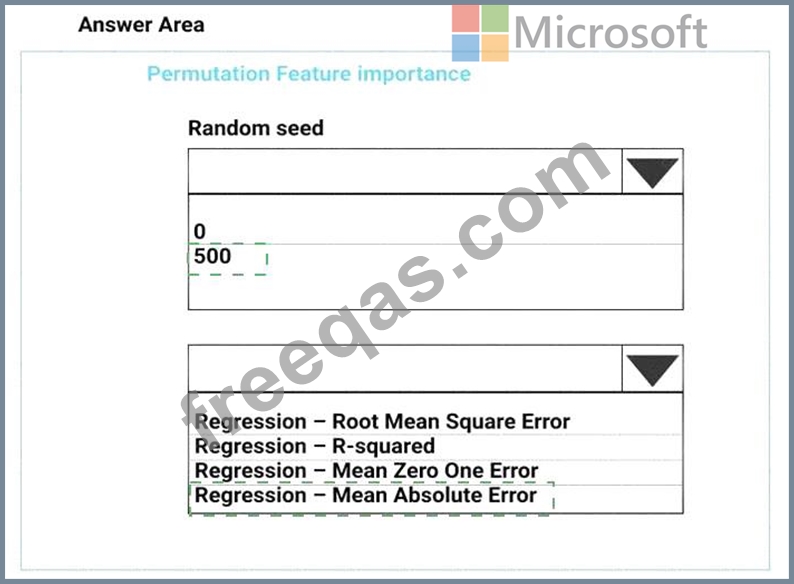
Question 61

You need to define a process for penalty event detection.
Which three actions should you perform in sequence? To answer, move the appropriate actions from the list of actions to the answer area and arrange them in the correct order.
Correct Answer:
insert code

Question 62

You are building an intelligent solution using machine learning models.
The environment must support the following requirements:
* Data scientists must build notebooks in a cloud environment
* Data scientists must use automatic feature engineering and model building in machine learning pipelines.
* Notebooks must be deployed to retrain using Spark instances with dynamic worker allocation.
* Notebooks must be exportable to be version controlled locally.
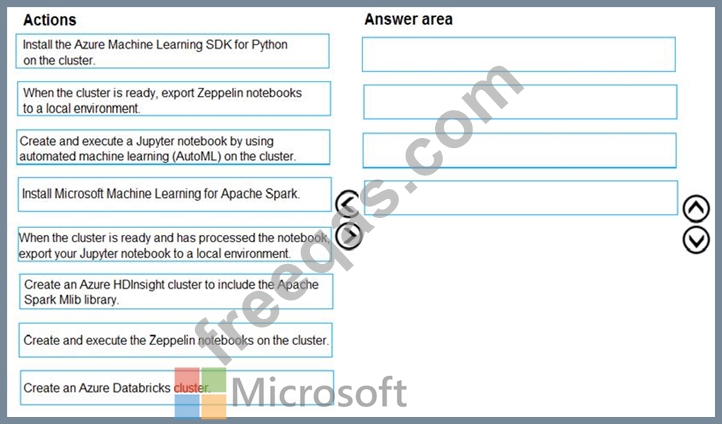
You need to create the environment.
Correct Answer:

Explanation:
Step 1: Create an Azure HDInsight cluster to include the Apache Spark Mlib library Step 2: Install Microsot Machine Learning for Apache Spark You install AzureML on your Azure HDInsight cluster.
Microsoft Machine Learning for Apache Spark (MMLSpark) provides a number of deep learning and data science tools for Apache Spark, including seamless integration of Spark Machine Learning pipelines with Microsoft Cognitive Toolkit (CNTK) and OpenCV, enabling you to quickly create powerful, highly-scalable predictive and analytical models for large image and text datasets.
Step 3: Create and execute the Zeppelin notebooks on the cluster
Step 4: When the cluster is ready, export Zeppelin notebooks to a local environment.
Notebooks must be exportable to be version controlled locally.
References:
https://docs.microsoft.com/en-us/azure/hdinsight/spark/apache-spark-zeppelin-notebook
https://azuremlbuild.blob.core.windows.net/pysparkapi/intro.html
insert code

Question 63

You use the Azure Machine Learning SDK in a notebook to run an experiment using a script file in an experiment folder.
The experiment fails.
You need to troubleshoot the failed experiment.
What are two possible ways to achieve this goal? Each correct answer presents a complete solution.

Correct Answer: B,D
Use get_details_with_logs() to fetch the run details and logs created by the run.
You can monitor Azure Machine Learning runs and view their logs with the Azure Machine Learning studio.
Reference:
https://docs.microsoft.com/en-us/python/api/azureml-pipeline-core/azureml.pipeline.core.steprun
https://docs.microsoft.com/en-us/azure/machine-learning/how-to-monitor-view-training-logs
insert code

Question 64

You need to modify the inputs for the global penalty event model to address the bias and variance issue.
Which three actions should you perform in sequence? To answer, move the appropriate actions from the list of actions to the answer area and arrange them in the correct order.

Correct Answer:
insert code

Question 65

You are retrieving data from a large datastore by using Azure Machine Learning Studio.
You must create a subset of the data for testing purposes using a random sampling seed based on the system clock.
You add the Partition and Sample module to your experiment.
You need to select the properties for the module.
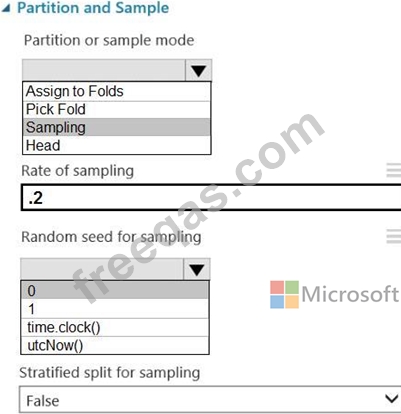
Which values should you select? To answer, select the appropriate options in the answer area.
NOTE: Each correct selection is worth one point.
Correct Answer:

Box 1: Sampling
Create a sample of data
This option supports simple random sampling or stratified random sampling. This is useful if you want to create a smaller representative sample dataset for testing.
1. Add the Partition and Sample module to your experiment in Studio, and connect the dataset.
2. Partition or sample mode: Set this to Sampling.
3. Rate of sampling. See box 2 below.
Box 2: 0
3. Rate of sampling. Random seed for sampling: Optionally, type an integer to use as a seed value.
This option is important if you want the rows to be divided the same way every time. The default value is 0, meaning that a starting seed is generated based on the system clock. This can lead to slightly different results each time you run the experiment.
References:
https://docs.microsoft.com/en-us/azure/machine-learning/studio-module-reference/partition-and-sample
insert code
  • ««
  • «
  • …
  • 9
  • 10
  • 11
  • 12
  • 13
  • 14
  • 15
  • 16
  • 17
  • 18
  • …
  • »
  • »»
[×]

Download PDF File

Enter your email address to download Microsoft.DP-100.v2022-03-09.q103 Dumps

Email:

FreeQAs

Our website provides the Largest and the most Latest vendors Certification Exam materials around the world.

Using dumps we provide to Pass the Exam, we has the Valid Dumps with passing guranteed just which you need.

  • DMCA
  • About
  • Contact Us
  • Privacy Policy
  • Terms & Conditions
©2026 FreeQAs

www.freeqas.com materials do not contain actual questions and answers from Cisco's certification exams.
