FreeQAs
 Request Exam  Contact
  • Home
  • View All Exams
  • New QA's
  • Upload
PRACTICE EXAMS:
  • Oracle
  • Fortinet
  • Juniper
  • Microsoft
  • Cisco
  • Citrix
  • CompTIA
  • VMware
  • ISC
  • SAP
  • EMC
  • PMI
  • HP
  • Salesforce
  • Other
  • Oracle
    Oracle
  • Fortinet
    Fortinet
  • Juniper
    Juniper
  • Microsoft
    Microsoft
  • Cisco
    Cisco
  • Citrix
    Citrix
  • CompTIA
    CompTIA
  • VMware
    VMware
  • ISC
    ISC
  • SAP
    SAP
  • EMC
    EMC
  • PMI
    PMI
  • HP
    HP
  • Salesforce
    Salesforce
  1. Home
  2. Microsoft Certification
  3. DP-100 Exam
  4. Microsoft.DP-100.v2022-09-20.q176 Dumps
  • ««
  • «
  • …
  • 9
  • 10
  • 11
  • 12
  • 13
  • 14
  • 15
  • 16
  • 17
  • 18
  • …
  • »
  • »»
Download Now

Question 61

You are solving a classification task.
The dataset is imbalanced.
You need to select an Azure Machine Learning Studio module to improve the classification accuracy.
Which module should you use?

Correct Answer: D
Explanation
Explanation:
Use the SMOTE module in Azure Machine Learning Studio (classic) to increase the number of underepresented cases in a dataset used for machine learning. SMOTE is a better way of increasing the number of rare cases than simply duplicating existing cases.
You connect the SMOTE module to a dataset that is imbalanced. There are many reasons why a dataset might be imbalanced: the category you are targeting might be very rare in the population, or the data might simply be difficult to collect. Typically, you use SMOTE when the class you want to analyze is under-represented.
Reference:
https://docs.microsoft.com/en-us/azure/machine-learning/studio-module-reference/smote
insert code

Question 62

A coworker registers a datastore in a Machine Learning services workspace by using the following code:
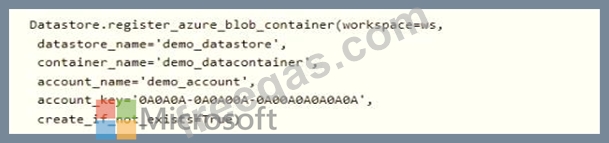
You need to write code to access the datastore from a notebook.

Correct Answer:

Explanation:
Box 1: DataStore
To get a specific datastore registered in the current workspace, use the get() static method on the Datastore class:
# Get a named datastore from the current workspace
datastore = Datastore.get(ws, datastore_name='your datastore name')
Box 2: ws
Box 3: demo_datastore
Reference:
https://docs.microsoft.com/en-us/azure/machine-learning/how-to-access-data
insert code

Question 63

You are evaluating a Python NumPy array that contains six data points defined as follows:
data = [10, 20, 30, 40, 50, 60]
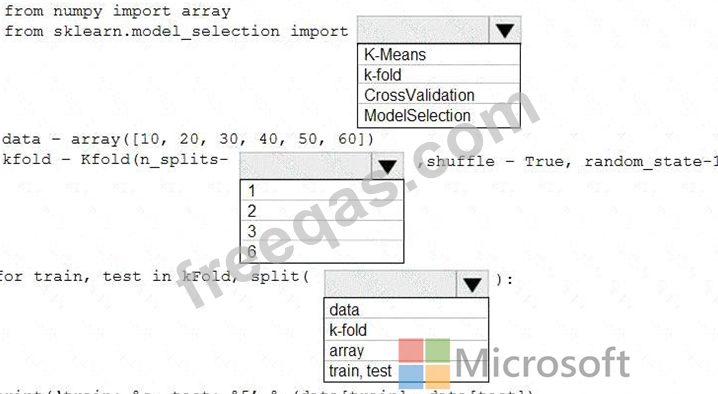
You must generate the following output by using the k-fold algorithm implantation in the Python Scikit-learn machine learning library:
train: [10 40 50 60], test: [20 30]
train: [20 30 40 60], test: [10 50]
train: [10 20 30 50], test: [40 60]
You need to implement a cross-validation to generate the output.
How should you complete the code segment? To answer, select the appropriate code segment in the dialog box in the answer area.
NOTE: Each correct selection is worth one point.
Correct Answer:

Explanation

Box 1: k-fold
Box 2: 3
K-Folds cross-validator provides train/test indices to split data in train/test sets. Split dataset into k consecutive folds (without shuffling by default).
The parameter n_splits ( int, default=3) is the number of folds. Must be at least 2.
Box 3: data
Example: Example:
>>>
>>> from sklearn.model_selection import KFold
>>> X = np.array([[1, 2], [3, 4], [1, 2], [3, 4]])
>>> y = np.array([1, 2, 3, 4])
>>> kf = KFold(n_splits=2)
>>> kf.get_n_splits(X)
2
>>> print(kf)
KFold(n_splits=2, random_state=None, shuffle=False)
>>> for train_index, test_index in kf.split(X):
print("TRAIN:", train_index, "TEST:", test_index)
X_train, X_test = X[train_index], X[test_index]
y_train, y_test = y[train_index], y[test_index]
TRAIN: [2 3] TEST: [0 1]
TRAIN: [0 1] TEST: [2 3]
References:
https://scikit-learn.org/stable/modules/generated/sklearn.model_selection.KFold.html
insert code

Question 64

You create an Azure Machine Learning workspace. You are preparing a local Python environment on a laptop computer. You want to use the laptop to connect to the workspace and run experiments.
You create the following config.json file.

You must use the Azure Machine Learning SDK to interact with data and experiments in the workspace.
You need to configure the config.json file to connect to the workspace from the Python environment.
Which two additional parameters must you add to the config.json file in order to connect to the workspace?
Each correct answer presents part of the solution.
NOTE: Each correct selection is worth one point.

Correct Answer: B,C
To use the same workspace in multiple environments, create a JSON configuration file. The configuration file saves your subscription (subscription_id), resource (resource_group), and workspace name so that it can be easily loaded.
The following sample shows how to create a workspace.
from azureml.core import Workspace
ws = Workspace.create(name='myworkspace',
subscription_id='<azure-subscription-id>',
resource_group='myresourcegroup',
create_resource_group=True,
location='eastus2'
)
Reference:
https://docs.microsoft.com/en-us/python/api/azureml-core/azureml.core.workspace.workspace
insert code

Question 65

You are creating a new Azure Machine Learning pipeline using the designer.
The pipeline must train a model using data in a comma-separated values (CSV) file that is published on a website. You have not created a dataset for this file.
You need to ingest the data from the CSV file into the designer pipeline using the minimal administrative effort.
Which module should you add to the pipeline in Designer?


Correct Answer: D
Explanation
The preferred way to provide data to a pipeline is a Dataset object. The Dataset object points to data that lives in or is accessible from a datastore or at a Web URL. The Dataset class is abstract, so you will create an instance of either a FileDataset (referring to one or more files) or a TabularDataset that's created by from one or more files with delimited columns of data.
Example:
from azureml.core import Dataset
iris_tabular_dataset = Dataset.Tabular.from_delimited_files([(def_blob_store, 'train-dataset/iris.csv')]) Reference:
https://docs.microsoft.com/en-us/azure/machine-learning/how-to-create-your-first-pipeline
insert code
  • ««
  • «
  • …
  • 9
  • 10
  • 11
  • 12
  • 13
  • 14
  • 15
  • 16
  • 17
  • 18
  • …
  • »
  • »»
[×]

Download PDF File

Enter your email address to download Microsoft.DP-100.v2022-09-20.q176 Dumps

Email:

FreeQAs

Our website provides the Largest and the most Latest vendors Certification Exam materials around the world.

Using dumps we provide to Pass the Exam, we has the Valid Dumps with passing guranteed just which you need.

  • DMCA
  • About
  • Contact Us
  • Privacy Policy
  • Terms & Conditions
©2026 FreeQAs

www.freeqas.com materials do not contain actual questions and answers from Cisco's certification exams.