You manage a Dynamics 365 environment for Sales. You create the following rule items to respond to inbound emails from potential customers:
* Emails that contain the words support or help must create a new high-priority case.
* Emails that contain the words buy or purchase must create a warm-lead record. The words buy and purchase are more important than support or help.
* Emails that specifically mention ProductA must always create a hot lead for that product regardless of other words mentioned.
* If none of the targeted words are present in an email, a cold lead must be created.
You need to configure the order in which rule items are processed.
In which order should you run the rule items? To answer, move all actions from the list of actions to the answer area and arrange them in the correct order.

A company uses Dynamics 365 for Sales.
You must track a competitor to help your company win a sale.
You need to associate the competitor with a Dynamics 365 entity.
To which type of entity can you associate the competitor?
A company is implementing Dynamics 365 Sales.
The solution must support a new standardized sales process. The process must be the same for both new and existing customers.
Sales representatives must follow up on email inquiries about products within 24 hours.
The time it takes for sales representatives to follow up on inquiries must be reportable.
All quotes for new customers must be reviewed and approved by the sales manager for specific criteria.
You need to configure playbooks to meet the requirements.
What should you do? To answer, select the appropriate options in the answer area.
NOTE: Each correct selection is worth one point.

A company uses Dynamics 365 Sales. You add the Kanban control to the Opportunity entity.
You plan to implement Kanban views in the system. The implementation must accomplish the following:
Set up opportunities so they are visible in Kanban views.
Ensure that the default view displays the opportunities in the sales cycle.
Ensure that users know how to change the status in the Kanban status view without opening the full record.
You need to complete the Kanban setup.
What should you do? To answer, select the appropriate options in the answer area.
NOTE: Each correct selection is worth one point.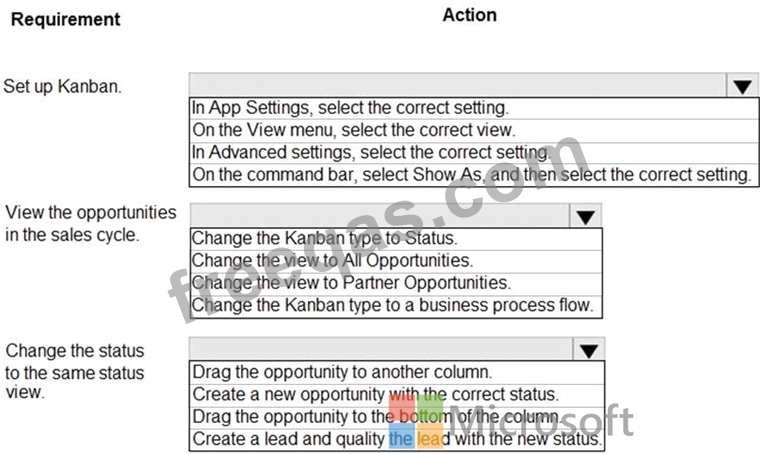

Please wait while the virtual machine loads. Once loaded, you may proceed to the lab section. This may take a few minutes, and the wait time will not be deducted from your overall test time.
When the Next button is available, click it to access the lab section. In this section, you will perform a set of tasks in a live environment. While most functionality will be available to you as it would be in a live environment, some functionality (e.g., copy and paste, ability to navigate to external websites) will not be possible by design.
Scoring is based on the outcome of performing the tasks stated in the lab. In other words, it doesn't matter how you accomplish the task, if you successfully perform it, you will earn credit for that task.
Labs are not timed separately, and this exam may have more than one lab that you must complete. You can use as much time as you would like to complete each lab. But, you should manage your time appropriately to ensure that you are able to complete the lab(s) and all other sections of the exam in the time provided.
Please note that once you submit your work by clicking the Next button within a lab, you will NOT be able to return to the lab.
A sales manager requests to view all the closed opportunities by source campaigns. The manager wants the visual formatted as a stacked bar comparison of which closed opportunities are won versus lost.
You need to configure your environment to provide access to the visual. You must name the visual Opportunities Won vs. Lost by Campaign.
To complete this task, sign in to the Dynamics 365 portal.

