FreeQAs
 Request Exam  Contact
  • Home
  • View All Exams
  • New QA's
  • Upload
PRACTICE EXAMS:
  • Oracle
  • Fortinet
  • Juniper
  • Microsoft
  • Cisco
  • Citrix
  • CompTIA
  • VMware
  • ISC
  • SAP
  • EMC
  • PMI
  • HP
  • Salesforce
  • Other
  • Oracle
    Oracle
  • Fortinet
    Fortinet
  • Juniper
    Juniper
  • Microsoft
    Microsoft
  • Cisco
    Cisco
  • Citrix
    Citrix
  • CompTIA
    CompTIA
  • VMware
    VMware
  • ISC
    ISC
  • SAP
    SAP
  • EMC
    EMC
  • PMI
    PMI
  • HP
    HP
  • Salesforce
    Salesforce
  1. Home
  2. Microsoft Certification
  3. MB-230 Exam
  4. Microsoft.MB-230.v2024-01-19.q286 Dumps
  • ««
  • «
  • …
  • 40
  • 41
  • 42
  • 43
  • 44
  • 45
  • 46
  • 47
  • 48
  • 49
  • …
  • »
  • »»
Download Now

Question 216

You are a Dynamics 365 Customer Service administrator.
Users inform you about situations in which child cases are not working correctly.
You need to configure the system to correct the issues.
What should you do in each situation? To answer, select the appropriate options in the answer area.
NOTE: Each correct selection is worth one point.

Correct Answer:

Reference:
https://docs.microsoft.com/en-us/dynamics365/customer-service/define-settings-parent-child-cases
insert code

Question 217

You are implementing Dynamics 365 Customer Service Insights.
The product manager would like to see product sales trends by age group. The groupings are as follows:
- Ages 18 and younger
- Ages 19-25
- Ages 26-40
- Ages 41-55
- Ages 56 and older
You need to configure the system.
What should you define?

Correct Answer: B
https://docs.microsoft.com/en-us/dynamics365/customer-insights/audience-insights/measures
insert code

Question 218

You need to set up the system for cases going to supervisors.
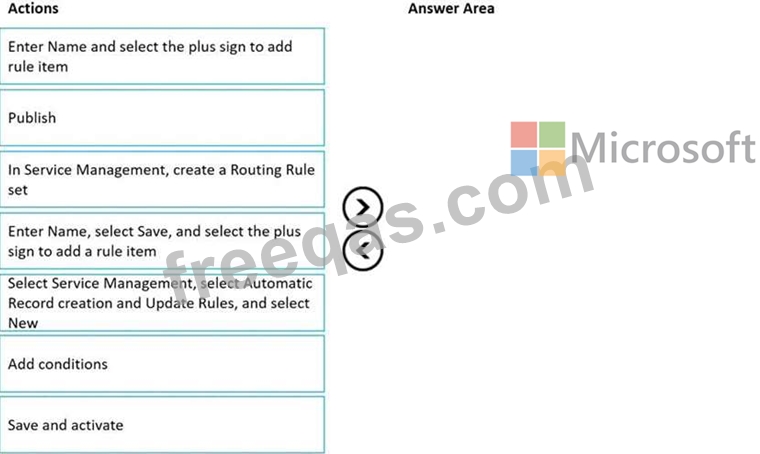
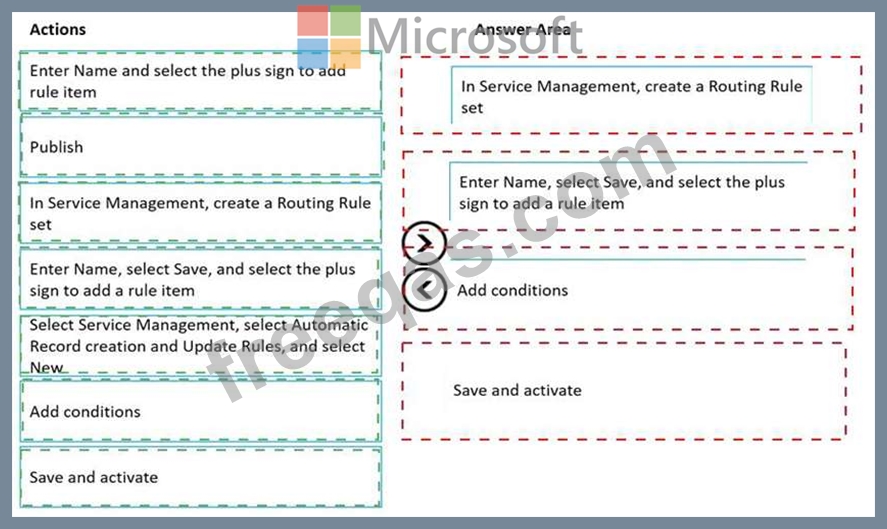
Which four actions should you perform in sequence? To answer, move the appropriate actions from the list of actions to the answer area and arrange them in the correct order.
Correct Answer:

Explanation
Step 1: In Service Management, create a Routing Rule set.
Scenario: If a case is open more than 30 days, the case must automatically be routed to the supervisor.
Create routing rulesets to route cases.
Use routing rules in Customer Service to route cases to the right agents at the right time without any manual intervention. You can also use routing rules to route cases that are escalated to specific queues.
Step 2: Enter Name, Select Save, and select the plus sign to add a rule item On the General tab, in Routing Rule Set Information, Enter Name and Description for the routing ruleset.
Select Save. The routing ruleset is saved, and the Rule Items section is displayed.
In the Rule Items section, select the Add Rule Item button + to specify conditions for routing cases to a queue.
Step 3: Add conditions
Under Then Conditions, specify the queue to which the cases will be routed or the user or team to which the cases will be assigned if the conditions in the If Conditions section are met.
Step 4: Save and activate.
Select Save and Close.
In the routing ruleset record, select Activate so that the ruleset is applied to the cases matching the conditions in the rule.
Reference:
https://docs.microsoft.com/en-us/dynamics365/customer-service/create-rules-automatically-route-cases
insert code

Question 219

A company uses Dynamics 365 Customer Service.
You need to implement queues to meet company requirements.
Which types of queues should you use? To answer, drag the appropriate queue types to the correct requirements. Each queue type may be used once, more than once, or not at all. You may need to drag the split bar between panes or scroll to view content.
NOTE: Each correct selection is worth one point.

Correct Answer:

Reference:
https://docs.microsoft.com/en-us/dynamics365/customer-service/set-up-queues-manage-activities-cases
insert code

Question 220

A service manager discovers a high number of cases in the agent queues. Cases are created manually but can be reassigned using a workflow or custom API.
The manager needs to know whether cases are getting duplicated because of simultaneous case creation or simultaneous case assignment.
You need to identify the number of cases that are created in each scenario.
How many cases are created? To answer, drag the appropriate cases created options to the correct simultaneous actions. Each cases created option may be used once, more than once, or not at all. You may need to drag the split bar between panes or scroll to view content.
NOTE:Each correct selection is worth one point.

Correct Answer:

Explanation
Graphical user interface, application Description automatically generated

Reference:
https://docs.microsoft.com/en-us/dynamics365/customer-service/set-up-queues-manage-activities-cases
insert code
  • ««
  • «
  • …
  • 40
  • 41
  • 42
  • 43
  • 44
  • 45
  • 46
  • 47
  • 48
  • 49
  • …
  • »
  • »»
[×]

Download PDF File

Enter your email address to download Microsoft.MB-230.v2024-01-19.q286 Dumps

Email:

FreeQAs

Our website provides the Largest and the most Latest vendors Certification Exam materials around the world.

Using dumps we provide to Pass the Exam, we has the Valid Dumps with passing guranteed just which you need.

  • DMCA
  • About
  • Contact Us
  • Privacy Policy
  • Terms & Conditions
©2026 FreeQAs

www.freeqas.com materials do not contain actual questions and answers from Cisco's certification exams.
