You are entering products and services into Dynamics 365 CE Field Services.
You need to ensure that your field technicians can use the products when completing work orders.
Which two field service product types should you configure to allow your technicians to add work order products? Each correct answer presents a complete solution.
You are implementing a Microsoft Dynamics 365 Field Service solution for a client The client needs to be able to view the Parent Asset and Master Asset when the Primary Incident Customer Asset is associated to a work order. The asset data should not be stored directly on the work order. It should only be visible when the Customer Asset is selected.
Solution:
1. Create the Parent Asset and Master Asset on the work order.
2. Use Microsoft Power Automate to populate fields when the Customer Asset contains data.
Does this meet the goal?
Drag and Drop Question
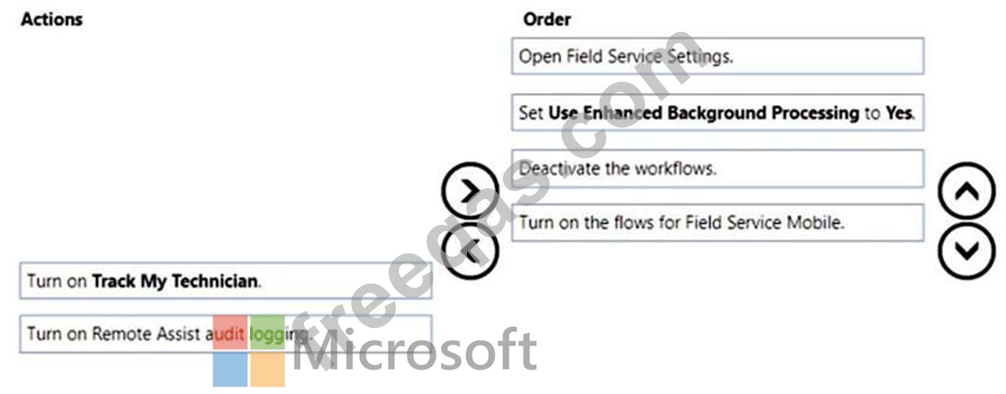
Your client wants to build some workflows to automate certain approvals.
You need to enable Microsoft Power Automate flows in the Microsoft Dynamics 365 Field Service settings.
Which four actions should you perform in sequence? To answer, move the appropriate actions from the list of actions to the answer area and arrange them in the correct order.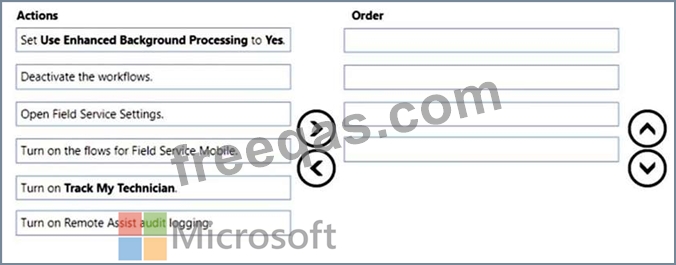
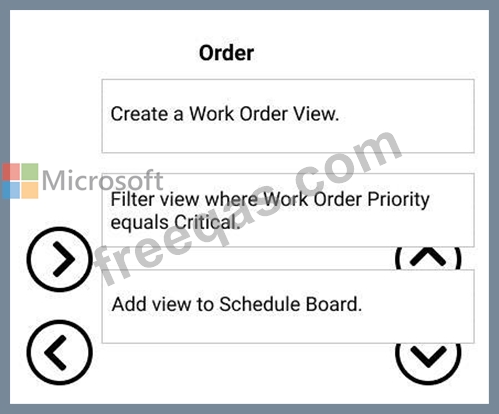
You are a Dynamics 365 for Field Service Administrator. You are working with your company's scheduling team on requirements for a new schedule board view.
The team needs a schedule board view where they only see work orders with a priority of Critical.
Which three steps should you perform, in sequence, to meet their need? To answer, move the appropriate actions from the list of actions to the answer area and arrange them in the correct order.

You are a Dynamics 365 Field Service Administrator Your organization wants to use Incident Types with Work Orders.
You need to create and configure Incident Types based on the provided scenarios.
Which Incident Type feature should you use with each scenario? To answer, drag the appropriate Incident Type feature to the appropriate scenario. Each feature may be used once, more than once, or not at all. You may need to drag the split bar between panes or scroll to view the content.
NOTE: Each correct selection is worth one point.


