FreeQAs
 Request Exam  Contact
  • Home
  • View All Exams
  • New QA's
  • Upload
PRACTICE EXAMS:
  • Oracle
  • Fortinet
  • IBM
  • Juniper
  • Microsoft
  • Cisco
  • Citrix
  • CompTIA
  • VMware
  • ISC
  • SAP
  • EMC
  • PMI
  • HP
  • Salesforce
  • Other
  • Oracle
    Oracle
  • Fortinet
    Fortinet
  • IBM
    IBM
  • Juniper
    Juniper
  • Microsoft
    Microsoft
  • Cisco
    Cisco
  • Citrix
    Citrix
  • CompTIA
    CompTIA
  • VMware
    VMware
  • ISC
    ISC
  • SAP
    SAP
  • EMC
    EMC
  • PMI
    PMI
  • HP
    HP
  • Salesforce
    Salesforce
  1. Home
  2. Microsoft Certification
  3. MB-310 Exam
  4. Microsoft.MB-310.v2025-12-25.q273 Dumps
  • ««
  • «
  • …
  • 47
  • 48
  • 49
  • 50
  • 51
  • 52
  • 53
  • 54
  • 55
  • 56
  • »
Download Now

Question 251

You are implementing a Dynamics 365 for Finance and Operations General ledger module for a client that has multiple legal entities.
The client has the following requirements:
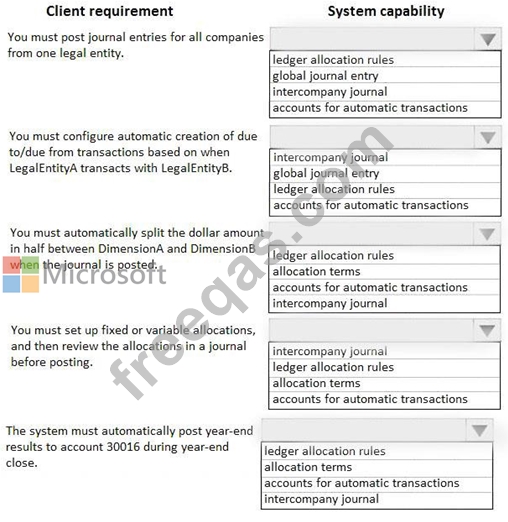
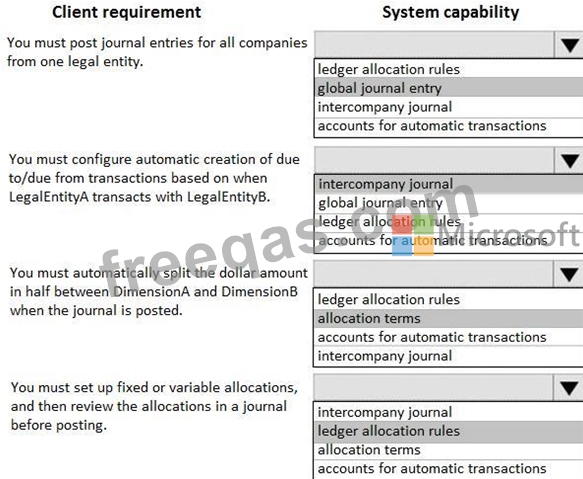
* Post journal entries for all companies from one legal entity.
* Configure automatic creation of due to/due from transactions based on when LegalEntityA transacts with LegalEntityB.
* Automatically split the dollar amount in half between DimensionA and DimensionB when the journal is posted.
* Set up fixed or variable allocations, and then review the allocations in a journal before posting,
* Automatically post year-end results to account 30016 during year-end close.
You need to configure the system.
Which system capability should you configure? To answer, select the appropriate configuration in the answer area.
Correct Answer:

Explanation

insert code

Question 252

You need to validate the sales tax postings for Tennessee and Alabama.
Which tax selections meet the requirement? To answer. select the appropriate options in the answer area NOTE: Each correct selection is worth one point.



Correct Answer:

Explanation
Graphical user interface Description automatically generated
insert code

Question 253

A company implements expense management in Dynamic employee travel expenses.
The current per diem setup on the Expense management parameters page is as follow:

Use the drop-down menus to select the answer choice that that answers each question based on the information presented in the graphic.


Correct Answer:
insert code

Question 254

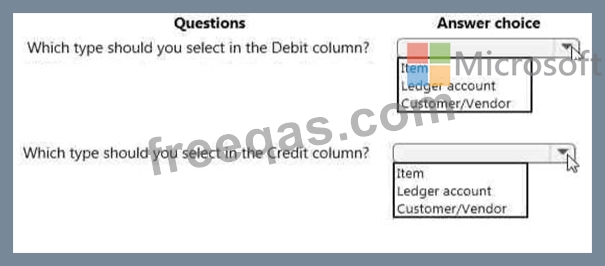
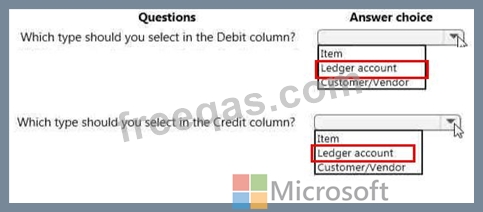
You need to configure an Accounts payable charge for freight for a company. The company requires that the system include the freight invoice to be paid to the vendor and record the expense in main account 600120 - Freight In.
Correct Answer:
insert code

Question 255

You are a functional consultant for Contoso Entertainment System USA (USMF).
USMF plans to implement a new manufacturing department that will be based in Australia.
You need to create a draft account structure for the new department. The account structure must use the same account structure as a department named Manufacturing India and be named Manufacturing Australia.
To complete this task, sign in to the Dynamics 365 portal.


Correct Answer:
See explanation below.
Explanation
You need to create an account structure with the same structure as the department named Manufacturing India by using the following instructions.
* Go to Navigation pane > Modules > General ledger > Chart of accounts > Structures > Configure account structures.
* On the Action pane, click New to open the drop dialog.
* In the Account structure field, type a name to describe the purpose of the account structure.
* In the Description field, type a description to specify the purpose of the account structure.
* Click Create.
* In the Segments and allowed values, click Add segment.
* In the dimensions list, select the dimension to add to the account structure.
* At the end of the list, click Add segment.
* Repeat step 6 to 9 as needed.
* In the Allowed value details section, select the segment to edit the allowed values. For example, click the Main Account field.
* In the Operator field, select an option, such as is between and includes.
* In the Value field, type a value. For example, 600000.
* In the through field, type a value. For example, 699999.
* In the Allowed value details
* Repeat step 10 to 15 as needed.
* In the Allowed value details
* In the Operator field, select an option, such as is between and includes.
* In the Value field, type a value. For example, 033.
* In the through field, type a value. For example, 034.
* Click Apply.
* In the grid, select the segment to edit the allowed values. For example, Cost Center.
* In the CostCenter field, type a value. For example, 007..021.
* In the Segments and allowed values, click Add.
* In the MainAccount field, type a value. For example, 600000..699999
* In the grid, select the segment to edit the allowed values. For example, Department.
* In the Department field, type a value. For example, 032.
* In the CostCenter field, type a value. For example, 086.
* On the Action pane, click Validate.
Reference:
https://docs.microsoft.com/en-us/dynamics365/finance/general-ledger/tasks/create-account-structures
insert code
  • ««
  • «
  • …
  • 47
  • 48
  • 49
  • 50
  • 51
  • 52
  • 53
  • 54
  • 55
  • 56
  • »
[×]

Download PDF File

Enter your email address to download Microsoft.MB-310.v2025-12-25.q273 Dumps

Email:

FreeQAs

Our website provides the Largest and the most Latest vendors Certification Exam materials around the world.

Using dumps we provide to Pass the Exam, we has the Valid Dumps with passing guranteed just which you need.

  • DMCA
  • About
  • Contact Us
  • Privacy Policy
  • Terms & Conditions
©2026 FreeQAs

www.freeqas.com materials do not contain actual questions and answers from Cisco's certification exams.