FreeQAs
 Request Exam  Contact
  • Home
  • View All Exams
  • New QA's
  • Upload
PRACTICE EXAMS:
  • Oracle
  • Fortinet
  • IBM
  • Juniper
  • Microsoft
  • Cisco
  • Citrix
  • CompTIA
  • VMware
  • ISC
  • SAP
  • EMC
  • PMI
  • HP
  • Salesforce
  • Other
  • Oracle
    Oracle
  • Fortinet
    Fortinet
  • IBM
    IBM
  • Juniper
    Juniper
  • Microsoft
    Microsoft
  • Cisco
    Cisco
  • Citrix
    Citrix
  • CompTIA
    CompTIA
  • VMware
    VMware
  • ISC
    ISC
  • SAP
    SAP
  • EMC
    EMC
  • PMI
    PMI
  • HP
    HP
  • Salesforce
    Salesforce
  1. Home
  2. Microsoft Certification
  3. MS-100 Exam
  4. Microsoft.MS-100.v2023-11-24.q428 Dumps
  • ««
  • «
  • …
  • 5
  • 6
  • 7
  • 8
  • 9
  • 10
  • 11
  • 12
  • 13
  • 14
  • …
  • »
  • »»
Download Now

Question 41

You have a Microsoft SharePoint Online site and an on-premises file server.
The site contains the files shown in the following table.

The file server contains the files shown in the following table.

You migrate D:\Folder1 and D:\Folder2 to the Documents library by using the SharePoint Migration Tool as shown in the following exhibit.

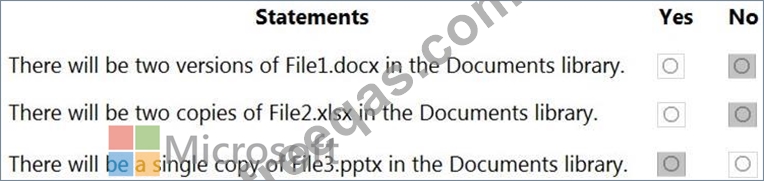
For each of the following statements, select Yes if the statement is true. Otherwise, select No.
NOTE: Each correct selection is worth one point.

Correct Answer:

Explanation

You can't have two files with the same name and extension in a SharePoint documents library. If a file on the source server has the same and extension as an existing file in the document library, this will cause a conflict.
The options for dealing with a conflict are: Skip, Merge, or Overwrite.
The "Keep all versions" setting in the exhibit is used to retain the file history for a migrated file. It does not create multiple versions of a file in a document library.
Box 1: No
File1.docx exists in the document library so this will cause a conflict.
Box 2: No
Migrating two File2.xlsx files will cause a conflict.
Box 3: Yes
There is only one File3.pptx in the source server and none in the document library so there will be no conflict.
insert code

Question 42

You have a new Microsoft 365 subscription.
A user named User1 has a mailbox in Microsoft Exchange Online.
You need to log any changes to the mailbox folder permissions of User1.
Which command should you run? To answer, select the appropriate options in the answer area.
NOTE: Each correct selection is worth one point.

Correct Answer:

Reference:
https://support.microsoft.com/en-us/help/4026501/office-auditing-in-office-365-for-admins
https://docs.microsoft.com/en-us/powershell/module/exchange/mailboxes/set-mailbox?view=exchange-ps
insert code

Question 43

You have a data loss prevention (DLP) policy.
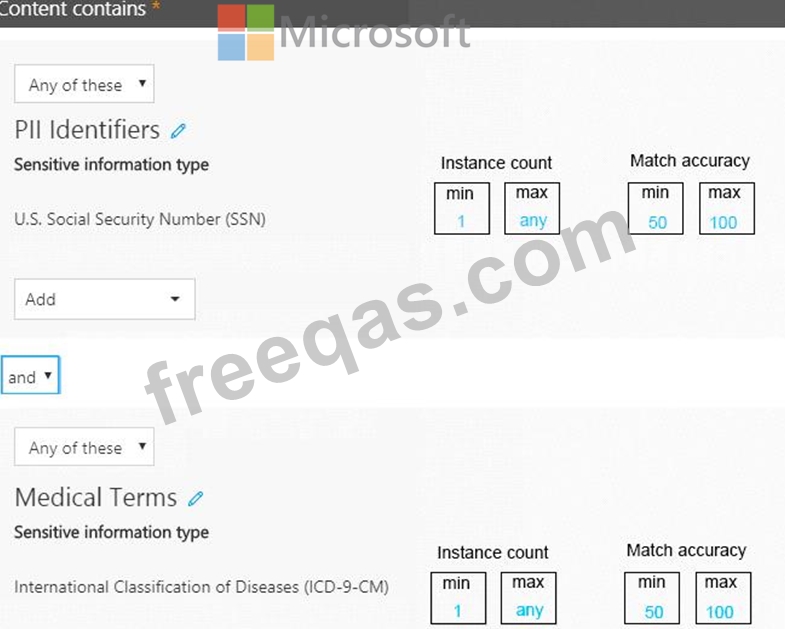
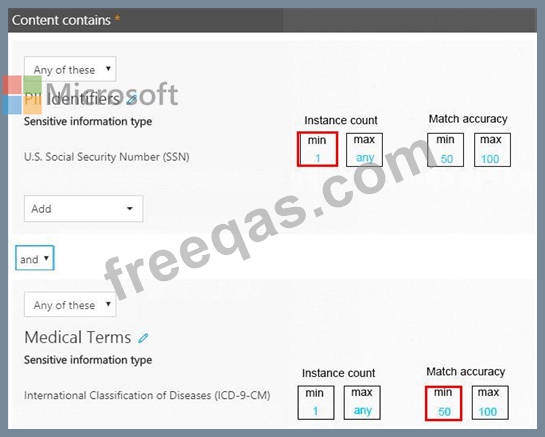
You need to increase the likelihood that the DLP policy will apply to data that contains medical terms from the International Classification of Diseases (ICD-9-CM). The solution must minimize the number of false positives.
Which two settings should you modify? To answer, select the appropriate settings in the answer area.
NOTE: Each correct selection is worth one point.
Correct Answer:

Explanation:
References:
https://docs.microsoft.com/en-us/office365/securitycompliance/data-loss-prevention-policies
https://docs.microsoft.com/en-us/office365/securitycompliance/what-the-sensitive-information-types-look-for
insert code

Question 44

You have a Microsoft 365 subscription that contains the users shown in the following table.

You have the named locations shown in the following table.

You create a conditional access policy that has the following configurations:
Users and groups:
Include: Group1
Exclude: Group2
Cloud apps: Include all cloud apps
Conditions:
Include: Any location
Exclude: Montreal
Access control: Grant access, Require multi-factor authentication
User1 is on the multi-factor authentication (MFA) blocked users list.
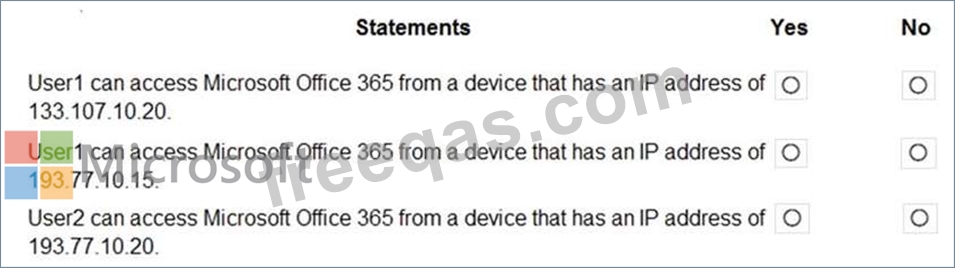
For each of the following statements, select Yes if the statement is true. Otherwise, select No.
NOTE: Each correct selection is worth one point.
Correct Answer:

Reference:
https://docs.microsoft.com/en-us/azure/active-directory/authentication/howto-mfa-mfasettings
insert code

Question 45

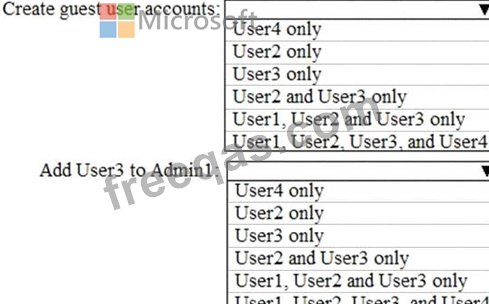
You company has a Microsoft Azure Active Directory (Azure AD) tenant that contains the users shown in the following table.

The tenant includes a security group named Admin1. Admin1 will be used to manage administrative accounts.
You need to identify which users can perform the following administrative tasks:
* Create guest user accounts.
* Add User3 to Admin1.
Which users should you identify for each task? To answer, select the appropriate options in the answer area.
NOTE: Each correct selection is worth one point.
Correct Answer:

Explanation

References:
A User Administrator is the only role listed that can create user accounts included Guest user accounts. A Global Administrator can also create user accounts.
A User Administrator is also the only role listed that can modify the group membership of users.
Reference:
https://docs.microsoft.com/en-us/azure/active-directory/users-groups-roles/directory-assign-admin-roles
insert code
  • ««
  • «
  • …
  • 5
  • 6
  • 7
  • 8
  • 9
  • 10
  • 11
  • 12
  • 13
  • 14
  • …
  • »
  • »»
[×]

Download PDF File

Enter your email address to download Microsoft.MS-100.v2023-11-24.q428 Dumps

Email:

FreeQAs

Our website provides the Largest and the most Latest vendors Certification Exam materials around the world.

Using dumps we provide to Pass the Exam, we has the Valid Dumps with passing guranteed just which you need.

  • DMCA
  • About
  • Contact Us
  • Privacy Policy
  • Terms & Conditions
©2026 FreeQAs

www.freeqas.com materials do not contain actual questions and answers from Cisco's certification exams.
