You have a Microsoft 365 subscription that uses an Azure Active Directory (Azure AD) tenant named contoso.com. The tenant contains the Windows 10 devices shown in the following table.
All the devices are managed by using Microsoft Endpoint Manager and are members of a group named Group1.
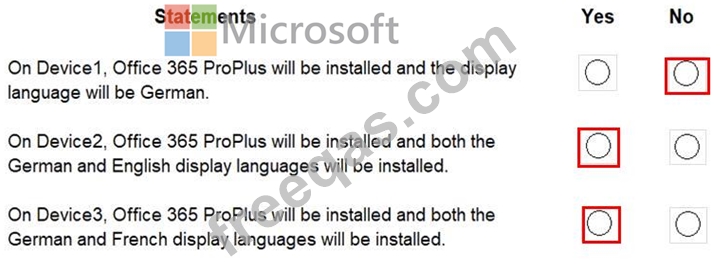
From the Microsoft Endpoint Manager admin center, you create an app suite named App1 for Microsoft Office 365 apps.
You configure the App1 settings as shown in the exhibit. (Click the Exhibit tab.)
You assign App1 to Group1.
For each of the following statements, select Yes if the statement is true. Otherwise, select No.
Note: Each correct selection is worth one point.
Your company has a Microsoft 365 tenant.
You plan to allow users from the engineering department to enroll their mobile device in mobile device management (MDM).
The device type restrictions are configured as shown in the following table.
The device limit restrictions are configured as shown in the following table.
What is the effective configuration for the members of the Engineering group? To answer, select the appropriate options in the answer area.
NOTE: Each correct selection is worth one point.

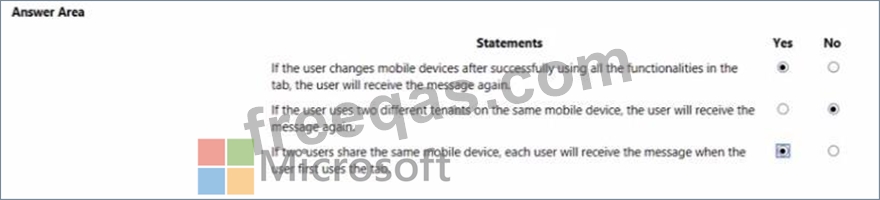
You are developing a Microsoft Teams tab that will capture coordinates from mobile devices and send notifications to users.
The relevant portion of the app manifest is shown in the App Manifest exhibit (Click the App Manifest tab.) The relevant portion of the JavaScript code for the tab is shown in the JavaScript exhibit (Click the JavaScript tab) While testing the tab. a user receives the message shown in the Message exhibit (Click the Message tab.) For each of the following statements, select Yes if the statement is true. Otherwise, select No.
NOTE; Each correct selection is worth one point.

You have a Microsoft 365 subscription.
All users have their email stored in Microsoft Exchange Online
In the mailbox of a user named User, you need to preserve a copy of all the email messages that contain the word ProjectX.
What should you do first?
Your company has 10,000 users who access all applications from an on-premises data center.
You plan to create a Microsoft 365 subscription and to migrate data to the cloud.
You plan to implement directory synchronization.
User account and group accounts must sync to Microsoft Azure Directory (Azure AD) successfully.
You discover that several user accounts fail to sync to Azure AD.
You need to identify which user accounts failed to sync. You must resolve the issue as quickly as possible.
What should you do?

