You have 100 computers that run Windows 8.1 and are enrolled in Upgrade Readiness.
Two of the computers are configured as shown in the following table.
From Upgrade Readiness, you view the applications shown in the following table.
You enroll a computer named Computer3 in Upgrade Readiness. Computer3 has the following configurations:
* 8 GB of memory
* 64-bit architecture
* An application named App3 installed
App3 is installed on Computer3 only.
For each of the following statements, select Yes if the statement is true. Otherwise, select No.
NOTE: Each correct selection is worth one point.


You have a Microsoft 365 subscription that contains all the user data.
You plan to create the retention policy shown in the Locations exhibit. (Click the Locations tab.)
You configure the Advanced retention settings as shown in the Retention exhibit. (Click the Retention tab.)
The locations specified in the policy include the groups shown in the following table.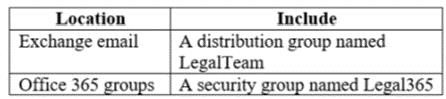
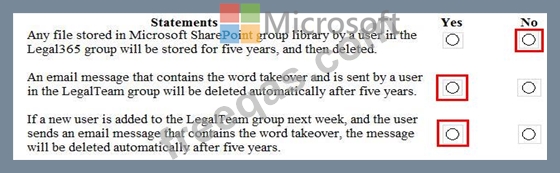
For each of the following statements, select Yes if the statement is true. Otherwise, select No.
NOTE: Each correct selection is worth one point.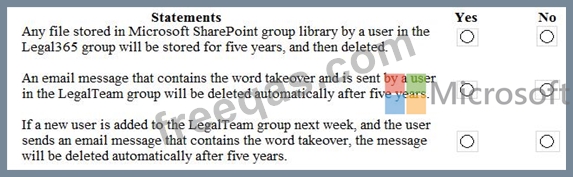
You have a Microsoft 365 subscription.
All users have their email stored in Microsoft Exchange Online.
In the mailbox of a user named User1, you need to preserve a copy of all the email messages that contain the word ProjectX.
What should you do first?
You have a Microsoft 365 tenant that contains 1,000 Windows 10 devices. The devices are enrolled in Microsoft Intune.
Company policy requires that the devices have the following configurations:
* Require complex passwords.
* Require the encryption of removable data storage devices.
* Have Microsoft Defender Antivirus real-time protection enabled.
You need to configure the devices to meet the requirements.
What should you use?
Note: This question is part of a series of questions that present the same scenario. Each question in the series contains a unique solution that might meet the stated goals. Some question sets might have more than one correct solution, while others might not have a correct solution.
After you answer a question in this section, you will NOT be able to return to it. As a result, these questions will not appear in the review screen.
You have a Microsoft 365 subscription.
From the Security & Compliance admin center, you create a role group named US eDiscovery Managers by copying the eDiscovery Manager role group.
You need to ensure that the users in the new role group can only perform content searches of mailbox content for users in the United States.
Solution: From Windows PowerShell, you run the New-ComplianceSecurityFilter cmdlet with the appropriate parameters.
Does this meet the goal?

