FreeQAs
 Request Exam  Contact
  • Home
  • View All Exams
  • New QA's
  • Upload
PRACTICE EXAMS:
  • Oracle
  • Fortinet
  • Juniper
  • Microsoft
  • Cisco
  • Citrix
  • CompTIA
  • VMware
  • ISC
  • SAP
  • EMC
  • PMI
  • HP
  • Salesforce
  • Other
  • Oracle
    Oracle
  • Fortinet
    Fortinet
  • Juniper
    Juniper
  • Microsoft
    Microsoft
  • Cisco
    Cisco
  • Citrix
    Citrix
  • CompTIA
    CompTIA
  • VMware
    VMware
  • ISC
    ISC
  • SAP
    SAP
  • EMC
    EMC
  • PMI
    PMI
  • HP
    HP
  • Salesforce
    Salesforce
  1. Home
  2. Microsoft Certification
  3. MS-101 Exam
  4. Microsoft.MS-101.v2022-09-24.q387 Dumps
  • ««
  • «
  • …
  • 36
  • 37
  • 38
  • 39
  • 40
  • 41
  • 42
  • 43
  • 44
  • 45
  • …
  • »
  • »»
Download Now

Question 196

Your network contains an Active Directory domain named contoso.com that uses Microsoft System Center Configuration Manager (Current Branch).
You have Windows 10 and Windows 8.1 devices.
You need to ensure that you can analyze the upgrade readiness of all the Windows 8.1 devices and analyze the update compliance of all the Windows 10 devices.
What should you do? To answer, select the appropriate options in the answer area.
NOTE: Each correct selection is worth one point.

Correct Answer:

Reference:
https://docs.microsoft.com/en-us/windows/deployment/upgrade/upgrade-readiness-get-started
https://docs.microsoft.com/en-us/windows/deployment/update/update-compliance-get-started
insert code

Question 197

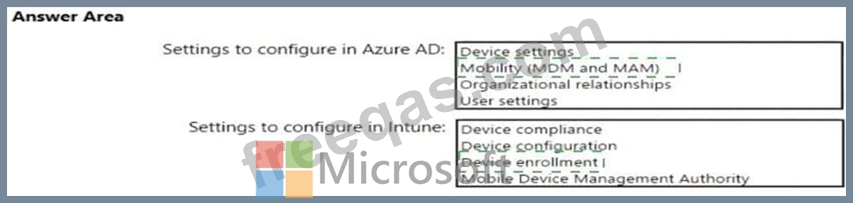
You need to meet the technical requirements and planned changes for Intune.
What should you do? To answer, select the appropriate options in the answer area.
NOTE: Each correct selection is worth one point.
Correct Answer:

Explanation

Reference:
https://docs.microsoft.com/en-us/intune/windows-enroll
insert code

Question 198

You have a Microsoft Azure Active Directory (Azure AD) tenant named contoso.com.
A user named User1 has files on a Windows 10 device as shown in the following table.

In Azure Information Protection, you create a label named Label1 that is configured to apply automatically.
Label1 is configured as shown in the following exhibit.

For each of the following statements, select Yes if the statement is true. Otherwise, select No.
NOTE: Each correct selection is worth one point.

Correct Answer:

Explanation

The phrase to match is "im" and it is case sensitive. The phrase must also appear at least twice.
Box 1: No
File1.docx contain the word "import" once only
Box 2: Yes
File2.docx contains two occurrences of the word "import" as well as the word "imported" Box 3: No File3.docx contains "IM" but his is not the correct letter case.
References:
https://docs.microsoft.com/en-us/azure/information-protection/configure-policy-classification
insert code

Question 199

Note: This question is part of a series of questions that present the same scenario. Each question in the series contains a unique solution that might meet the stated goals. Some question sets might have more than one correct solution, while others might not have a correct solution.
After you answer a question in this section, you will NOT be able to return to it. As a result, these questions will not appear in the review screen.
You have a computer that runs Windows 10.
You need to verify which version of Windows 10 is installed.
Solution: From the Settings app, you select Update & Security to view the update history.
Does this meet the goal?

Correct Answer: B
Section: [none]
Explanation/Reference:
https://support.microsoft.com/en-us/windows/which-version-of-windows-operating-system-am-i-running-
628bec99-476a-2c13-5296-9dd081cdd808
Testlet 2
Case Study
Overview
Contoso, Ltd. is a consulting company that has a main office in Montreal and two branch offices in Seattle and New York.
The company has the employees and devices shown in the following table.

Contoso recently purchased a Microsoft 365 E5 subscription.
Existing Environment
The network contains an on-premises Active Directory forest named contoso.com. The forest contains the servers shown in the following table.

All servers run Windows Server 2016. All desktops and laptops run Windows 10 Enterprise and are joined to the domain.
The mobile devices of the users in the Montreal and Seattle offices run Android. The mobile devices of the users in the New York office run iOS.
The domain is synced to Azure Active Directory (Azure AD) and includes the users shown in the following table.

The domain also includes a group named Group1.
Requirements
Planned Changes
Contoso plans to implement the following changes:
* Implement Microsoft 365.
* Manage devices by using Endpoint Manager.
* Implement Azure Advanced Threat Protection (ATP).
* Update computers in Seattle and Montreal with the fall Semi-Annual Channel feature update.
* Update computers in the New York office with the spring Semi-Annual Channel feature update.
Technical Requirements
Contoso identifies the following technical requirements:
* When a Windows 10 device is joined to Azure AD, the device must enroll to Endpoint Manager automatically.
* Dedicated support technicians must enroll all the Montreal office mobile devices in Endpoint Manager.
* Each dedicated support technician must be assigned only a single Device Enrollment Manager (DEM) account.
* User1 must be able to enroll all the New York office mobile devices in Endpoint Manager.
* Azure ATP sensors must be installed and must NOT use port mirroring.
* Whenever possible, the principle of least privilege must be used.
* A Microsoft Store for Business must be created.
Compliance Requirements
Contoso identifies the following compliance requirements:
* Ensure that the users in Group1 can only access Microsoft Exchange Online from devices that are enrolled in Endpoint Manager and configured in accordance with the corporate policy.
* Configure Windows Information Protection (WIP) for the Windows 10 devices.
insert code

Question 200

You have several devices enrolled in Microsoft Intune.
You have a Microsoft Azure Active Directory (Azure AD) tenant that includes the users shown in the following table.

The device limit restrictions in Intune are configured as shown in the following table.

You add User3 as a device enrollment manager in Intune.
For each of the following statements, select Yes if the statement is true. Otherwise, select No.
NOTE: Each correct selection is worth one point.

Correct Answer:

Explanation

References:
https://docs.microsoft.com/en-us/sccm/mdm/deploy-use/enroll-devices-with-device-enrollment-manager
insert code
  • ««
  • «
  • …
  • 36
  • 37
  • 38
  • 39
  • 40
  • 41
  • 42
  • 43
  • 44
  • 45
  • …
  • »
  • »»
[×]

Download PDF File

Enter your email address to download Microsoft.MS-101.v2022-09-24.q387 Dumps

Email:

FreeQAs

Our website provides the Largest and the most Latest vendors Certification Exam materials around the world.

Using dumps we provide to Pass the Exam, we has the Valid Dumps with passing guranteed just which you need.

  • DMCA
  • About
  • Contact Us
  • Privacy Policy
  • Terms & Conditions
©2026 FreeQAs

www.freeqas.com materials do not contain actual questions and answers from Cisco's certification exams.
