You have a new Microsoft 365 subscription.
A user named User1 has a mailbox in Microsoft Exchange Online.
You need to log any changes to the mailbox folder permissions of User1.
Which command should you run? To answer, select the appropriate options in the answer area.
NOTE: Each correct selection is worth one point.

You have a Microsoft 365 E5 tenant that contains a Microsoft SharePoint Online site named Site1. Site1 contains the files shown in the following table.
You create a sensitivity label named Sensitivity1 and an auto-label policy that has the following configurations:
* Name: AutoLabel1
* Label to auto-apply: Sensitivity1
* Rules for SharePoint Online sites: Rule1-SPO
* Choose locations where you want to apply the label: Site1
Rule1-SPO is configured as shown in the following exhibit.
For each of the following statements, select Yes if the statement is true. Otherwise, select No.
NOTE: Each correct selection is worth one point.


You have a Microsoft 365 subscription.
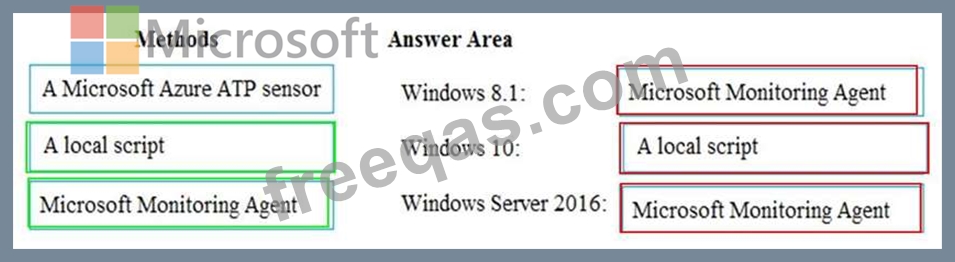
You have the devices shown in the following table.
You need to onboard the devices to Windows Defender Advanced Threat Protection (ATP). The solution must avoid installing software on the devices whenever possible.
Which onboarding method should you use for each operating system? To answer, drag the appropriate methods to the correct operating systems. Each method may be used once, more than once, or not at all. You may need to drag the split bar between panes or scroll to view content.
NOTE: Each correct selection is worth one point.
You have an Azure subscription and an on-premises Active Directory domain. The domain contains 50 computers that run Windows 10.
You need to centrally monitor System log events from the computers.
What should you do? To answer, select the appropriate options in the answer area.
NOTE: Each correct selection is worth one point.


You have a Microsoft Azure Active Directory (Azure AD) tenant named contoso.onmicrosoft.com.
You have a Microsoft 365 subscription.
You need to ensure that administrators can manage the configuration settings for all the Windows 10 devices in your organization.
What should you configure?

