FreeQAs
 Request Exam  Contact
  • Home
  • View All Exams
  • New QA's
  • Upload
PRACTICE EXAMS:
  • Oracle
  • Fortinet
  • IBM
  • Juniper
  • Microsoft
  • Cisco
  • Citrix
  • CompTIA
  • VMware
  • ISC
  • SAP
  • EMC
  • PMI
  • HP
  • Salesforce
  • Other
  • Oracle
    Oracle
  • Fortinet
    Fortinet
  • IBM
    IBM
  • Juniper
    Juniper
  • Microsoft
    Microsoft
  • Cisco
    Cisco
  • Citrix
    Citrix
  • CompTIA
    CompTIA
  • VMware
    VMware
  • ISC
    ISC
  • SAP
    SAP
  • EMC
    EMC
  • PMI
    PMI
  • HP
    HP
  • Salesforce
    Salesforce
  1. Home
  2. Microsoft Certification
  3. MS-102 Exam
  4. Microsoft.MS-102.v2024-11-11.q350 Dumps
  • ««
  • «
  • …
  • 5
  • 6
  • 7
  • 8
  • 9
  • 10
  • 11
  • 12
  • 13
  • 14
  • …
  • »
  • »»
Download Now

Question 41

HOTSPOT
You have a Microsoft 365 E5 subscription.
You need to meet the following requirements:
Automatically encrypt documents stored in Microsoft OneDrive and SharePoint.
Enable co-authoring for Microsoft Office documents encrypted by using a sensitivity label.
Which two settings should you use in the Microsoft Purview compliance portal? To answer, select the appropriate settings in the answer area.
NOTE: Each correct selection is worth one point.

Correct Answer:

Explanation

Box 1: Information protection
Automatically encrypt documents stored in Microsoft OneDrive and SharePoint.
How to integrate Microsoft Purview Information Protection with Defender for Cloud Apps Enable Microsoft Purview Information Protection All you have to do to integrate Microsoft Purview Information Protection with Defender for Cloud Apps is select a single checkbox. By enabling automatic scan, you enable searching for sensitivity labels from Microsoft Purview Information Protection on your Office 365 files without the need to create a policy. After you enable it, if you have files in your cloud environment that are labeled with sensitivity labels from Microsoft Purview Information Protection, you'll see them in Defender for Cloud Apps.
To enable Defender for Cloud Apps to scan files with content inspection enabled for sensitivity labels:
In the Microsoft 365 Defender portal, select Settings. Then choose Cloud Apps. Then go to Information Protection -> Microsoft Information Protection.
Note: Encryption of data at rest
Encryption at rest includes two components: BitLocker disk-level encryption and per-file encryption of customer content.
BitLocker is deployed for OneDrive for Business and SharePoint Online across the service. Per-file encryption is also in OneDrive for Business and SharePoint Online in Microsoft 365 multi-tenant and new dedicated environments that are built on multi-tenant technology.
Box 2: Settings
Enable co-authoring for Microsoft Office documents encrypted by using a sensitivity label.
1. Sign in to the Microsoft Purview compliance portal as a global admin for your tenant.
2. From the navigation pane, select Settings > Co-authoring for files with sensitivity files.
3. On the Co-authoring for files with sensitivity labels page, read the summary description, prerequisites, and what to expect.
4. Then select Turn on co-authoring for files with sensitivity labels, and Apply.
5. Wait 24 hours for this setting to replicate across your environment before you use this new feature for co-authoring.
Reference:
https://learn.microsoft.com/en-us/defender-cloud-apps/azip-integration
https://learn.microsoft.com/en-us/microsoft-365/compliance/sensitivity-labels-coauthoring
insert code

Question 42

You have a Microsoft 365 E5 subscription that has published sensitivity labels shown in the following exhibit.
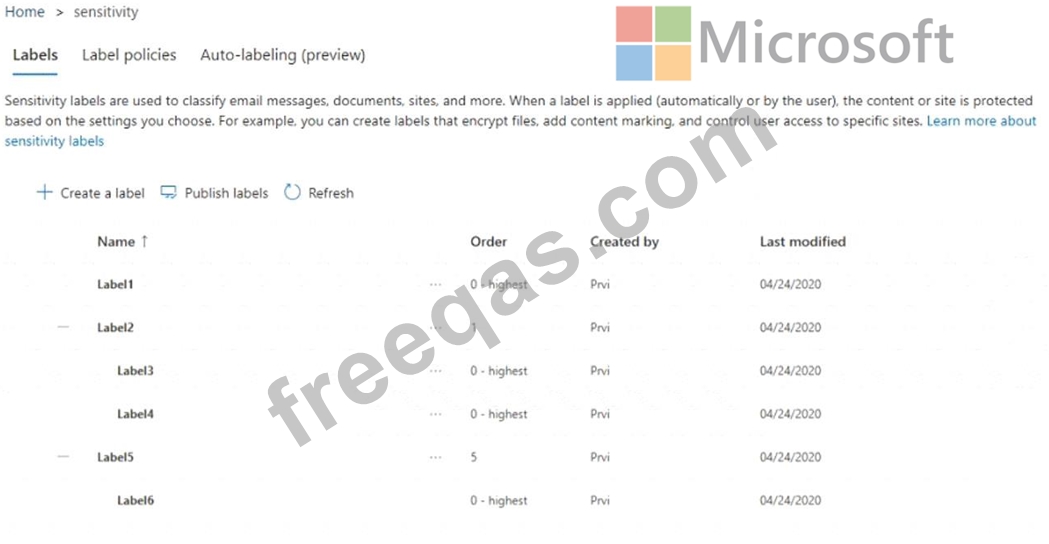
Which labels can users apply to content?

Correct Answer: D
insert code

Question 43

You have a Microsoft 365 subscription that contains three groups named All users, Sales team, and Office users, and two users shown in the following table.

In Microsoft Endpoint Manager, you have the Policies for Office apps settings shown in the following exhibit.

The policies use the settings shown in the following table.

What is the default share folder location for User1 and the default Office theme for User2? To answer, select the appropriate options in the answer area.
NOTE: Each correct selection is worth one point.
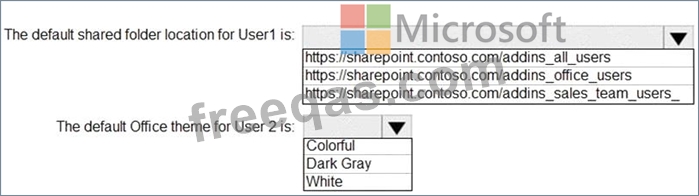
Correct Answer:

Explanation:

Reference:
https://docs.microsoft.com/en-us/deployoffice/overview-office-cloud-policy-service
insert code

Question 44

Note: This question is part of a series of questions that present the same scenario. Each question in the series contains a unique solution that might meet the stated goals. Some question sets might have more than one correct solution, while others might not have a correct solution.
After you answer a question in this section, you will NOT be able to return to it as a result these questions will not appear in the review screen.
Your network contains an Active Directory forest.
You deploy Microsoft 365.
You plan to implement directory synchronization.
You need to recommend a security solution for the synchronized identities. The solution must meet the following requirements:
* Users must be able to authenticate successfully to Microsoft 365 services if Active Directory becomes unavailable.
* User passwords must be 10 characters or more.
Solution: implement password hash synchronization and modify the password settings from the Default Domain Policy in Active Directory.
Does this meet the goal?

Correct Answer: A
insert code

Question 45

You have a Microsoft 365 E5 subscription linked to an Azure Active Directory (Azure AD) tenant. The tenant contains a group named Group1 and the users shown in the following table:
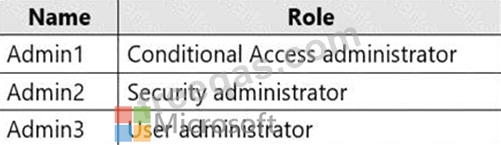
The tenant has a conditional access policy that has the following configurations:
Name: Policy1
Assignments:
- Users and groups: Group1
- Cloud aps or actions: All cloud apps
* Access controls:
* Grant, require multi-factor authentication
* Enable policy: Report-only
You set Enabled Security defaults to Yes for the tenant.
For each of the following settings select Yes, if the statement is true. Otherwise, select No.
NOTE: Each correct selection is worth one point.

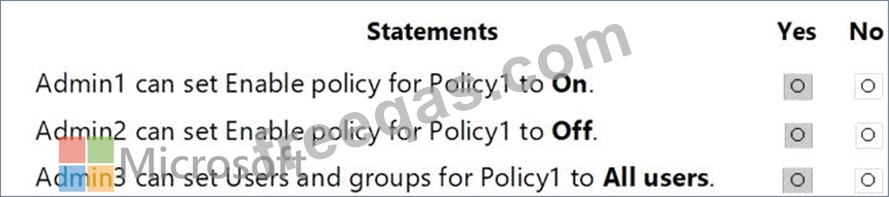
Correct Answer:

Explanation:

Report-only mode is a new Conditional Access policy state that allows administrators to evaluate the impact of Conditional Access policies before enabling them in their environment. With the release of report-only mode:
* Conditional Access policies can be enabled in report-only mode.
* During sign-in, policies in report-only mode are evaluated but not enforced.
* Results are logged in the Conditional Access and Report-only tabs of the Sign-in log details.
* Customers with an Azure Monitor subscription can monitor the impact of their Conditional Access policies using the Conditional Access insights workbook.
Reference:
https://docs.microsoft.com/en-us/azure/active-directory/conditional-access/concept-conditional-access-report-onl
insert code
  • ««
  • «
  • …
  • 5
  • 6
  • 7
  • 8
  • 9
  • 10
  • 11
  • 12
  • 13
  • 14
  • …
  • »
  • »»
[×]

Download PDF File

Enter your email address to download Microsoft.MS-102.v2024-11-11.q350 Dumps

Email:

FreeQAs

Our website provides the Largest and the most Latest vendors Certification Exam materials around the world.

Using dumps we provide to Pass the Exam, we has the Valid Dumps with passing guranteed just which you need.

  • DMCA
  • About
  • Contact Us
  • Privacy Policy
  • Terms & Conditions
©2026 FreeQAs

www.freeqas.com materials do not contain actual questions and answers from Cisco's certification exams.
