Your company named Contoso, Ltd. has a Microsoft Exchange Server 2019 organization that contains the mailbox databases shown in the following table.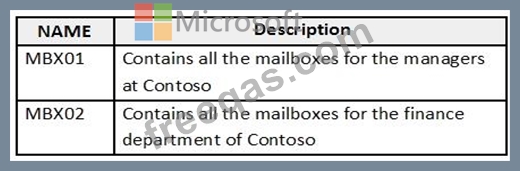
You need to assign an offline address book (OAB) named Managers to all the users in a group named Managers.
How should you complete the PowerShell script? To answer, select the appropriate options in the answer area.
NOTE: Each correct selection is worth one point.

Note: This question is part of a series of questions that present the same scenario. Each question in the series contains a unique solution that might meet the stated goals. Some question sets might have more than one correct solution, while others might not have a correct solution.
After you answer a question in this section, you will NOT be able to return to it. As a result, these questions will not appear in the review screen.
You have a Microsoft Exchange Online tenant that contains the following email domains:
Adatum.com
Contoso.com
Fabrikam.com
When external recipients receive email messages from the users in the tenant, all the messages are delivered by using the @contoso.com email domain.
You need to ensure that the users send email by using the @fabrikam.com email domain.
Solution: From the Exchange Management Shell, you run Set-Mailbox cmdlet.
Does this meet the goal?
You run the Get-WebServicesVirtualDirectory cmdlet as shown in the following exhibit.
Use the drop-down menus to select the answer choice that answers each question based on the information presented in the graphic.
NOTE: Each correct selection is worth one point.

You manage a Microsoft Exchange Online subscription.
You use Advanced Threat Protection (ATP).
A partner company sends daily invoices to your company. The invoices are always named AdatumInvoice.xlsx.
Some users report that sometimes they cannot find the invoices in their Inbox folder.
You need to identify whether the invoices are identified as malicious by Microsoft 365.
Which two blades should you use? To answer, select the appropriate blades in the answer area.
NOTE: Each correct selection is worth one point.


You have a Microsoft Exchange Online subscription that uses a namespace of litwareinc.com.
You create a connector in Exchange Online that is configured as shown in the following exhibit.
Use the drop-down menus to select the answer choice that completes each statement based on the information presented in the graphic.
NOTE: Each correct selection is worth one point.


