Your company named Contoso, Ltd. has a Microsoft Exchange Online subscription.
You have several transport rules. The rules automatically apply a disclaimer to email messages that contain certain keywords in the subject and are sent to recipients in an email domain named fabrikam.com.
You receive a report that some messages are delivered without the disclaimer.
You need to view which transport rules were applied to messages sent to the fabrikam.com recipients.
What should you use?
You have a Microsoft Exchange Online tenant that contains a user named User1.
You need to grant User1 the Send on Behalf permission for 20 mailboxes.
Which PowerShell cmdlet should you use?
You have a Microsoft 365 E5 tenant that contains the users shown in the following table.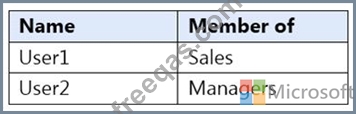
You have a connector for a remote domain named contoso.com as shown in the following exhibit.
You have a transport rule as shown in the following exhibit.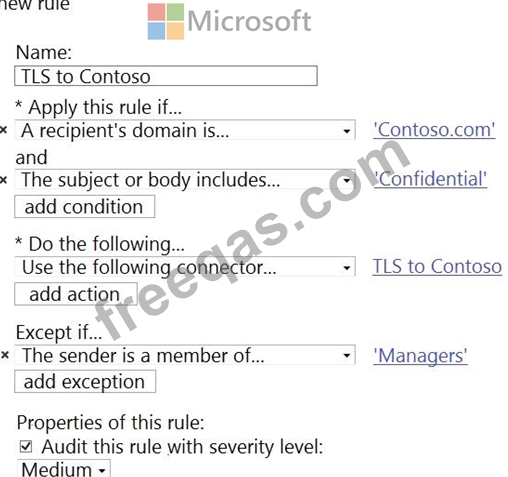
User1 sends an email message to [email protected] that has a subject line containing the word Confidential.
User2 sends an email message to [email protected] that has a subject line of New report. The body of the message contains the word confidential.
For each of the following statements, select Yes if the statement is true. Otherwise, select No.
NOTE: Each correct selection is worth one point.


