FreeQAs
 Request Exam  Contact
  • Home
  • View All Exams
  • New QA's
  • Upload
PRACTICE EXAMS:
  • Oracle
  • Fortinet
  • Juniper
  • Microsoft
  • Cisco
  • Citrix
  • CompTIA
  • VMware
  • ISC
  • SAP
  • EMC
  • PMI
  • HP
  • Salesforce
  • Other
  • Oracle
    Oracle
  • Fortinet
    Fortinet
  • Juniper
    Juniper
  • Microsoft
    Microsoft
  • Cisco
    Cisco
  • Citrix
    Citrix
  • CompTIA
    CompTIA
  • VMware
    VMware
  • ISC
    ISC
  • SAP
    SAP
  • EMC
    EMC
  • PMI
    PMI
  • HP
    HP
  • Salesforce
    Salesforce
  1. Home
  2. Microsoft Certification
  3. MS-203 Exam
  4. Microsoft.MS-203.v2022-06-16.q213 Dumps
  • ««
  • «
  • …
  • 23
  • 24
  • 25
  • 26
  • 27
  • 28
  • 29
  • 30
  • 31
  • 32
  • …
  • »
  • »»
Download Now

Question 131

You have a Microsoft Exchange Online tenant named contoso.com.
You create a partnership with two other companies named fabrikam.com and wingtiptoys.com. All the mailboxes of fabrikam.com are hosted in Microsoft 365. All the mailboxes of wingtiptoys.com are hosted in an on-premises Exchange Server 2019 organization.
You need to ensure that all the email messages sent from contoso.com to fabrikam.com and wingtiptoys.com is encrypted by using TLS.
What should you do?

Correct Answer: E
Explanation/Reference:
https://docs.microsoft.com/en-us/exchange/mail-flow-best-practices/use-connectors-to-configure-mail-flow/ set-up-connectors-for-secure-mail-flow-with-a-partner Plan and implement a hybrid configuration and migration Question Set 1
insert code

Question 132

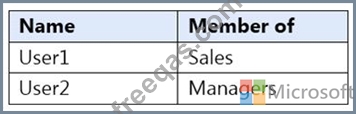
You have a Microsoft 365 E5 tenant that contains the users shown in the following table.
You have a connector for a remote domain named contoso.com as shown in the following exhibit.

You have a transport rule as shown in the following exhibit.
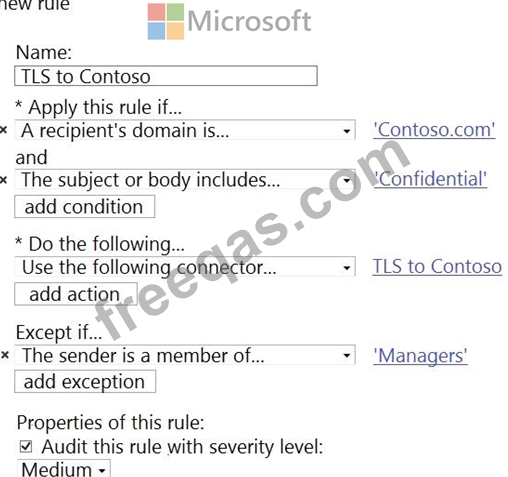
User1 sends an email message to [email protected] that has a subject line containing the word Confidential.
User2 sends an email message to [email protected] that has a subject line of New report. The body of the message contains the word confidential.
For each of the following statements, select Yes if the statement is true. Otherwise, select No.
NOTE: Each correct selection is worth one point.

Correct Answer:

Reference:
https://docs.microsoft.com/en-us/compliance/assurance/assurance-encryption-in-transit
insert code

Question 133

You have a Microsoft Exchange Server 2019 hybrid deployment that contains the public folders shown in the following table.

D18912E1457D5D1DDCBD40AB3BF70D5D
You plan to migrate the public folders to Exchange Online to improve the collaboration options available to users.
Which public folders can be migrated to Office 365 groups without losing the folders' existing functionality?

Correct Answer: A
Not PF1. Office 365 groups are 'flat' so you would lose the folder hierarchy.
Reference:
https://docs.microsoft.com/en-us/exchange/collaboration/public-folders/migrate-to-microsoft-365-groups?view=exchserver-2019
insert code

Question 134

Please wait while the virtual machine loads. Once loaded, you may proceed to the lab section. This may take a few minutes, and the wait time will not be deducted from your overall test time.
When the Next button is available, click it to access the lab section. In this section, you will perform a set of tasks in a live environment. While most functionality will be available to you as it would be in a live environment, some functionality (e.g., copy and paste, ability to navigate to external websites) will not be possible by design.
Scoring is based on the outcome of performing the tasks stated in the lab. In other words, it doesn't matter how you accomplish the task, if you successfully perform it, you will earn credit for that task.
Labs are not timed separately, and this exam may have more than one lab that you must complete. You can use as much time as you would like to complete each lab. But, you should manage your time appropriately to ensure that you are able to complete the lab(s) and all other sections of the exam in the time provided.
Please note that once you submit your work by clicking the Next button within a lab, you will NOT be able to return to the lab.

Use the following login credentials as needed:
To enter your username, place your cursor in the Sign in box and click on the username below.
To enter your password, place your cursor in the Enter password box and click on the password below.
Microsoft 365 Username: [email protected]
Microsoft 365 Password: xxxxxx
If the Microsoft 365 portal does not load successfully in the browser, press CTRL-K to reload the portal in a new browser tab.
The following information is for technical support purposes only.
Lab Instance: XXXXXX
You need to ensure that a notification email is sent to [email protected] when a user marks an email message as Not Junk in Microsoft Outlook.
To complete this task, sign in to the Microsoft 365 admin center.

Correct Answer:
Go to the Microsoft 365 Defender portal and under Email & collaboration select Policies & rules > Alert policy.
An alert policy consists of the following settings and conditions.
- Activity the alert is tracking. You create a policy to track an activity or in some cases a few related activities, such a sharing a file with an external user by sharing it, assigning access permissions, or creating an anonymous link. When a user performs the activity defined by the policy, an alert is triggered based on the alert threshold settings.
- Activity conditions. For most activities, you can define additional conditions that must be met to trigger an alert. Common conditions include IP addresses (so that an alert is triggered when the user performs the activity on a computer with a specific IP address or within an IP address range), whether an alert is triggered if a specific user or users perform that activity, and whether the activity is performed on a specific file name or URL. You can also configure a condition that triggers an alert when the activity is performed by any user in your organization. The available conditions are dependent on the selected activity.
You can also define user tags as a condition of an alert policy. This results in the alerts triggered by the policy to include the context of the impacted user. You can use system user tags or custom user tags.
- When the alert is triggered. You can configure a setting that defines how often an activity can occur before an alert is triggered. This allows you to set up a policy to generate an alert every time an activity matches the policy conditions, when a certain threshold is exceeded, or when the occurrence of the activity the alert is tracking becomes unusual for your organization.
If you select the setting based on unusual activity, Microsoft establishes a baseline value that defines the normal frequency for the selected activity. It takes up to seven days to establish this baseline, during which alerts won't be generated. After the baseline is established, an alert is triggered when the frequency of the activity tracked by the alert policy greatly exceeds the baseline value. For auditing-related activities (such as file and folder activities), you can establish a baseline based on a single user or based on all users in your organization; for malware-related activities, you can establish a baseline based on a single malware family, a single recipient, or all messages in your organization.
- Alert category. To help with tracking and managing the alerts generated by a policy, you can assign one of the following categories to a policy.
- Data loss prevention
- Information governance
- Mail flow
- Permissions
- Threat management
- Others
When an activity occurs that matches the conditions of the alert policy, the alert that's generated is tagged with the category defined in this setting. This allows you to track and manage alerts that have the same category setting on the Alerts page in the compliance center because you can sort and filter alerts based on category.
- Alert severity. Similar to the alert category, you assign a severity attribute (Low, Medium, High, or Informational) to alert policies. Like the alert category, when an activity occurs that matches the conditions of the alert policy, the alert that's generated is tagged with the same severity level that's set for the alert policy. Again, this allows you to track and manage alerts that have the same severity setting on the Alerts page. For example, you can filter the list of alerts so that only alerts with a High severity are displayed.
- Email notifications. You can set up the policy so that email notifications are sent (or not sent) to a list of users when an alert is triggered. You can also set a daily notification limit so that once the maximum number of notifications has been reached, no more notifications are sent for the alert during that day. In addition to email notifications, you or other administrators can view the alerts that are triggered by a policy on the Alerts page. Consider enabling email notifications for alert policies of a specific category or that have a higher severity setting.
Reference:
https://docs.microsoft.com/en-us/microsoft-365/compliance/alert-policies?view=o365-worldwide#how-alert-policies-work
insert code

Question 135

You need to resolve the email delivery delay issue.
What should you do?

Correct Answer: A
References:
https://docs.microsoft.com/en-us/office365/securitycompliance/dynamic-delivery-and-previewing
Topic 2, Case Study
Overview
Litware, Inc. is food service supplier in Europe.
Topic 2, Litware, inc
Physical Locations
Litware has a main office in Paris and branch offices in Munich, London, Brussels, Vienna, and Rome.
Each branch office has its own compliance officer.
Existing Environment
The network contains one Active Directory forest named litware.com. The forest contains a single Active Directory domain. Each office is configured as an Active Directory site.
Each branch office is represented organizational unit (OU) in an OU named Offices in Active Directory.
Each branch office has a special Administrators group that contains the delegated administrators for that office. Each Administrators group is named based on its location in a format of RegionalAdmins_Brussels, RegionalAdmins_Munich, RegionalAdmins_London, RegionalAdmins_Vienna and RegionalAdmins_Rome.
Network Infrastructure
Each office contains two domain controllers from the litware.com domain. All the domain controllers are configured as DNS servers. All client computers connect only to the DNS servers in their respective office.
All offices have a high-speed connection to the Internet. Each office connects to the Internet by using a VPN appliance.
Each office has the following servers and client computers:


The office in Brussels contains an Exchange Server 2016 server that has the Unified Messaging role installed and hosted voicemail configured.
Mailboxes are hosted on all the Exchange servers. Public folders are hosted only on an Exchange server in the main office. Litware uses a disjoint namespace to access the servers.
Each user has an archive mailbox. Archiving is configured to use the default settings.
Exchange services are published to the internet by using a reverse proxy in each office.
A full backup of Exchange is performed nightly. Incremental backups occur every six hours.
All the users in the transport department connect to network resources by using a connection in the main office.
Requirements
Planned Changes
Litware plans to implement the following changes:
Implement calendar sharing to partner companies.
Implement a solution that prevents malware from being delivered to end users.
Use personal archives to eliminate the need for PST files.
Ensure the Brussels office and move all the users in the Brussels office to the main office. All the mailboxes in the Brussels office will be moved to a server in the main office.
Implement a compliance solution to ensure that items deleted from public folders are retained. If an item in a public folder is modified, the original version of the item must be available.
Technical Requirements
Litware identifies the following technical requirements:
Minimize administrative effort.
Use the principle of least privilege.
Ensure that junk email is deleted automatically after 14 days.
Ensure that sent items and deleted items are deleted automatically after 30 days.
Ensure that users in the customer service department can open multiple mailboxes.
Ensure that all the former Brussels office users always maintain access to hosted voicemail.
Ensure that the staff in the IT department can manage the email environment without and-user involvement.
Ensure that users cannot recover email messages that are deleted from the Junk Email folder and the Deleted Items.
Ensure that if an email message has a spam confidence level (SCL) of 3 or higher, the message automatically moves to the Junk Email folder.
Problem statements
The transport department users report that accessing a public folder named TransportPF is sometimes very slow.
Users in the customer service department report that Microsoft Outlook sometimes hangs when many mailboxes are open.
insert code
  • ««
  • «
  • …
  • 23
  • 24
  • 25
  • 26
  • 27
  • 28
  • 29
  • 30
  • 31
  • 32
  • …
  • »
  • »»
[×]

Download PDF File

Enter your email address to download Microsoft.MS-203.v2022-06-16.q213 Dumps

Email:

FreeQAs

Our website provides the Largest and the most Latest vendors Certification Exam materials around the world.

Using dumps we provide to Pass the Exam, we has the Valid Dumps with passing guranteed just which you need.

  • DMCA
  • About
  • Contact Us
  • Privacy Policy
  • Terms & Conditions
©2026 FreeQAs

www.freeqas.com materials do not contain actual questions and answers from Cisco's certification exams.
